

Projector App & Screen Share
Projector App & Screen Share is made and published by Manfred Kuegel. AppBrain is an independent app data site and isn't affiliated with Manfred Kuegel. The app name, icon, screenshots and description belong to Manfred Kuegel and are shown as published on the App Store.
AppBrain's verdict
- Rating on App Store
- 4.42
- 55 ratings
- Last updated
- October 3, 2026
It doesn't have enough ratings yet to judge what users think.
Rankings
App Store top chartsApp Store Rankings for Projector App & Screen Share
Competitors
Similar apps and more from Manfred KuegelAlternatives to Projector App & Screen Share


More from Manfred Kuegel


Releases
Updates seen on the App Store- Version
- 1.4
- Launched
- June 2026
No changelog data
User feedback
Ratings and reviews on the App StoreComments on Projector App & Screen Share for iOS
We don't have enough comments to show example comments. Please check back later.
Technology
Found in the app by AppBrain- Price
- Free
- App size
- 58.9 MB
- Content rating
- High
Technologies used by Projector App & Screen Share
About the app and developer
About Projector App & Screen Share
Projector App & Screen Share is an utilities app developed by Manfred Kuegel.
What is the rating of Projector App & Screen Share?
Projector App & Screen Share is rated 4.42 out of 5 stars, based on 55 ratings.
Is Projector App & Screen Share free?
Projector App & Screen Share is free. The app size is 58.87 MB. The latest version available is 1.4. The last update was on October 3, 2026.
What are the requirements for Projector App & Screen Share?
The app has a content rating of High Maturity. The app has been available on the App Store since June 2026.
Developer information for Manfred Kuegel
Address:
Store listing
By Manfred Kuegel, from the App Store


Description by Manfred Kuegel Written by the developer, not by AppBrain. Click to read.
MIRROR ANYTHING, INSTANTLY
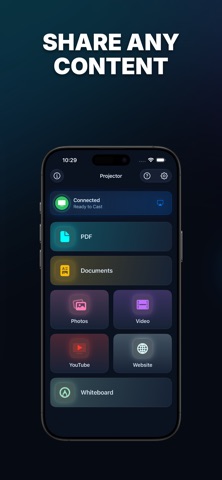
• Stream to AirPlay-enabled smart TVs, streaming boxes and AirPlay receivers over Wi-Fi
• Plug-and-play with USB-C and other HDMI adapters — automatically detected
• Built-in AirPlay picker for one-tap connection
PRESENT ANY KIND OF CONTENT
• PDFs — full-page viewer with pinch-to-zoom and page navigation
• Photos & videos — pick multiple items, reorder them and present in any sequence
• Office documents — open .pptx, .docx, .xlsx and more in the built-in viewer
• Web browser — show any website in fullscreen
• YouTube — distraction-free in-app player
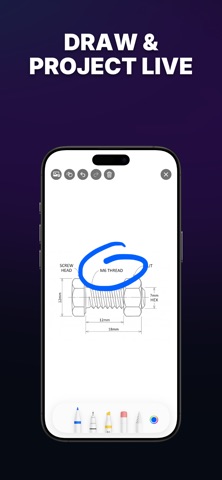
• Whiteboard — draw freehand, add photos and save your sketches
TOOLS FOR GREAT PRESENTATIONS
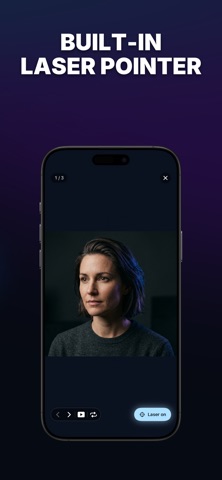
• Laser pointer — a glowing dot that follows your finger, in any color you choose
• Slideshow mode — auto-advance every 3, 5 or 10 seconds
• Page counter, manual stepping and loop replay
• Pinch-to-zoom for fine detail
BUILT FOR EVERYDAY USE
• Recents — jump back into anything you opened recently
• Files & Photos integration — import from anywhere on your device
• Dark, Light and System themes
• Haptic feedback for every action
ALWAYS-ON HELP
• AI Support chat — ask questions and get instant answers
• Built-in tutorial covers AirPlay and HDMI setup
• Email us anytime at info@frequency-analyzer.com
Privacy Policy: https://frequency-analyzer.com/privacy-policy-projectors/
Terms of Use: https://frequency-analyzer.com/terms-and-conditions-projector-app/