ProofPix: Before & After is a business app developed by Geos LLC.
User Ratings
ProofPix: Before & After is rated 5.00 out of 5 stars. The rating is based on one rating ratings.
App Information
ProofPix: Before & After is freely available from the App Store. The app size is 70.12 MB. The latest version available is 2.0.7. The last update was on October 14, 2026.
Technical Requirements
The app has a content rating of Everyone. The app has been available on the App Store since December 2025.
ProofPix: Before & After is made and published by
Geos LLC.
AppBrain is an independent app data site and isn't affiliated with Geos LLC.
The app name, icon, screenshots and description belong to Geos LLC and are shown as published on the App Store.
Description by Geos LLC(from the App Store)
ProofPix – Before & After Photo Comparison App
Capture your work. Compare before and after. Share the results. ProofPix helps you document completed work and show clients what changed. Take before, progress, and after photos directly in the app and keep them organized by project, so you can find the right images without searching through your camera roll. Use Ghost Mode to match the angle of your before photo, then create a clear comparison of the original condition and the finished result. Add labels and your branding, and export it to send to a client, include in a report, or post on social media. Built for cleaning, construction, remodeling, and other service businesses, ProofPix brings your job photos, before-and-after comparisons, and sharing tools together in one app.
DOCUMENT YOUR WORK - start with a before photo, capture progress along the way, and add the finished result. Keep a visual record of each project for client updates, reports, and future reference. • Capture before, progress, and after photos • Keep related photos together by project
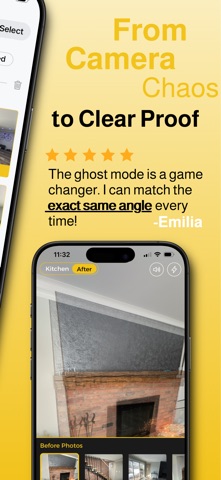
CAPTURE THE SAME VIEW - take photos directly inside the app. Ghost Mode overlays a previous photo to help you match the angle, making the changes easier to see in your final comparison. • Use the before photo as a guide for your after shot • Spend less time searching for matching photos
MAKE THE RESULT CLEAR - bring your before-and-after photos together in a comparison that shows what changed. Choose a layout that suits the job and customize it with labels and your branding. • Choose side-by-side, stacked, or wide layouts • Add labels, colors, fonts, your logo, and watermark
KEEP CLIENTS UPDATED - share progress while the work is underway or send a comparison when the job is complete. Give clients a clear visual explanation of the work you’ve done. • Export results to share with clients • Use photos in reports and documentation
KEEP EVERY PROJECT ORGANIZED - keep photos grouped by job, so you can find the right images without scrolling through your camera roll. Connect your cloud storage to back up your work. • Find photos from current and completed projects • Keep a photo record you can return to later
SHOWCASE YOUR COMPLETED WORK - the photos you take for documentation can also help you promote your business. Turn a completed project into a branded before-and-after image for social media or show it to a potential client as an example of your work.
Download ProofPix to document your next job and show your clients the results.
Terms
Licensed Application End User License Agreement: https://www.apple.com/legal/internet-services/itunes/dev/stdeula/
Each subscription will automatically renew 3 days before the expiration date for
the same time period. Subscriptions can be cancelled at any time before the renewal.