

PuchiScreen
PuchiScreen is made and published by YUUSUKE HARASAWA. AppBrain is an independent app data site and isn't affiliated with YUUSUKE HARASAWA. The app name, icon, screenshots and description belong to YUUSUKE HARASAWA and are shown as published on the App Store.
AppBrain's verdict
- Last updated
- July 28, 2026
Rankings
App Store top chartsApp Store Rankings for PuchiScreen
Competitors
Similar apps and more from YUUSUKE HARASAWAAlternatives to PuchiScreen


More from YUUSUKE HARASAWA


Releases
Updates seen on the App Store- Version
- 2.5.0
- Launched
- March 2025
No changelog data
User feedback
Ratings and reviews on the App StoreComments on PuchiScreen for iOS
We don't have enough comments to show example comments. Please check back later.
Technology
Found in the app by AppBrain- Price
- Free
- App size
- 14.0 MB
- Content rating
- Everyone
Technologies used by PuchiScreen
About the app and developer
About PuchiScreen
PuchiScreen is a photo & video app developed by YUUSUKE HARASAWA.
User Ratings
The app has no ratings yet.
App Information
PuchiScreen is freely available from the App Store. The app size is 14.01 MB. The latest version available is 2.5.0. The last update was on July 28, 2026.
Technical Requirements
The app has a content rating of Everyone. The app has been available on the App Store since March 2025.
Developer information for YUUSUKE HARASAWA
Address:
Store listing
By YUUSUKE HARASAWA, from the App Store

Description by YUUSUKE HARASAWA Written by the developer, not by AppBrain. Click to read.
Easy video file selection
Select videos directly from the Files app or your Photos library. A wide range of formats is supported, so you can always import your favorite videos.
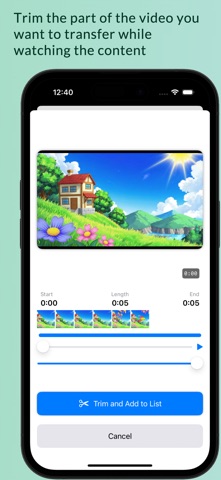
Set start and end points with a slider
While previewing the video, move the slider to intuitively select the part you want to trim. Quickly create short clips by cutting out unnecessary sections.
Transfer to Apple Watch
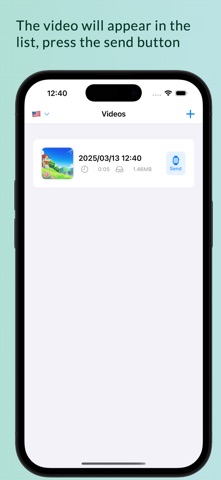
Send trimmed videos from your iPhone to Apple Watch. Whether you’re on the go or just waiting, you can conveniently play videos right from your wrist.
Manage multiple videos
Trimmed files are stored within the app, and can be replayed or resent at any time from a list. You can also rename them or manage only your favorites.
Fast trimming & MP4 export
With our unique VideoConverter, you can quickly remove unwanted parts and export them as MP4. It’s also great for sharing on social media.
Try it for free
You can experience trimming short videos in the free version. For longer videos or additional features, consider the Premium version (in-app purchase).
Simple, user-friendly UI
The trimming slider and thumbnail display make it easy to see which parts will be cut out.
Safe design & privacy protection
The app only accesses files explicitly chosen by the user. Personal data is managed within the app and never sent outside without permission.
Recommended for
Anyone who wants to quickly trim travel or event videos
Easily edit your memories and view them anytime on your Apple Watch.
Anyone who needs short presentation or demo videos on hand
It’s convenient to instantly show a video from your wrist in meetings or business settings.
About in-app purchases (Premium version)
Trim longer videos
The free version has a limit on trimming length, but the Premium version lets you edit without time restrictions.
Enjoy a smarter way to watch videos with “PuchiScreen”!