

PulseDrive is made and published by Brent Gaddis. AppBrain is an independent app data site and isn't affiliated with Brent Gaddis. The app name, icon, screenshots and description belong to Brent Gaddis and are shown as published on the App Store.
AppBrain's verdict
- Last updated
- October 15, 2026
- Size
- 4.60 MB
User feedback
Ratings and reviews on the App StoreComments on PulseDrive for iOS
We don't have enough comments to show example comments. Please check back later.
Store listing
By Brent Gaddis, from the App Store

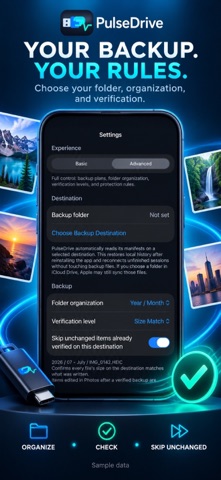
Screenshots by Brent Gaddis, from the the App Store listing
Description by Brent Gaddis Written by the developer, not by AppBrain. Click to read.
Back up before you delete.
PulseDrive copies photos and videos from your iPhone or iPad to a folder you choose through Files. Use a compatible external drive or another writable Files destination, organize your media, and keep a receipt of what was copied and checked.
BACK UP YOUR WAY
Start with the full library, recent items, large videos, favorites, screenshots, a Photos album, a date range, or your own selection. Back Up What’s New skips unchanged items already verified on the selected destination.
CHECK THE COPY
Choose Basic, Size Match, or Checksum verification. Each session records verified items, bytes written, and anything that needs attention. A portable manifest travels with the backup so you can import history when reconnecting the destination.
PAUSE, RESUME, AND RESTORE
Pause a transfer and continue unfinished work later. Follow supported backup progress with a Live Activity. Browse verified backup files and restore selected photos or videos to Photos when needed.
REVIEW BEFORE REMOVING
Safe Delete Review checks backup proof and keeps favorites and recent items protected by default. You choose what to remove, and Photos asks for confirmation. Nothing is deleted automatically. Space becomes available according to Photos’ Recently Deleted rules.
FITS YOUR SCREEN
Use Basic or Advanced mode, light or dark appearance, and layouts that adapt to iPhone, Duo, and iPad windows.
No account, subscription, advertising, or developer cloud service is required. Your media goes to the destination you select; choosing iCloud Drive or another cloud-backed provider may let that provider sync it. Originals stored only in iCloud Photos may need to download before copying. Keep the destination connected and return to the app to resume work if the system pauses background activity.
PulseDrive copies photos and videos from your iPhone or iPad to a folder you choose through Files. Use a compatible external drive or another writable Files destination, organize your media, and keep a receipt of what was copied and checked.
BACK UP YOUR WAY
Start with the full library, recent items, large videos, favorites, screenshots, a Photos album, a date range, or your own selection. Back Up What’s New skips unchanged items already verified on the selected destination.
CHECK THE COPY
Choose Basic, Size Match, or Checksum verification. Each session records verified items, bytes written, and anything that needs attention. A portable manifest travels with the backup so you can import history when reconnecting the destination.
PAUSE, RESUME, AND RESTORE
Pause a transfer and continue unfinished work later. Follow supported backup progress with a Live Activity. Browse verified backup files and restore selected photos or videos to Photos when needed.
REVIEW BEFORE REMOVING
Safe Delete Review checks backup proof and keeps favorites and recent items protected by default. You choose what to remove, and Photos asks for confirmation. Nothing is deleted automatically. Space becomes available according to Photos’ Recently Deleted rules.
FITS YOUR SCREEN
Use Basic or Advanced mode, light or dark appearance, and layouts that adapt to iPhone, Duo, and iPad windows.
No account, subscription, advertising, or developer cloud service is required. Your media goes to the destination you select; choosing iCloud Drive or another cloud-backed provider may let that provider sync it. Originals stored only in iCloud Photos may need to download before copying. Keep the destination connected and return to the app to resume work if the system pauses background activity.
Safety and technology
Found in the app by AppBrain- Price
- $1.99
- App size
- 4.60 MB
- Content rating
- Everyone
Technologies used by PulseDrive
Releases
Updates seen on the App Store- Version
- 2.1
- Launched
- June 2026
No changelog data
Alternatives
Similar apps and more from Brent GaddisMore from Brent Gaddis


Rankings
App Store top chartsApp Store Rankings for PulseDrive
This app is not ranked
About the app and developer
About PulseDrive
PulseDrive is a photo & video app developed by Brent Gaddis.
User Ratings
The app has no ratings yet.
App Information
PulseDrive costs $1.99. The app size is 4.60 MB. The latest version available is 2.1. The last update was on October 15, 2026.
Technical Requirements
The app has a content rating of Everyone. The app has been available on the App Store since June 2026.
Developer information for Brent Gaddis
Address: