

Pulso Convert: RAW Converter
Pulso Convert: RAW Converter is made and published by Peretz Yam. AppBrain is an independent app data site and isn't affiliated with Peretz Yam. The app name, icon, screenshots and description belong to Peretz Yam and are shown as published on the App Store.
AppBrain's verdict
- Rating on App Store
- 5.00
- 1 ratings
- Last updated
- September 24, 2026
It doesn't have enough ratings yet to judge what users think.
Rankings
App Store top chartsApp Store Rankings for Pulso Convert: RAW Converter
Competitors
Similar apps and more from Peretz YamAlternatives to Pulso Convert: RAW Converter


Releases
Updates seen on the App Store- Version
- 1.5.0
- Launched
- June 2026
No changelog data
User feedback
Ratings and reviews on the App StoreComments on Pulso Convert: RAW Converter for iOS
We don't have enough comments to show example comments. Please check back later.
Technology
Found in the app by AppBrain- Price
- Free
- App size
- 7.22 MB
- Content rating
- Everyone
Technologies used by Pulso Convert: RAW Converter
About the app and developer
About Pulso Convert: RAW Converter
Pulso Convert: RAW Converter is a photo & video app developed by Peretz Yam.
User Ratings
Pulso Convert: RAW Converter is rated 5.00 out of 5 stars. The rating is based on one rating ratings.
App Information
Pulso Convert: RAW Converter is freely available from the App Store. The app size is 7.22 MB. The latest version available is 1.5.0. The last update was on September 24, 2026.
Technical Requirements
The app has a content rating of Everyone. The app has been available on the App Store since June 2026.
Developer information for Peretz Yam
Address:
Frequently asked questions about Pulso Convert: RAW Converter
Is Pulso Convert: RAW Converter free?
Yes. Pulso Convert: RAW Converter is free on the App Store.
Is Pulso Convert: RAW Converter still available?
Yes. Pulso Convert: RAW Converter is on the App Store, and the last update we saw was on September 24, 2026.
How large is Pulso Convert: RAW Converter?
Pulso Convert: RAW Converter is 7.22 MB.
Is Pulso Convert: RAW Converter suitable for children?
App Store rates the content of Pulso Convert: RAW Converter as suitable for everyone.
How do people rate Pulso Convert: RAW Converter?
Pulso Convert: RAW Converter has one rating of 5.00 stars on the App Store.
Who made Pulso Convert: RAW Converter?
Pulso Convert: RAW Converter was developed by Peretz Yam. It is listed in the photo & video category on the App Store.
What are the best alternatives to Pulso Convert: RAW Converter?
People looking at Pulso Convert: RAW Converter also look at these photo & video apps: RawToJPG - RAW to JPG, Rawly: RAW to JPG, Raw To HEIC, RAWUnravel, Trimage: RAW & JPEG Compressor.
Store listing
By Peretz Yam, from the App Store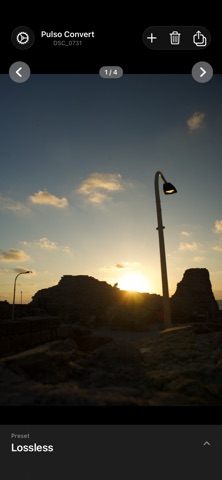
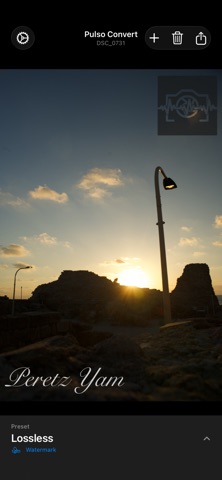
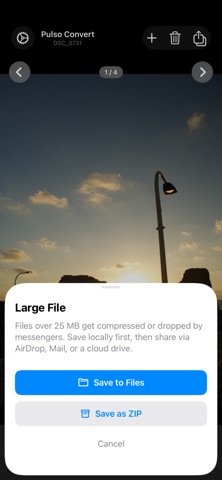
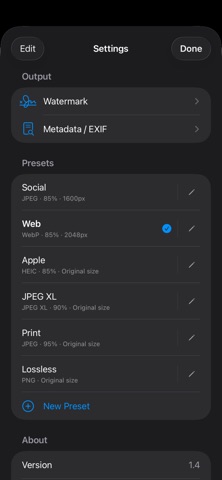

Description by Peretz Yam Written by the developer, not by AppBrain. Click to read.
Pulso Convert turns your iPhone and iPad into a capable photo conversion tool. All processing is local — no uploads, no cloud, no subscription.
DEVICE REQUIREMENT
RAW conversion needs a device with 4 GB of memory or more: iPhone 11 or later, iPad (10th gen), iPad Air (4th gen) or later, iPad mini (6th gen) or later, any iPad Pro, or any M-series iPad. All other formats (JPEG, PNG, HEIC, WebP, JPEG XL…) work on every supported device.
SUPPORTED FORMATS
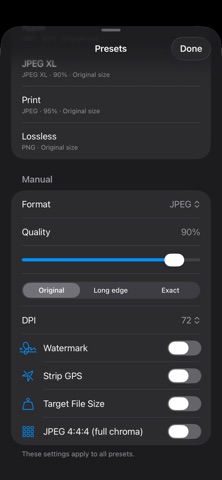
Input: JPEG, PNG, HEIC, TIFF, WebP, BMP, and RAW files from Canon (CR2, CR3), Nikon (NEF), Sony (ARW), Fujifilm (RAF), Adobe (DNG), Panasonic (RW2), Olympus (ORF), Pentax (PEF), and 20+ more camera brands.
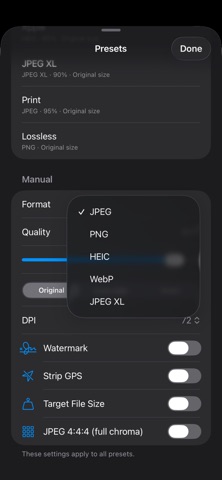
Output: JPEG, PNG, HEIC, WebP, and JPEG XL.
MATCH CAMERA LOOK
Convert RAW while keeping your camera's signature color and tone — the look straight out of the camera, not a flat, washed-out RAW.
HDR & HIGH BIT DEPTH
Preserve HDR when exporting to HEIC. Keep full 16-bit color with lossless PNG and JPEG XL archives.
RESIZE & TARGET SIZE
Scale to any long edge, or hit an exact file size for email, web, or upload limits.
PRESETS
Save format, quality, resize, and watermark settings as named presets. One tap to apply to any batch.
WATERMARK
Add text or image watermarks to exports. Control position, opacity, and size.
BATCH
Convert multiple photos in one go. Large files over 25 MB can be saved directly to Files or packaged as a ZIP archive.
SHARE EXTENSION
Convert photos without opening the app — share directly from the Photos app, up to 10 images at once.
COPY TO CLIPBOARD
Convert and copy the result directly to clipboard for instant paste anywhere.
PRIVACY
No account required. No analytics. No data leaves your device. GPS metadata can be stripped before export.
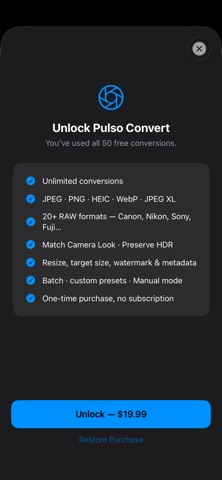
ONE-TIME PURCHASE
Pay once, use forever.