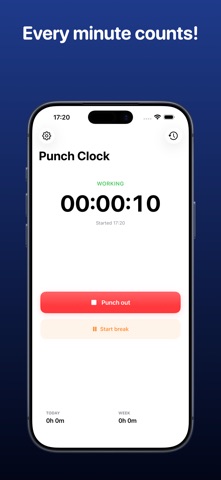
Punch Clock - Work Hours is a business app developed by MPK Tec AB.
User Ratings
The app has no ratings yet.
App Information
Punch Clock - Work Hours is freely available from the App Store. The app size is 8.72 MB. The latest version available is 1.1. The last update was on September 3, 2026.
Technical Requirements
The app has a content rating of Everyone. The app has been available on the App Store since April 2026.
Description by MPK Tec AB(from the App Store)
Turn your iPhone and Apple Watch into a simple personal punch clock. Punch Clock helps you document work sessions, breaks, and assignments without accounts, ads, or complicated HR systems.
Punch in with one tap, follow your hours for today and this week, and create clear records for payroll or invoicing support.
Features: • One-tap punching: Punch in and out quickly from iPhone or Apple Watch. • Break tracking: Start and end breaks manually or use an optional automatic standard break. • Reliable history: Changes to automatic-break settings never rewrite previously created work sessions. • Assignments: Create optional assignments, choose a default, and filter history and reports. • History and editing: Review, add, edit, or delete work sessions and breaks when needed. • At-a-glance totals: See worked time for today and the current week. • PDF and CSV: Generate summary or detailed reports for any selected period. • Flexible reports: Include breaks, notes, assignments, and time zone information when needed. • Widget and Live Activity: Follow an active session from the Home Screen, Lock Screen, and Dynamic Island on supported devices. • Siri and Shortcuts: Punch in or out and manage breaks using Siri, Shortcuts, or Home Screen Quick Actions.
Designed for hourly workers, consultants, freelancers, contractors, and small business owners who want a clear personal work-hours record.
Your information is stored locally on your devices. Punch Clock does not collect your personal work sessions and contains no advertising.
Punch Clock is a personal documentation tool. It is not payroll, invoicing, accounting, legal, or compliance software. You or your employer are responsible for checking which rules and requirements apply.
Each subscription will automatically renew 3 days before the expiration date for
the same time period. Subscriptions can be cancelled at any time before the renewal.