

Punct Diary - Museum Visit Log
Punct Diary - Museum Visit Log is made and published by Yasushi Hino. AppBrain is an independent app data site and isn't affiliated with Yasushi Hino. The app name, icon, screenshots and description belong to Yasushi Hino and are shown as published on the App Store.
AppBrain's verdict
- Last updated
- October 4, 2026
Rankings
App Store top chartsApp Store Rankings for Punct Diary - Museum Visit Log
Competitors
Similar apps and more from Yasushi Hino







Releases
Updates seen on the App Store- Version
- 1.28.0
- Launched
- April 2024
No changelog data
User feedback
Ratings and reviews on the App StoreComments on Punct Diary - Museum Visit Log for iOS
We don't have enough comments to show example comments. Please check back later.
Technology
Found in the app by AppBrain- Price
- Free
- App size
- 167.1 MB
- Content rating
- Medium
Technologies used by Punct Diary - Museum Visit Log
About the app and developer
About Punct Diary - Museum Visit Log
Punct Diary - Museum Visit Log is a lifestyle app developed by Yasushi Hino.
What is the rating of Punct Diary - Museum Visit Log?
Punct Diary - Museum Visit Log has no ratings yet.
Is Punct Diary - Museum Visit Log free?
Punct Diary - Museum Visit Log is free. The app size is 167.09 MB. The latest version available is 1.28.0. The last update was on October 4, 2026.
What are the requirements for Punct Diary - Museum Visit Log?
The app has a content rating of Medium Maturity. The app has been available on the App Store since April 2024.
Developer information for Yasushi Hino
Address:
Store listing
By Yasushi Hino, from the App Store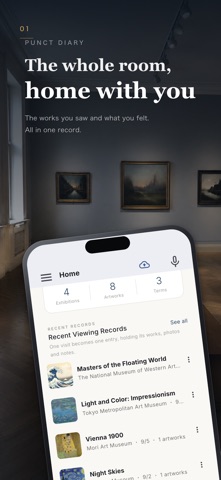




Description by Yasushi Hino Written by the developer, not by AppBrain. Click to read.
Be quick inside the museum, and take your time on the way home or at home. That two-step rhythm turns a visit from a one-off experience into a record that builds up over time.
■ Visit Mode: never stop moving inside the museum
Start a visit and a note opens where you can drop photos and memos in seconds. Just shoot, just jot, so you never have to cut short the time you spend in front of a work. Organizing can wait.
It works even where there is no signal, and your records are backed up to the cloud automatically afterwards.
■ Pin it to the note, tidy it up later
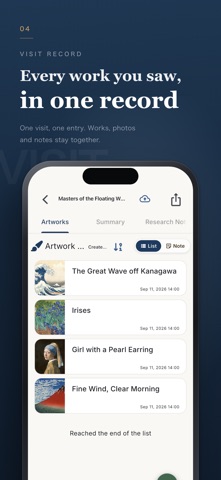
Photos you took, memos you wrote, audio, handouts. Pin them all to the note and arrange them however you like.
Back home, sort what you want to keep as artworks from what you don't, and only what matters ends up in your artwork list. You can also import from your camera roll in one go.
■ Remember artworks and terms together
For each artwork, record photos, the artist's name and your impressions.
Terms that catch your eye can be written down with their meaning and background, and linked to artworks. Later, "I've seen this technique before" becomes something you can actually trace.
■ Your journey becomes your collection
Every visit is stamped into your passport. Look back by year or by month to see where you have been.
Arrange the works you loved in "My Museum" and build an exhibition room of your own.
■ Find where to go next
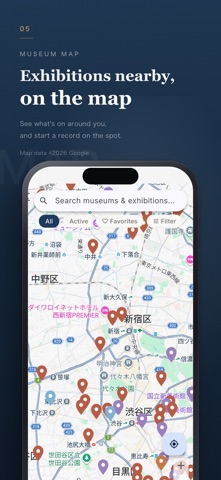
Search the map for museums and galleries nearby, and see what exhibitions are on.
For exhibitions that interest you, you can also see how many other people have recorded them.
■ Made for people who
- see an exhibition but often can't recall what was in it
- buy the catalogue and rarely open it again
- take photos of artworks that pile up unorganized
- want to look back on what, and how much, they have seen
See, write, look back. Repeat, and the next exhibition gets even better.