

Pure Weather Pro is made and published by Jason Burt. AppBrain is an independent app data site and isn't affiliated with Jason Burt. The app name, icon, screenshots and description belong to Jason Burt and are shown as published on the App Store.
AppBrain's verdict
- Last updated
- May 13, 2026
- Size
- 5.33 MB
User feedback
Ratings and reviews on the App StoreComments on Pure Weather Pro for iOS
We don't have enough comments to show example comments. Please check back later.
Store listing
By Jason Burt, from the App Store




Description by Jason Burt Written by the developer, not by AppBrain. Click to read.
The Home tab is your at-a-glance weather dashboard for your current location.
Current Conditions
The top of the screen shows your city name, current condition, temperature, chance of rain, and today's high/low. The background animates to match current conditions — rain falls during storms, stars appear at night, wind streaks blow through breezy days.
Outlook Card
A brief natural-language summary of current conditions followed by a scrollable hourly forecast showing weather icons, precipitation percentage, and temperature for the next several hours.
Sunset Quality
Predicts how visually dramatic tonight's sunset will be on a 1–5 flame scale based on cloud cover and atmospheric conditions near sunset time.
Weather Detail Grid
Key metrics at a glance: dew point, humidity, UV index, visibility, pressure and trend, wind chill, and cloud cover.
Precipitation Timeline
A minute-by-minute chart showing rain intensity for the next hour, when available.
Sunrise & Sunset
Today's sunrise and sunset times with a visual arc showing daylight progression.
Space Weather
Solar wind speed, magnetic field orientation, Kp geomagnetic index, and solar X-ray activity from NOAA. Includes a northern lights visibility estimate for your latitude.
Wind Detail
A compass rose showing wind direction, speed, and gust strength.
Air Quality
Real-time AQI (Air Quality Index) on the standard 0–500 US EPA scale with a color-coded bar. Powered by OpenWeatherMap.
Weather Time Machine
Look up historical weather for any day in the past 10 days at your current location.
Weather Stats
Tracks your local weather history since you installed the app. Shows hottest day, coldest day, sunny days, total days tracked, and a rolling list of the last 5 days with highs, lows, and precipitation.
Detail Tab
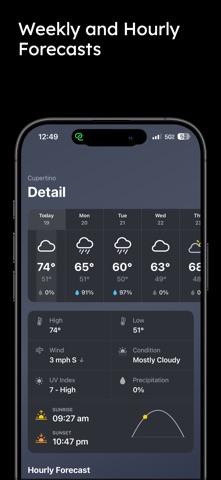
Expands on today's conditions with a full 10-day forecast. Tap any day to see a detailed breakdown including:
High/low temperatures
Precipitation chance and type
Wind speed and direction
UV index
Sunrise and sunset times
Moon phase
Maps Tab
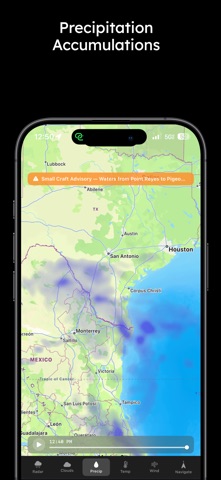
An interactive weather map with multiple data layers and road trip navigation.
Layer Toggles (bottom bar)
Radar — Live precipitation radar from RainViewer, animated with past frames and nowcast
Clouds — Cloud cover overlay
Precip — Precipitation intensity overlay
Temp — Temperature overlay
Wind — Wind speed overlay
Events - NASA EONET "Earth Observatory Natural Event Tracker". This adds earthquakes, floods, wildfires, landslides, severe weather and more
Playback Controls
Scrub through past radar frames or watch the animation play automatically. The timestamp shows the current frame time.
Weather Alerts
Active alerts for your area appear as a banner at the top. Tap to expand the full alert text. Tap outside to collapse.
Navigate
Tap Navigate to plan a road trip:
Tap the search icon and type your destination
The route draws automatically
Use the search chip bar to find gas stations, restaurants, EV chargers, hotels, parks, and more along your route
Tap any pin to see current weather at that stop
Tap + to add a stop to your trip
Tap Start with X Stops to begin navigation with optimized stop order
Search This Area
After panning the map to a new location, a Search This Area button appears in the center of the screen. Tap it to re-run your last search in the currently visible map region.
Pilot Tab
Aviation weather tools for pilots and aviation enthusiasts.
Airport Search
Type an ICAO or IATA airport code (e.g., KMSP, LAX) to retrieve:
METAR — Current observed conditions at the airport
TAF — Terminal Aerodrome Forecast (multi-hour/day forecast)
Flight Category — VFR / MVFR / IFR / LIFR color-coded status
Space Weather Panel
Live solar wind conditions, geomagnetic Kp index, and aurora visibility estimate — useful for HF radio operators and high-altitude flight planning
Cams Tab
Live webcam viewer powered by Windy.
Browse webcams near your current location
Safety and technology
Found in the app by AppBrain- Price
- $4.99
- App size
- 5.33 MB
- Content rating
- Everyone
Technologies used by Pure Weather Pro
Releases
Updates seen on the App Store- Version
- 3.0.3
- Launched
- April 2026
No changelog data
Alternatives
Similar apps and more from Jason BurtMore from Jason Burt


Rankings
App Store top chartsApp Store Rankings for Pure Weather Pro
About the app and developer
About Pure Weather Pro
Pure Weather Pro is a weather app developed by Jason Burt.
User Ratings
The app has no ratings yet.
App Information
Pure Weather Pro costs $4.99. The app size is 5.33 MB. The latest version available is 3.0.3. The last update was on May 13, 2026.
Technical Requirements
The app has a content rating of Everyone. The app has been available on the App Store since April 2026.
Developer information for Jason Burt
Address:
Frequently asked questions about Pure Weather Pro
Is Pure Weather Pro free?
No. Pure Weather Pro costs $4.99 on the App Store.
Is Pure Weather Pro still available?
Yes. Pure Weather Pro is on the App Store, and the last update we saw was on May 13, 2026.
How large is Pure Weather Pro?
Pure Weather Pro is 5.33 MB.
Is Pure Weather Pro suitable for children?
App Store rates the content of Pure Weather Pro as suitable for everyone.
Who made Pure Weather Pro?
Pure Weather Pro was developed by Jason Burt. It is listed in the weather category on the App Store.