

PureOpen — Markdown Editor
PureOpen — Markdown Editor is made and published by Yechiel Ben David. AppBrain is an independent app data site and isn't affiliated with Yechiel Ben David. The app name, icon, screenshots and description belong to Yechiel Ben David and are shown as published on the App Store.
AppBrain's verdict
- Last updated
- September 26, 2026
- Size
- 5.22 MB
User feedback
Ratings and reviews on the App StoreComments on PureOpen — Markdown Editor for iOS
We don't have enough comments to show example comments. Please check back later.
Store listing
By Yechiel Ben David, from the App Store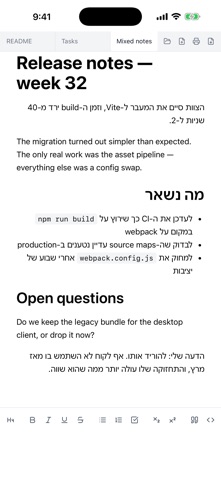


Description by Yechiel Ben David Written by the developer, not by AppBrain. Click to read.
Most editors treat RTL as a switch: turn it on and the whole document flips, which breaks the moment you write Hebrew or Arabic with English words in it. PureOpen decides direction per block instead. Every paragraph, heading and list item takes its direction from the first strong character in it — so a mixed document displays correctly with no setting, and with no direction marks written into your file.
Files open in tabs, the way a browser opens pages, and your changes are on disk 600ms after you stop typing.
RIGHT-TO-LEFT, PER BLOCK
• RTL and LTR live side by side in one file. A Hebrew paragraph aligns right, the English paragraph under it aligns left, and each stays that way as you edit.
• A Hebrew or Arabic sentence with English terms, code spans and links inside it reads correctly — the block stays RTL and the Latin runs sit where they belong.
• A block with no strong character inherits the direction of the block above it, so blank lines and numbers don't break the flow.
• Nothing is added to your Markdown to make this work: no RTL marks, no wrapper tags. The file stays portable.
OPEN IT FROM THE FILE, NOT FROM THE APP
• Right-click a Markdown file in Finder — or long-press it in Files on iPhone and iPad — and PureOpen sits at the top of "Open With". One click and the document is open in a tab in the window you already have.
• No launching the app first, no file picker, no importing into a library. Double-click works the same way, and so does dragging a file onto the window.
• Registered as the owner and editor of .md, .markdown, .mdown and .mkd.
TABS
• Every file opens in its own tab. ⌘1–⌘9 jump by position, Ctrl+Tab cycles, middle-click closes, and ⌘W closes the tab rather than the window.
• The tabs you had open come back the next time you launch.
SAVING
• Autosave writes 600ms after you stop typing, and again on tab switch, tab close and window blur. A grey dot marks a tab with unsaved content.
• If the file changes on disk — another editor, a sync client — it is reloaded quietly and your scroll position is kept. If it is deleted, editing locks so stale content is not written back over it.
• Opening a file doesn't reformat it: an edit that didn't actually change the content doesn't trigger a write.
EDITING
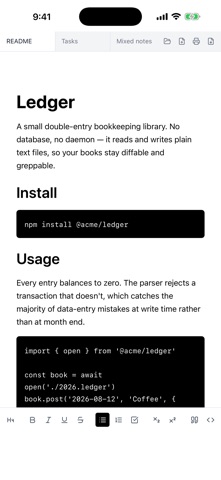
• 17 formatting buttons: headings 1–4, bold, italic, underline, strikethrough, bullet, numbered and task lists, subscript, superscript, quote, inline code, code block and horizontal rule.
• Each button reflects the block and the marks under the cursor, and updates as the cursor moves.
• Underline, subscript and superscript are kept as HTML rather than dropped when the file is saved.
PRINTING AND PDF
• Print what you see. The page is the document as the editor renders it — headings, tables, task lists, code blocks, Hebrew and English side by side — without the tabs and the toolbar around them.
• Export the same page straight to a PDF file, without going through the print dialog to find "Save as PDF".
• Nothing is rendered a second time for paper, so what prints is what you were looking at. Pages break between lines, and the page is always light even when the app is in dark mode.
ALSO
• On iPhone and iPad, files opened from Files are edited in place — not copied into the app.
• Dark mode follows the system setting.
• Files past roughly 4 million characters open read-only as raw text, so the interface doesn't stall.
• No network, no account, no telemetry. Your files stay on your device.
PureOpen is free, with no in-app purchases.
Safety and technology
Found in the app by AppBrain- Price
- Free
- App size
- 5.22 MB
- Content rating
- Everyone
Technologies used by PureOpen — Markdown Editor
Releases
Updates seen on the App Store- Version
- 2.1.1
- Launched
- August 2026
No changelog data
Alternatives
Similar apps and more from Yechiel Ben DavidAlternatives to PureOpen — Markdown Editor


More from Yechiel Ben David


Rankings
App Store top chartsApp Store Rankings for PureOpen — Markdown Editor
About the app and developer
About PureOpen — Markdown Editor
PureOpen — Markdown Editor is a productivity app developed by Yechiel Ben David.
What is the rating of PureOpen — Markdown Editor?
PureOpen — Markdown Editor has no ratings yet.
Is PureOpen — Markdown Editor free?
PureOpen — Markdown Editor is free. The app size is 5.22 MB. The latest version available is 2.1.1. The last update was on September 26, 2026.
What are the requirements for PureOpen — Markdown Editor?
The app has a content rating of Everyone. The app has been available on the App Store since August 2026.
Developer information for Yechiel Ben David
Address: