

PuttrLab is made and published by ROSS JARED BRANCATI. AppBrain is an independent app data site and isn't affiliated with ROSS JARED BRANCATI. The app name, icon, screenshots and description belong to ROSS JARED BRANCATI and are shown as published on the App Store.
AppBrain's verdict
- Last updated
- May 27, 2026
Rankings
App Store top chartsApp Store Rankings for PuttrLab
Releases
Updates seen on the App Store- Version
- 1.1
- Launched
- May 2026
No changelog data
User feedback
Ratings and reviews on the App StoreComments on PuttrLab for iOS
We don't have enough comments to show example comments. Please check back later.
Technology
Found in the app by AppBrain- Price
- Free
- App size
- 4.66 MB
- Content rating
- Everyone
Technologies used by PuttrLab
About the app and developer
About PuttrLab
PuttrLab is a sports app developed by ROSS JARED BRANCATI.
What is the rating of PuttrLab?
PuttrLab has no ratings yet.
Is PuttrLab free?
PuttrLab is free. The app size is 4.66 MB. The latest version available is 1.1. The last update was on May 27, 2026.
What are the requirements for PuttrLab?
The app has a content rating of Everyone. The app has been available on the App Store since May 2026.
Developer information for ROSS JARED BRANCATI
Address:
Frequently asked questions about PuttrLab
Is PuttrLab free?
Yes. PuttrLab is free on the App Store.
Is PuttrLab still available?
Yes. PuttrLab is on the App Store, and the last update we saw was on May 27, 2026.
How large is PuttrLab?
PuttrLab is 4.66 MB.
Is PuttrLab suitable for children?
App Store rates the content of PuttrLab as suitable for everyone.
Who made PuttrLab?
PuttrLab was developed by ROSS JARED BRANCATI. It is listed in the sports category on the App Store.
Store listing
By ROSS JARED BRANCATI, from the App Store


Description by ROSS JARED BRANCATI Written by the developer, not by AppBrain. Click to read.
Set up your phone on a tripod above your putting surface, attach a free printable tracker to your putter, and get instant feedback on your stroke.
FREE TO DOWNLOAD AND USE
Start putting and tracking right away. The free version includes:
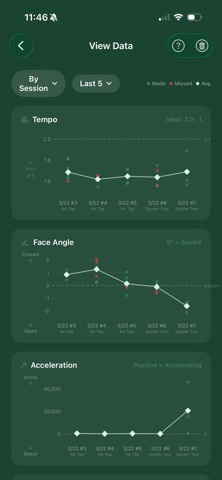
- Tempo: The ratio of your backswing duration to your forward swing. A consistent tempo is one of the hallmarks of great putters. Tour professionals typically putt with a 2:1 tempo.
- Face Angle: The angle of your putter face at the moment of impact, measured in degrees. Even small deviations from square can send your ball off line.
- Instant stroke replay so you can see exactly what your putter did
- Your three most recent sessions saved automatically
UPGRADE TO PUTTRLAB PRO
A one-time purchase unlocks the full PuttrLab experience. No subscription, pay once, own forever:
- Acceleration: Whether your putter head is accelerating or decelerating through impact. Decelerating into the ball is one of the most common putting faults.
- Stroke Path Symmetry: A symmetry rating of your backswing path to your forward swing path. A lower symmetry rating indicates your backswing and forward swing motion are more symmetrical, leading to more consistent putts.
- Face Contact Point: The location on the putter face where the ball is being struck. Striking the ball towards the toe or heel of the putter can send putts offline.
- Personalized coaching tips and drill recommendations after every session, based on your specific stroke
- Unlimited session history with visual performance charts to track your trends over days, weeks, and months
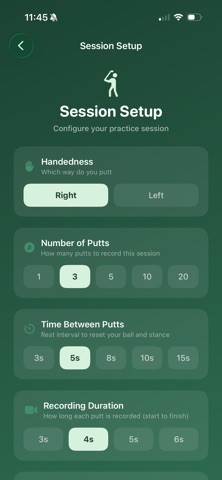
- Full session configuration — number of putts, time between putts, recording duration
- Session tagging to compare putters, drills, or practice conditions
- Made/missed tracking to correlate stroke metrics with results
CORE FEATURES
- 240fps slow-motion tracking for precise measurements
- Support for both right-handed and left-handed golfers
- Designed for use anywhere — practice green, home carpet, or hotel room
HARDWARE REQUIRED
All you need to get started is a tripod or phone mount that can point your iPhone toward the ground, and a printable tracking marker attached to your putter. Visit puttrlab.com for setup instructions, recommended tripods, and printable markers.
Note: The tripod and tracking marker are not included. You have the option to print free trackers from within the app.