

Puzzling Snapshots
Puzzling Snapshots is made and published by Mark Courtney. AppBrain is an independent app data site and isn't affiliated with Mark Courtney. The app name, icon, screenshots and description belong to Mark Courtney and are shown as published on the App Store.
AppBrain's verdict
- Last updated
- March 26, 2026
- Size
- 280.5 MB
User feedback
Ratings and reviews on the App StoreComments on Puzzling Snapshots for iOS
We don't have enough comments to show example comments. Please check back later.
Store listing
By Mark Courtney, from the App Store


Description by Mark Courtney Written by the developer, not by AppBrain. Click to read.
THE IMAGES
Puzzling Snapshots has 250 images across six categories. The collection includes nature and travel scenes along with other subjects that may catch the photographer's eye.
All the photographs were taken by the app developer who also works as a photographer. There's been little or no post-processing done on them so as to retain a more natural feel to the images. The aim is a variety that lends itself to good puzzles, from photographs that could be displayed in a gallery to photographs that may not be frame-worthy but just make fun puzzles.
THE PUZZLE TYPES
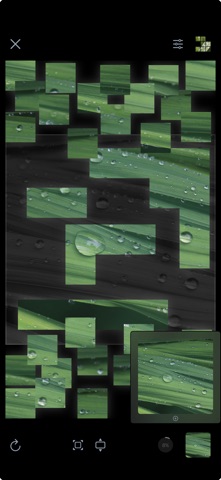
Each image in Puzzling Snapshots can be done with any or all of four puzzle types.
- Classic: connect scattered pieces in a standard, free-moving puzzle style
- Drop: drop pieces into place from above one at a time
- Slide: rearrange mixed-up pieces one at a time using a single open gap for moving
- Swap: rearrange mixed-up pieces by swapping two adjacent pieces at a time
KEEP IT FUN
Random Puzzle: Get a random image and puzzle type with the selection weighted toward images you haven't already done to keep things fresh.
Difficulty Settings: Customize settings for piece count or to use a full-sized guide image depending on your desired difficulty. You can set them globally, for certain puzzle types, or even for a specific image and puzzle type in progress.
Filters: Use filters to narrow things down to the categories of images you like or puzzle types you prefer.
SAVE & SYNC
Save: Puzzle progress is automatically saved, and it's easy to continue a puzzle where you left off or to see puzzles you've completed.
Sync: Puzzle progress, favorites, and settings are automatically synced across devices that use the same Apple account.
Favorites: Mark images as favorites so you can easily return to them to redo or try with a different puzzle type.
Safety and technology
Found in the app by AppBrain- Price
- $5.99
- App size
- 280.5 MB
- Content rating
- Everyone
Technologies used by Puzzling Snapshots
Releases
Updates seen on the App Store- Version
- 1.0.0
- Launched
- March 2026
No changelog data
Rankings
App Store top chartsApp Store Rankings for Puzzling Snapshots
About the app and developer
About Puzzling Snapshots
Puzzling Snapshots is a games app developed by Mark Courtney.
User Ratings
The app has no ratings yet.
App Information
Puzzling Snapshots costs $5.99. The app size is 280.47 MB. The latest version available is 1.0.0. The last update was on March 26, 2026.
Technical Requirements
The app has a content rating of Everyone. The app has been available on the App Store since March 2026.
Developer information for Mark Courtney
Address:
Frequently asked questions about Puzzling Snapshots
Is Puzzling Snapshots free?
No. Puzzling Snapshots costs $5.99 on the App Store.
Is Puzzling Snapshots still available?
Yes. Puzzling Snapshots is on the App Store, and the last update we saw was on March 26, 2026.
How large is Puzzling Snapshots?
Puzzling Snapshots is 280.47 MB.
Is Puzzling Snapshots suitable for children?
App Store rates the content of Puzzling Snapshots as suitable for everyone.
Who made Puzzling Snapshots?
Puzzling Snapshots was developed by Mark Courtney. It is listed in the games category on the App Store.