

Python IDE & Jupyter – Juno
Python IDE & Jupyter – Juno is made and published by Rational Matter. AppBrain is an independent app data site and isn't affiliated with Rational Matter. The app name, icon, screenshots and description belong to Rational Matter and are shown as published on the App Store.
AppBrain's verdict
EstablishedLoved by users- Rating on App Store
- 4.60
- 1,132 ratings
- Last updated
- October 13, 2026
Users love it: 4.6 stars from 1,132 ratings.
Rankings
App Store top chartsApp Store Rankings for Python IDE & Jupyter – Juno
Competitors
Similar apps and more from Rational MatterAlternatives to Python IDE & Jupyter – Juno





More from Rational Matter

Releases
Updates seen on the App Store- Version
- 4.3.4
- Launched
- September 2019
No changelog data
User feedback
Ratings and reviews on the App StoreComments on Python IDE & Jupyter – Juno for iOS
We don't have enough comments to show example comments. Please check back later.
Technology
Found in the app by AppBrain- Price
- Free
- App size
- 990.7 MB
- Content rating
- Everyone
Technologies used by Python IDE & Jupyter – Juno
About the app and developer
About Python IDE & Jupyter – Juno
Python IDE & Jupyter – Juno is an overall app developed by Rational Matter.
What is the rating of Python IDE & Jupyter – Juno?
Python IDE & Jupyter – Juno is rated 4.60 out of 5 stars, based on 1.1 thousand ratings.
Is Python IDE & Jupyter – Juno free?
Python IDE & Jupyter – Juno is free. The app size is 990.69 MB. The latest version available is 4.3.4. The last update was on October 13, 2026.
What are the requirements for Python IDE & Jupyter – Juno?
The app has a content rating of Everyone. The app has been available on the App Store since September 2019.
Developer information for Rational Matter
Address:
Frequently asked questions about Python IDE & Jupyter – Juno
Is Python IDE & Jupyter – Juno free?
Yes. Python IDE & Jupyter – Juno is free on the App Store.
Is Python IDE & Jupyter – Juno still available?
Yes. Python IDE & Jupyter – Juno is on the App Store, and the last update we saw was on October 13, 2026.
How large is Python IDE & Jupyter – Juno?
Python IDE & Jupyter – Juno is 990.69 MB.
Is Python IDE & Jupyter – Juno suitable for children?
App Store rates the content of Python IDE & Jupyter – Juno as suitable for everyone.
How do people rate Python IDE & Jupyter – Juno?
Python IDE & Jupyter – Juno scores 4.60 out of 5 stars, from 1,132 ratings on the App Store.
Who made Python IDE & Jupyter – Juno?
Python IDE & Jupyter – Juno was developed by Rational Matter. It is listed in the overall category on the App Store.
What are the best alternatives to Python IDE & Jupyter – Juno?
People looking at Python IDE & Jupyter – Juno also look at these overall apps: Breadpad - SPICE Simulator, Code Editor, CodeMaster - Mobile Coding IDE, Device Management App, Spider Proxy - HTTP(S) Catcher.
Store listing
By Rational Matter, from the App Store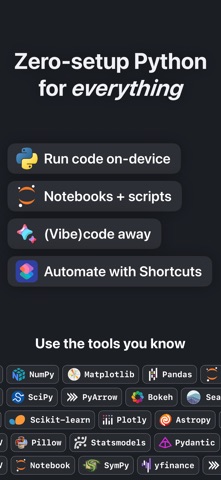



Description by Rational Matter Written by the developer, not by AppBrain. Click to read.
Juno is designed to cover all your Python coding needs, supporting both Python scripts (.py) and Jupyter notebooks (.ipynb) — a document format focused on applying Python to data analysis and computational science.
FREE FEATURES
- Navigate and manage files and folders, quickly preview documents and media
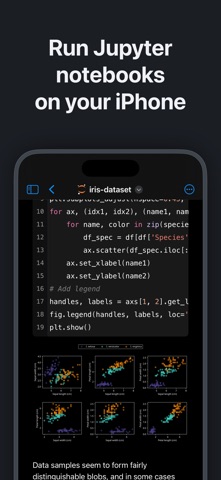
- Browse and edit Jupyter notebooks in a powerful, customizable notebook editor with beautifully rendered previews — editing is free
- Write and edit code sources, scripts, JSON, XML, and other text-based formats — one versatile editor for code and text alike, with syntax highlighting
- Add quick access bookmarks for file system locations outside the app's sandbox, or simply open documents in place
PRO FEATURES
Only one thing in Juno is Pro: running code. Even that is free to try — a generous trial allowance lets you run notebooks, scripts, projects, and the REPL before you buy. After the trial, running code unlocks with a one-time Pro purchase — not a subscription.
- Run Jupyter notebooks, Python scripts, and whole projects locally with the built-in Python 3.13 interpreter and a full suite of up-to-date, preinstalled scientific and data packages — entirely offline
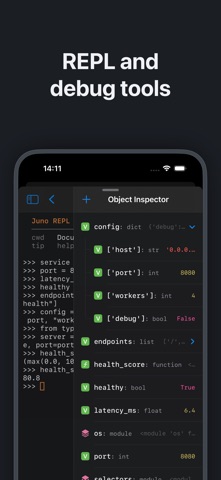
- Explore interactively in a Python REPL — open a standalone prompt, or drop into it after running a script or project to keep exploring what it defined
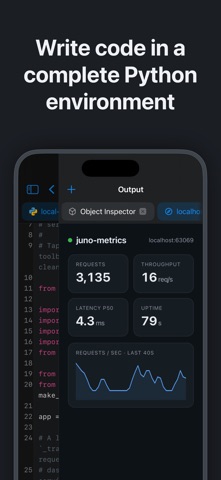
- Search the variables, functions, and imports in your session with the Object Inspector — no need to print each one
- Open any folder as a project: file tree, multiple editor tabs, run any script, with a coding assistant aware of the whole project
- Keep side outputs — Preview, Browser, Console, Object Inspector — open as side-by-side tabs in an output sidebar
- View local web servers and HTML your code produces in a built-in browser with developer debug tools
- Long-running scripts and Jupyter sessions keep going in the background
- Automate with Shortcuts and Siri: App Intents run a Python file, run Python code, or open a file — pass arguments and files, capture output, and chain actions
- Leverage powerful data analysis, machine learning and developer tools: NumPy, pandas, Polars, DuckDB, Matplotlib, SciPy, Scikit-learn, OpenCV, pygame, and more
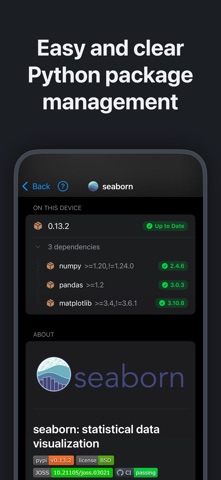
- Enjoy painless package management: install any pure Python package with an intuitive package manager
AI CODING ASSISTANT
The assistant runs on your account or your key, not ours: sign in with your account or add your OpenAI, Anthropic, or Gemini API key, and requests go straight from your device to your provider. You control what you spend and share — Juno never takes a cut.
GAMES AND EMULATORS
pygame is built in: write games with touch controls, sound, and full-screen graphics, and play them on your device. Eight complete games ship as examples, alongside NES, Game Boy, and CHIP-8 emulators written in Python, each with a library of freely licensed homebrew games — play them, then open the code to see how they work.
PYTHON MEETS iOS
Reach native iOS APIs straight from Python with the built-in juno modules: clipboard, Keychain, device info, location, motion sensors, contacts, reminders, photos, sound, notifications, sharing, and Bluetooth. Show native alerts and pickers, present full-screen image, video, and web previews, or call into UIKit, Foundation, and any Objective-C framework via the Objective-C bridge.
SCRIPTS AND NOTEBOOKS
Python scripts (.py) get snappy, intelligent code completion, a console with a full terminal emulator, and a built-in media viewer for code-generated images, plots, and web apps. Jupyter notebooks (.ipynb) keep live code, markdown text, plots, images, and LaTeX equations in one file, with every output embedded right in the document — a perfect playground for data analysis and computational science.