

qBitConnect is made and published by Rajnish Sharma. AppBrain is an independent app data site and isn't affiliated with Rajnish Sharma. The app name, icon, screenshots and description belong to Rajnish Sharma and are shown as published on the App Store.
AppBrain's verdict
- Rating on App Store
- 3.67
- 3 ratings
- Last updated
- January 13, 2026
It doesn't have enough ratings yet to judge what users think.
Rankings
App Store top chartsApp Store Rankings for qBitConnect
Competitors
Similar apps and more from Rajnish Sharma


Releases
Updates seen on the App Store- Version
- 1.7.0
- Launched
- January 2026
No changelog data
User feedback
Ratings and reviews on the App StoreComments on qBitConnect for iOS
We don't have enough comments to show example comments. Please check back later.
Technology
Found in the app by AppBrain- Price
- Free
- App size
- 36.3 MB
- Content rating
- High
Technologies used by qBitConnect
About the app and developer
About qBitConnect
qBitConnect is an utilities app developed by Rajnish Sharma.
What is the rating of qBitConnect?
qBitConnect is rated 3.67 out of 5 stars, based on 3 ratings.
Is qBitConnect free?
qBitConnect is free. The app size is 36.28 MB. The latest version available is 1.7.0. The last update was on January 13, 2026.
What are the requirements for qBitConnect?
The app has a content rating of High Maturity. The app has been available on the App Store since January 2026.
Developer information for Rajnish Sharma
Address:
Frequently asked questions about qBitConnect
Is qBitConnect free?
Yes. qBitConnect is free on the App Store.
Is qBitConnect still available?
Yes. qBitConnect is on the App Store, and the last update we saw was on January 13, 2026.
How large is qBitConnect?
qBitConnect is 36.28 MB.
Is qBitConnect suitable for children?
App Store gives qBitConnect a high maturity rating. It is meant for adults.
How do people rate qBitConnect?
qBitConnect scores 3.67 out of 5 stars, from 3 ratings on the App Store.
Who made qBitConnect?
qBitConnect was developed by Rajnish Sharma. It is listed in the utilities category on the App Store.
What are the best alternatives to qBitConnect?
People looking at qBitConnect also look at these utilities apps: qRemote for qBittorrent, Dashboarr, Simple qBittorrent Remote, transmission qbremote - NASCTL, iTransmission File Loader.
Store listing
By Rajnish Sharma, from the App Store


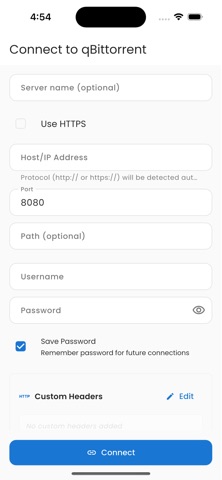
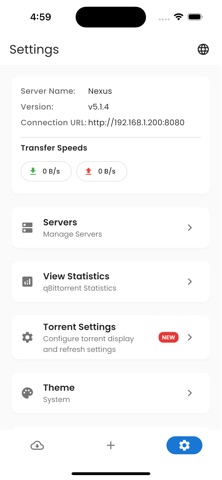


Description by Rajnish Sharma Written by the developer, not by AppBrain. Click to read.
Features
• Remote Access
• Connect to your qBittorrent server securely
• Monitor download and upload progress in real time
• View torrent status, speeds, and details
Real-Time Updates
• Live updates every few seconds
• Smart polling with change detection
• Instant status refresh
Torrent Control
• Pause, resume, and delete torrents
• Perform bulk actions on multiple torrents
• Set file download priorities
• Rename torrents and change save locations
• Force recheck and reannounce
Detailed Torrent Information
• View complete torrent metadata
• See tracker performance and peer connections
• Monitor transfer history and statistics
• Access individual file information
Modern User Interface
• Clean Material Design 3 layout
• Dark and light themes
• Responsive interface for all screen sizes
• Status indicators with progress and speed display
Secure Connections
• Password-protected access
• Supports custom HTTP headers
• Auto-reconnect and connection validation
File Management
• Manage individual files in torrents
• Set and track file download progress
• View size and completion status
Smart Features
• Automatically connect to saved servers
• Custom server naming
• Adjustable polling intervals
• Error handling and offline mode support
Cross-Platform Compatibility
• Supports all qBittorrent versions with Web UI
• Works with both local and remote servers
• No additional software required
It is not affiliated with or endorsed by the qBittorrent project.
Note: A properly configured qBittorrent Web UI is required for this app to function.