

QingMo - Markdown Editor
QingMo - Markdown Editor is made and published by 兆卓 张. AppBrain is an independent app data site and isn't affiliated with 兆卓 张. The app name, icon, screenshots and description belong to 兆卓 张 and are shown as published on the App Store.
AppBrain's verdict
- Last updated
- October 26, 2026
- Size
- 28.2 MB
User feedback
Ratings and reviews on the App StoreComments on QingMo - Markdown Editor for iOS
We don't have enough comments to show example comments. Please check back later.
Store listing
By 兆卓 张, from the App Store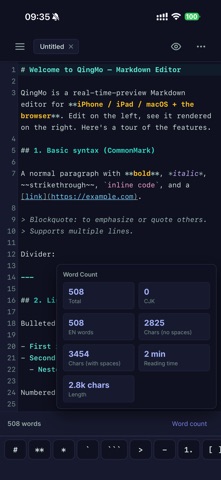




Description by 兆卓 张 Written by the developer, not by AppBrain. Click to read.
— Live Preview —
Rendering kicks in the moment you stop typing, with millisecond response. Switch freely between source, split, and preview modes. In split mode the editor and preview scroll in sync, so you never lose your place in long documents.
— Navigate Long Documents —
- Minimap: a structural overview on the right edge, color-coded by headings, body, and code. Click or drag to jump — accurate even with soft wrapping.
- Sticky Header: keeps the full heading path of your current position pinned at the top while scrolling; click any level to jump back.
- Two-way Linked Highlight: select text on one side and the matching text on the other is highlighted automatically.
(All optional, toggleable in Settings, off by default.)
— Full Markdown Support —
- CommonMark: headings, emphasis, lists, quotes, links, images, rules
- GitHub Flavored Markdown: tables, task lists, strikethrough, autolinks
- KaTeX math: inline $...$ and block $$...$$, rendered offline
- Superscript and subscript for chemical formulas and math notes
- Syntax highlighting for dozens of languages: Python, Swift, Rust, Go, Java, JavaScript, SQL, and more
— Fast Input —
One-tap toolbar for bold, headings, lists, tables, formulas and more. On mobile, a quick-symbol bar sits above the keyboard so hard-to-type characters are always within reach. Full keyboard shortcuts for external keyboard users.
— Consistent Across Devices + iCloud Sync —
iPhone, iPad, and Mac share the same rendering core for consistent results everywhere. Turn on iCloud and your documents sync automatically across devices signed in to your Apple ID.
— Handy File Management —
A built-in file explorer: create, rename, delete, duplicate, and drag items into folders. Export to PDF or a single self-contained HTML file for easy sharing and archiving.
— Privacy First —
QingMo collects no personal data and contains no ads or trackers. Your documents stay in the local folder you choose or in your own iCloud container.
— QingMo Pro (optional) —
The core writing experience is free forever. A one-time QingMo Pro purchase (no subscription) unlocks advanced extras:
- Mermaid diagrams (flowcharts, sequences, Gantt)
- One-tap publishing and Chinese typography tools (auto spacing, simplified/traditional conversion)
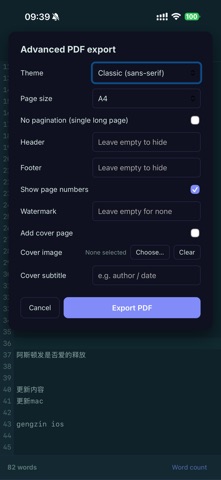
- Advanced PDF export (themes, headers/footers, page numbers, watermark, cover) and long-image export
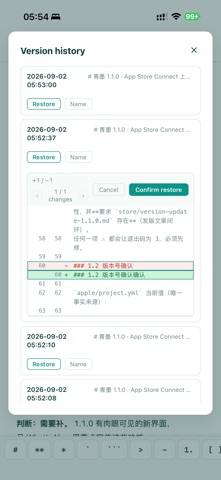
- Version history, detailed word count, focus mode, and image archiving
Purchase is handled entirely by the App Store, and "Restore Purchases" is available.
Whether you are writing technical notes, organizing to-dos, drafting papers, or capturing ideas, QingMo keeps you focused on the content.
Safety and technology
Found in the app by AppBrain- Price
- Free
- App size
- 28.2 MB
- Content rating
- Everyone
Technologies used by QingMo - Markdown Editor
Releases
Updates seen on the App Store- Version
- 1.1.2
- Launched
- July 2026
No changelog data
Alternatives
Similar apps and more from 兆卓 张Alternatives to QingMo - Markdown Editor


More from 兆卓 张

Rankings
App Store top chartsApp Store Rankings for QingMo - Markdown Editor
About the app and developer
About QingMo - Markdown Editor
QingMo - Markdown Editor is a productivity app developed by 兆卓 张.
User Ratings
The app has no ratings yet.
App Information
QingMo - Markdown Editor is freely available from the App Store. The app size is 28.23 MB. The latest version available is 1.1.2. The last update was on October 26, 2026.
Technical Requirements
The app has a content rating of Everyone. The app has been available on the App Store since July 2026.
Developer information for 兆卓 张
Address: