

QingTrace Countdown is made and published by 开棋 姜. AppBrain is an independent app data site and isn't affiliated with 开棋 姜. The app name, icon, screenshots and description belong to 开棋 姜 and are shown as published on the App Store.
AppBrain's verdict
- Last updated
- October 18, 2026
- Size
- 3.16 MB
User feedback
Ratings and reviews on the App StoreComments on QingTrace Countdown for iOS
We don't have enough comments to show example comments. Please check back later.
Store listing
By 开棋 姜, from the App Store

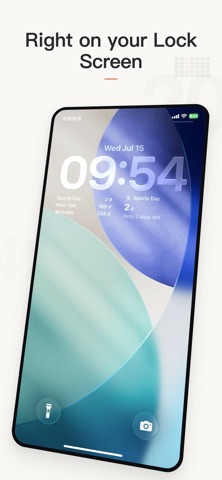

Screenshots by 开棋 姜, from the the App Store listing
Description by 开棋 姜 Written by the developer, not by AppBrain. Click to read.
Countdown is for people who want to track more than one special date and never lose them when switching phones — a desktop countdown app powered by iCloud sync.
WHO IT'S FOR
· People who track wedding countdowns, anniversaries, retirement, exam D-Days
· People who glance at their Home Screen or Lock Screen for "how many days left"
· People who use both iPhone and iPad and need data to sync automatically
· NOT for: someone who just needs a single number and finds multiple widgets overwhelming
3 SCENES YOU'LL USE IT FOR
· Want to remember a wedding/anniversary → enter the date once, it shows on your Home Screen and Lock Screen. When the day comes, it automatically flips to "married for X days"
· Wondering "how long until retirement" → turn on Working-Days mode, counts Mon–Fri only
· Lunar birthday reminders → set Lunar repeat, it updates automatically every year
WHY NOT OTHER COUNTDOWN APPS
· We don't rely on local storage — your data lives in iCloud, syncs across all devices automatically
· We don't just show raw numbers — far-off dates read "2 months 12 days" or "~3 weeks", not just "73 days"
· Focus + Overview in one — the Focus widget keeps your eyes on one date, while Timeline List shows all
ABOUT US
· Completely free, no ads, no tracking, no data collection. No account or sign-in needed.
FAQ
Q: Will I lose data when switching phones?
A: No. As long as you use the same Apple ID, everything syncs via iCloud automatically. Nothing to configure.
Q: Can I count only working days?
A: Yes. Each event has a Working-Days mode that counts Mon–Fri only.
Q: Can lunar birthdays repeat every year automatically?
A: Yes. Choose "Lunar Repeat" when creating an event, it updates automatically each year.
Q: Can I see multiple countdowns on the Lock Screen?
A: Yes. The "Lock Top 3" widget shows your three nearest countdowns below the clock.
Q: Is this app really free? Any ads?
A: Completely free — no ads, no in-app purchases, no subscriptions. No registration required.
Q: Will a long list of events look messy?
A: No. Past events are automatically moved to "Past" section. You choose which ones appear on widgets.
WHO IT'S FOR
· People who track wedding countdowns, anniversaries, retirement, exam D-Days
· People who glance at their Home Screen or Lock Screen for "how many days left"
· People who use both iPhone and iPad and need data to sync automatically
· NOT for: someone who just needs a single number and finds multiple widgets overwhelming
3 SCENES YOU'LL USE IT FOR
· Want to remember a wedding/anniversary → enter the date once, it shows on your Home Screen and Lock Screen. When the day comes, it automatically flips to "married for X days"
· Wondering "how long until retirement" → turn on Working-Days mode, counts Mon–Fri only
· Lunar birthday reminders → set Lunar repeat, it updates automatically every year
WHY NOT OTHER COUNTDOWN APPS
· We don't rely on local storage — your data lives in iCloud, syncs across all devices automatically
· We don't just show raw numbers — far-off dates read "2 months 12 days" or "~3 weeks", not just "73 days"
· Focus + Overview in one — the Focus widget keeps your eyes on one date, while Timeline List shows all
ABOUT US
· Completely free, no ads, no tracking, no data collection. No account or sign-in needed.
FAQ
Q: Will I lose data when switching phones?
A: No. As long as you use the same Apple ID, everything syncs via iCloud automatically. Nothing to configure.
Q: Can I count only working days?
A: Yes. Each event has a Working-Days mode that counts Mon–Fri only.
Q: Can lunar birthdays repeat every year automatically?
A: Yes. Choose "Lunar Repeat" when creating an event, it updates automatically each year.
Q: Can I see multiple countdowns on the Lock Screen?
A: Yes. The "Lock Top 3" widget shows your three nearest countdowns below the clock.
Q: Is this app really free? Any ads?
A: Completely free — no ads, no in-app purchases, no subscriptions. No registration required.
Q: Will a long list of events look messy?
A: No. Past events are automatically moved to "Past" section. You choose which ones appear on widgets.
Safety and technology
Found in the app by AppBrain- Price
- Free
- App size
- 3.16 MB
- Content rating
- Everyone
Technologies used by QingTrace Countdown
Releases
Updates seen on the App Store- Version
- 1.4.0
- Launched
- July 2026
No changelog data
Alternatives
Similar apps and more from 开棋 姜Alternatives to QingTrace Countdown


More from 开棋 姜


Rankings
App Store top chartsApp Store Rankings for QingTrace Countdown
This app is not ranked
About the app and developer
About QingTrace Countdown
QingTrace Countdown is an utilities app developed by 开棋 姜.
What is the rating of QingTrace Countdown?
QingTrace Countdown has no ratings yet.
Is QingTrace Countdown free?
QingTrace Countdown is free. The app size is 3.16 MB. The latest version available is 1.4.0. The last update was on October 18, 2026.
What are the requirements for QingTrace Countdown?
The app has a content rating of Everyone. The app has been available on the App Store since July 2026.
Developer information for 开棋 姜
Address: