

QR 2 CSV Pro is made and published by Dan Ristea. AppBrain is an independent app data site and isn't affiliated with Dan Ristea. The app name, icon, screenshots and description belong to Dan Ristea and are shown as published on the App Store.
AppBrain's verdict
- Rating on App Store
- 5.00
- 1 ratings
- Last updated
- September 24, 2026
- Size
- 4.08 MB
It doesn't have enough ratings yet to judge what users think.
User feedback
Ratings and reviews on the App StoreComments on QR 2 CSV Pro for iOS
We don't have enough comments to show example comments. Please check back later.
Store listing
By Dan Ristea, from the App Store




Description by Dan Ristea Written by the developer, not by AppBrain. Click to read.
Scan with your camera or enter values manually. Use single or continuous scanning, optional beep and vibration, and duplicate detection. Everything stays on your device.
EVERYTHING INCLUDED — NO IN-APP PURCHASES:
SCANNING & CAPTURE:
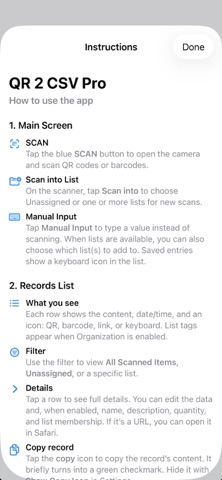
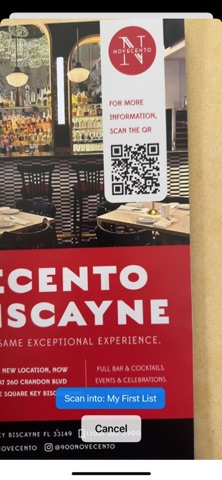
• Scan QR codes and barcodes with your camera
• Continuous or single-shot scanning with adjustable delay
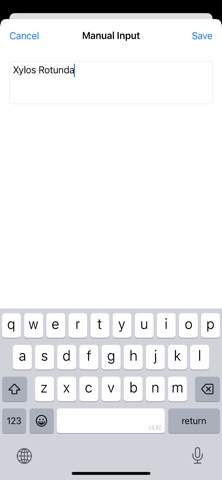
• Manual entry when you can’t scan
• Scanner Keyboard mode — switch Camera / Keyboard on the scanner screen
• Optional beep and vibration feedback
• Prevent duplicate scans with a confirmation prompt
• Timestamps on every record
• Open scanned URLs in Safari
• Search records (all fields: data, name, description, quantity, lists, timestamp)
• Select All in Bulk Actions (and List Assign): selects every visible item (search + list filter)
INVENTORY MANAGEMENT:
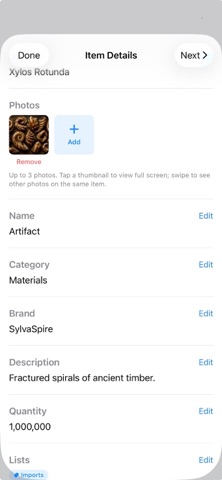
• Add names, brands, categories, descriptions, quantities, unit price and more
• Add up to 3 photos per record (camera or library)
• Edit multiple selected items at once
• Include inventory fields in your exports
• Copy Fields From Existing (scan or manual record).
• Search by Field (limit search to Data, Name, Brand, Category, Description, Quantity, Lists, or Timestamp)
• Fuzzy Barcode Lookup — partial matches from your library while typing (on by default)
• Brand Manager — create, browse, rename, and remove unused brands from your catalog
• Category Manager — create, browse, rename, and remove unused categories from your catalog
• Show Related Items — stack icon when an item is on multiple lists or has duplicate barcode entries;
ORGANIZATION / LISTS:
• Create lists and assign items to one or more lists
• Create list groups and assign lists to one or more groups
• Scan directly into a list (or leave items Unassigned)
• Filter by All, Unassigned, a list group, or a specific list
• Export by list group, list, including list names when enabled
• Bulk Actions: assign, edit, export, or delete selected items
• Export sort: Sort by Date, Data, Name, Description, Quantity, Price and more with optional Then by
• Tertiary export sort — up to 3 levels (Sort by / Then by)
WORKFLOWS (BETA):
• Choose from Stocking, Restocking, Dynamic, and Revision scanning modes
• Move known items between lists, add new items, or do both automatically
• Look up existing records across your Source lists while scanning
• Control how known, unknown, and duplicate items are handled
• Confirm, update, skip, or create records directly from the scanning workflow
• Set Destination lists for organized, repeatable stock operations
• Built-in demos let you try each workflow before using your own lists
SHELF OPS (BETA):
• Shelf-life tracking — production date, shelf life, expiration; per-list scope
• Row status badges — Near Expiry, Remove, Expired, Out of Stock
• Duplicate barcode statistics — duplicate count per item; swipe Reset Count on rows
• Fast Track — In Focus and Expand Catalog Menus for quicker Brand/Category editing
MANAGE & EXPORT:
• Swipe to delete, or delete specific / all / visible items
• Export as CSV, TXT, Excel (.xlsx) and PDF (.pdf) — share by email, Messages, Drive, and more
• Include Photos in .xlsx and .pdf Export (default off)
• Persistent local storage for scans and settings
• AI Assist (Beta) — on-device Apple Intelligence help
BACKUP & RESTORE (optional unlock):
• Backup Now — save scans, lists, and settings as a .qr2csv to Files, iCloud Drive, Google Drive, email and more
• Restore from user backups or system snapshots (private in-app copies)
• Preview before you replace anything
• System snapshots include photos; user backups do not
Pay once and get everything. Simply scan, organize, and export. All data stays on your device for privacy and control.
Safety and technology
Found in the app by AppBrain- Price
- $3.49
- App size
- 4.08 MB
- Content rating
- Everyone
Technologies used by QR 2 CSV Pro
Releases
Updates seen on the App Store- Version
- 2.9
- Launched
- November 2025
No changelog data
Alternatives
Similar apps and more from Dan RisteaMore from Dan Ristea


Rankings
App Store top chartsApp Store Rankings for QR 2 CSV Pro
About the app and developer
About QR 2 CSV Pro
QR 2 CSV Pro is an utilities app developed by Dan Ristea.
User Ratings
QR 2 CSV Pro is rated 5.00 out of 5 stars. The rating is based on one rating ratings.
App Information
QR 2 CSV Pro costs $3.49. The app size is 4.08 MB. The latest version available is 2.9. The last update was on September 24, 2026.
Technical Requirements
The app has a content rating of Everyone. The app has been available on the App Store since November 2025.
Developer information for Dan Ristea
Address:
Frequently asked questions about QR 2 CSV Pro
Is QR 2 CSV Pro free?
No. QR 2 CSV Pro costs $3.49 on the App Store.
Is QR 2 CSV Pro still available?
Yes. QR 2 CSV Pro is on the App Store, and the last update we saw was on September 24, 2026.
How large is QR 2 CSV Pro?
QR 2 CSV Pro is 4.08 MB.
Is QR 2 CSV Pro suitable for children?
App Store rates the content of QR 2 CSV Pro as suitable for everyone.
How do people rate QR 2 CSV Pro?
QR 2 CSV Pro has one rating of 5.00 stars on the App Store.
Who made QR 2 CSV Pro?
QR 2 CSV Pro was developed by Dan Ristea. It is listed in the utilities category on the App Store.