

QR Code Reader: Scan, Create
QR Code Reader: Scan, Create is made and published by Riverside Art LLC. AppBrain is an independent app data site and isn't affiliated with Riverside Art LLC. The app name, icon, screenshots and description belong to Riverside Art LLC and are shown as published on the App Store.
AppBrain's verdict
- Rating on App Store
- 4.60
- 5 ratings
- Last updated
- October 14, 2026
It doesn't have enough ratings yet to judge what users think.
Rankings
App Store top chartsApp Store Rankings for QR Code Reader: Scan, Create
Competitors
Similar apps and more from Riverside Art LLCAlternatives to QR Code Reader: Scan, Create


More from Riverside Art LLC


Releases
Updates seen on the App Store- Version
- 1.3.1
- Launched
- May 2026
No changelog data
User feedback
Ratings and reviews on the App StoreComments on QR Code Reader: Scan, Create for iOS
We don't have enough comments to show example comments. Please check back later.
Technology
Found in the app by AppBrain- Price
- Free
- App size
- 17.7 MB
- Content rating
- Everyone
Technologies used by QR Code Reader: Scan, Create
About the app and developer
About QR Code Reader: Scan, Create
QR Code Reader: Scan, Create is an utilities app developed by Riverside Art LLC.
User Ratings
QR Code Reader: Scan, Create is rated 4.60 out of 5 stars. The rating is based on 5 ratings.
App Information
QR Code Reader: Scan, Create is freely available from the App Store. The app size is 17.72 MB. The latest version available is 1.3.1. The last update was on October 14, 2026.
Technical Requirements
The app has a content rating of Everyone. The app has been available on the App Store since May 2026.
Developer information for Riverside Art LLC
Address:
Frequently asked questions about QR Code Reader: Scan, Create
Is QR Code Reader: Scan, Create free?
Yes. QR Code Reader: Scan, Create is free on the App Store.
Is QR Code Reader: Scan, Create still available?
Yes. QR Code Reader: Scan, Create is on the App Store, and the last update we saw was on October 14, 2026.
How large is QR Code Reader: Scan, Create?
QR Code Reader: Scan, Create is 17.72 MB.
Is QR Code Reader: Scan, Create suitable for children?
App Store rates the content of QR Code Reader: Scan, Create as suitable for everyone.
How do people rate QR Code Reader: Scan, Create?
QR Code Reader: Scan, Create scores 4.60 out of 5 stars, from 5 ratings on the App Store.
Who made QR Code Reader: Scan, Create?
QR Code Reader: Scan, Create was developed by Riverside Art LLC. It is listed in the utilities category on the App Store.
What are the best alternatives to QR Code Reader: Scan, Create?
People looking at QR Code Reader: Scan, Create also look at these utilities apps: Scan Barcode - QR Code Reader, QR Code Scanner, QR Code Reader: QR ACE Scanner, QR Scanner & Barcode Reader., QR Scanner - Quick Read & Scan.
Store listing
By Riverside Art LLC, from the App Store

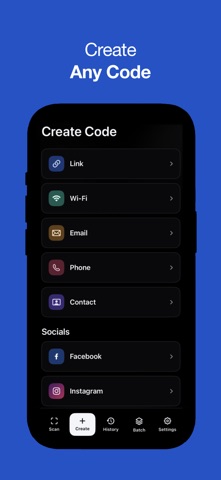


Description by Riverside Art LLC Written by the developer, not by AppBrain. Click to read.
Whether scanning barcodes for shopping comparison, or generating custom QR codes for your business, our advanced engine reliably delivers instant results.
CORE FEATURES & CAPABILITIES:
+ Instant Scanning Engine: Point your camera at any QR code or barcode for immediate, high-speed recognition.
+ Auto-Focus & Detection: Seamlessly detect codes even in low-light environments, at odd angles, or from a distance.
+ Safe Browsing Architecture: Automatically preview destination URLs to protect against malicious links before you visit them.
+ Comprehensive Format Support: Seamlessly read standard QR formats, UPC, EAN, Code 39, Data Matrix, Aztec, and more.
+ Custom Generation: Create personalized QR codes for websites, emails, phone numbers, VCards, Wi-Fi networks, and social media profiles.
+ Sequential Batch Mode: Scan dozens of items back-to-back without returning to the home screen for maximum productivity.
+ Local History Vault: Automatically log your scans for easy retrieval, organization, and future reference.
Core scanning functionalities are available upon initial download and are offered with a free trial. No payment needed at point of trial initiation. Users wanting continued uninterrupted access to the complete suite of advanced utilities, including unlimited custom creation, batch processing capabilities, and full history management, beyond the trial, will require a premium access upgrade to unlock the app's full functional potential and offered functionalities.
Subscription & Legal Information:
Access to the full suite of application services, ongoing feature updates, and continuous scanning tools including premium services is governed by standard billing protocols. By electing to upgrade your account status, the application provides access to features via an auto-renewing subscription model. Users may be offered an introductory 3-day free trial period to evaluate the full feature set, after which a standard subscription fee will be charged to the payment method associated with your Apple Account. Subscriptions automatically renew at the same price and duration period unless auto-renewal is turned off at least 24 hours prior to the end of the current billing cycle. Your account will be charged for renewal within 24 hours prior to the end of the current period. You can manage your subscriptions and turn off auto-renewal at any time by navigating to your Apple Account Settings after purchase. Any unused portion of a free trial period, if offered, will be forfeited when the user purchases a subscription to that publication, where applicable. By downloading and continuing to use the application, you agree to our standard Terms of Use and Privacy Policy.
Terms of Use (EULA): https://www.apple.com/legal/internet-services/itunes/dev/stdeula/
Terms of Use: https://riversideartcompany.com/terms-of-use
Privacy Policy: https://riversideartcompany.com/privacy-policy