

QR Code Scanner-Barcode Reader
QR Code Scanner-Barcode Reader is made and published by AI Filter Lab: Editor & Generator. AppBrain is an independent app data site and isn't affiliated with AI Filter Lab: Editor & Generator. The app name, icon, screenshots and description belong to AI Filter Lab: Editor & Generator and are shown as published on the App Store.
AppBrain's verdict
- Rating on App Store
- 4.18
- 11 ratings
- Last updated
- October 8, 2026
It doesn't have enough ratings yet to judge what users think.
Rankings
App Store top chartsApp Store Rankings for QR Code Scanner-Barcode Reader
Competitors
Similar apps and more from AI Filter Lab: Editor & GeneratorAlternatives to QR Code Scanner-Barcode Reader


More from AI Filter Lab: Editor & Generator


Releases
Updates seen on the App Store- Version
- 1.5
- Launched
- August 2026
No changelog data
User feedback
Ratings and reviews on the App StoreComments on QR Code Scanner-Barcode Reader for iOS
We don't have enough comments to show example comments. Please check back later.
Technology
Found in the app by AppBrain- Price
- Free
- App size
- 50.9 MB
- Content rating
- Everyone
Technologies used by QR Code Scanner-Barcode Reader
About the app and developer
About QR Code Scanner-Barcode Reader
QR Code Scanner-Barcode Reader is an utilities app developed by AI Filter Lab: Editor & Generator.
User Ratings
QR Code Scanner-Barcode Reader is rated 4.18 out of 5 stars. The rating is based on 11 ratings.
App Information
QR Code Scanner-Barcode Reader is freely available from the App Store. The app size is 50.88 MB. The latest version available is 1.5. The last update was on October 8, 2026.
Technical Requirements
The app has a content rating of Everyone. The app has been available on the App Store since August 2026.
Developer information for AI Filter Lab: Editor & Generator
AI Filter Lab: Editor & Generator
Address:
Frequently asked questions about QR Code Scanner-Barcode Reader
Is QR Code Scanner-Barcode Reader free?
Yes. QR Code Scanner-Barcode Reader is free on the App Store.
Is QR Code Scanner-Barcode Reader still available?
Yes. QR Code Scanner-Barcode Reader is on the App Store, and the last update we saw was on October 8, 2026.
How large is QR Code Scanner-Barcode Reader?
QR Code Scanner-Barcode Reader is 50.88 MB.
Is QR Code Scanner-Barcode Reader suitable for children?
App Store rates the content of QR Code Scanner-Barcode Reader as suitable for everyone.
How do people rate QR Code Scanner-Barcode Reader?
QR Code Scanner-Barcode Reader scores 4.18 out of 5 stars, from 11 ratings on the App Store.
Who made QR Code Scanner-Barcode Reader?
QR Code Scanner-Barcode Reader was developed by AI Filter Lab: Editor & Generator. It is listed in the utilities category on the App Store.
What are the best alternatives to QR Code Scanner-Barcode Reader?
People looking at QR Code Scanner-Barcode Reader also look at these utilities apps: Afensia, SwipeCleaner: Photo & Video, AI Cleaner:Clean Up Storage++, Lumirox Optimizer, Declutter: Smart Photo Cleaner.
Store listing
By AI Filter Lab: Editor & Generator, from the App Store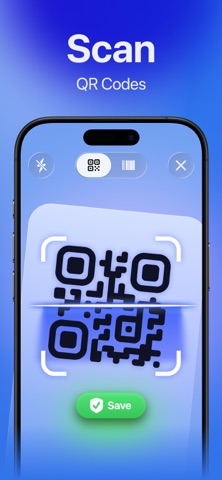

Description by AI Filter Lab: Editor & Generator Written by the developer, not by AppBrain. Click to read.
SCAN QR CODES & BARCODES
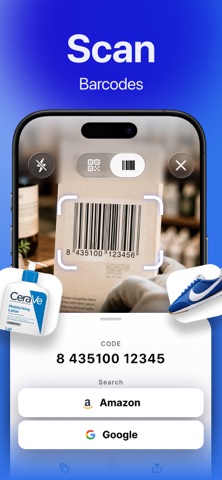
Point your camera at a code or select a photo or screenshot. Code recognition runs on your device. Scan common barcode formats, including EAN, UPC, Code 128, Code 39, and ITF, or enter a barcode number manually.
CHECK LINKS BEFORE YOU OPEN THEM
Safe Scanning checks links on your device for suspicious patterns, such as look-alike website addresses. See a "Looks Safe" badge or a warning before opening a link, then decide how to proceed. Link checks cannot detect every online threat.
SMART RESULTS FOR EVERY SCAN
Open, copy, or share links and connect to Wi-Fi from scan results. Get tailored result screens for contacts, phone numbers, email addresses, and text.
CHECK PRODUCTS WITH AI
Take 1-2 photos of sneakers, bags, food, or supplements. Get an AI assessment with a detail checklist and highlighted areas on your photos to help you review visible features and possible inconsistencies.
AI can make mistakes. Results are not proof of authenticity or safety.
EXPLORE PRODUCT DETAILS
Scan a food barcode to view available Open Food Facts data: calories, protein, carbs, fat, ingredients, and allergens, plus Nutri-Score nutrition ratings and NOVA food processing groups. Search for products on Google or Amazon.
Availability varies by product. Always check the product label for ingredients and allergens.
CREATE QR CODES
Use the built-in QR code generator to create codes for websites, Wi-Fi networks, contacts, email, SMS, phone numbers, and plain text. Share guest Wi-Fi, put contact details on a business card, or turn a link into a scannable code.
CUSTOMIZE YOUR QR CODES
Choose colors and gradients, change module shapes, round the elements, and add your logo. Make a design that matches your personal style, business card, or product packaging. Save created codes to your library and share them through the iOS share menu.
KEEP YOUR SCANS ORGANIZED
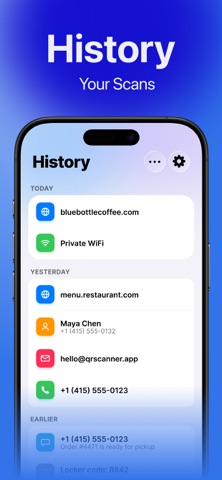
Find past scans in a history grouped by date. Delete individual entries or clear the entire history. The app has no ads and supports light and dark themes.
SCANNING & QR CREATION LIMITS
Scan with your camera or photos, save history, check links, and search Google or Amazon without usage limits. Create up to three QR codes without a subscription. Subscribe for unlimited QR creation.
Download QR code reader and barcode scanner to scan safely, check products with AI, and create custom QR codes in one app.
QR Code is a registered trademark of DENSO WAVE INCORPORATED.
Subscription Information:
- Payment will be charged to your Apple ID at confirmation of purchase.
- Subscription automatically renews unless auto-renewal is turned off at least 24 hours before the end of the current period.
- Your account will be charged for renewal within 24 hours prior to the end of the current period;the cost of the renewal will be indicated in advance.
- You can manage your subscriptions and turn off automatic renewal at any time in your Apple ID account settings.
- You can cancel your subscription at any time in your Apple ID settings. All prices include applicable local taxes.
- If a free trial is offered, any unused portion will be forfeited when you purchase a subscription.
- After the free trial ends, if offered, the subscription automatically renews at the regular price unless canceled before the end of the trial period.
Privacy Policy: https://footclo.uk/privacy-policy/index.html
Terms of Use: https://footclo.uk/terms-of-service/index.html