AppBrain
AppBrain
  • Apps
  • Apps being viewed right now Trending apps today Most popular apps All-time most installed apps Top rated apps iPhone and iPad apps
  • Intelligence ▾
    Intelligence overview → Track any Android app or your whole market
    Track & analyze
    Keyword Tracker & OptimizerTrack & improve Play rankings App Performance ReportOne-off PDF for any app StatisticsFree Android & Play market stats
    Promote your app
    Featured Apps App Links
  • Intelligence
  • Pricing
  • Dashboard
  • Sign up
  • Log in
App Store Apps > Productivity > QRArtify – QR Code Maker
App profile & analytics · Productivity · Data updated 2026-10-21
QRArtify – QR Code Maker icon

QRArtify – QR Code Maker

by Sradanund Jeebun · Free · Version 1.0
Availability On the App Store since December 2025 ↗
Rating on App Store
–
Rating
–
0 reviews
Best rank
–
not in the top lists
Last updated
December 1, 2025
1.0

QRArtify – QR Code Maker is made and published by Sradanund Jeebun. AppBrain is an independent app data site and isn't affiliated with Sradanund Jeebun. The app name, icon, screenshots and description belong to Sradanund Jeebun and are shown as published on the App Store.

About QRArtify – QR Code Maker

QRArtify – QR Code Maker is a productivity app developed by Sradanund Jeebun.

What is the rating of QRArtify – QR Code Maker?

QRArtify – QR Code Maker has no ratings yet.

Is QRArtify – QR Code Maker free?

QRArtify – QR Code Maker is free. The app size is 6.29 MB. The latest version available is 1.0. The last update was on December 1, 2025.

What are the requirements for QRArtify – QR Code Maker?

The app has a content rating of Everyone. The app has been available on the App Store since December 2025.

Description by Sradanund Jeebun (from the App Store)
Transform your QR codes into stunning, personalized designs with QRArtify - the most powerful and beautifully crafted QR generator.
Whether you're sharing links, WiFi passwords, contact details, or branding materials, QRArtify gives you full creative control with professional customization tools.

QRArtify makes QR creation simple, fast, and visually unique.


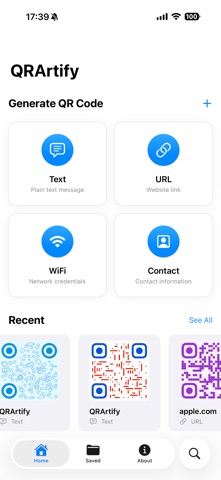
Create 4 Types of QR Codes
Text QR Codes – messages, notes, announcements
URL QR Codes – perfect for websites, portfolios, social media
WiFi QR Codes – connect instantly without typing passwords
Contact (vCard) QR Codes – digital business cards made easy

Import contact details directly from your phone and generate professional vCards in seconds.


Powerful Customization Tools

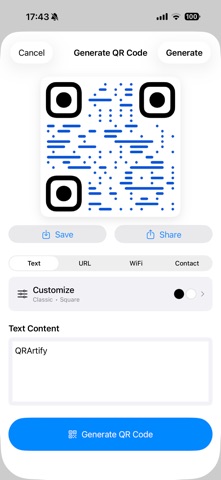
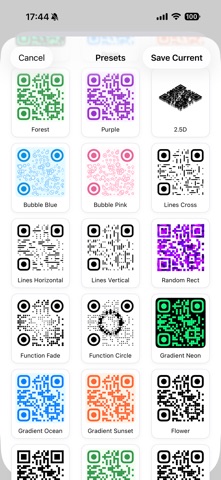
Make your QR codes stand out with 8 stunning style types:
Basic – clean and classic
2.5D – modern depth and shading
Image Style – blend logos or images into the QR
Bubble Style – rounded, playful pixel design
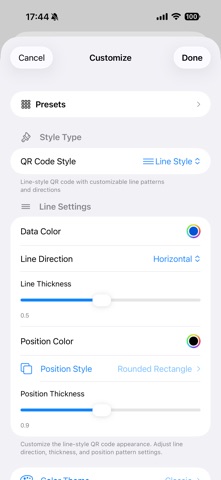
Line Style – geometric line-based patterns
Random Rectangle – dynamic and organic
Resample Image Style – advanced pattern blending
Function Style – fade, circular, and artistic effects

Customize colors, shapes, corners, and patterns to match your brand.


Color Themes & Custom Colors

Choose from 10 color themes:
Classic, Neon, Ocean, Sunset, Forest, Purple Dream, Fire, Midnight, Pastel, Rainbow.

Or create your own:
Custom foreground/background
Gradients
Opacity controls
Real-time preview


Pixel & Corner Shapes

Choose from multiple module shapes:
Square, Rounded Rectangle, Circle, Squircle, Curve Pixel, Flower, Sharp, Shield

Customize corner points:
Square or Circle


Logo & Watermark Support

Add your logo, brand image, or watermark to any QR code.

Supports:
Multiple blend modes
Size & placement controls
Automatic contrast recommendation

Perfect for businesses, brands, and marketing materials.


Save, Organize & Share

All QR codes are saved locally on your device.
Name your QR codes
View creation dates
Search instantly
Share via Messages, Email, AirDrop, social apps
Save to Photos for printing

No accounts, no cloud dependency, no tracking.


Share Extension

Generate QR codes directly from other apps:
Share a contact -> Create vCard QR
Share a URL -> Instant QR generation
Share a .vcf file -> Auto-filled contact QR

Seamless workflow without typing anything manually.


Dark Mode

Beautifully optimized for both light and dark appearances.


Multilingual Support

Fully translated in 12 languages:
English, Spanish, French, German, Simplified Chinese, Hindi, Arabic, Portuguese (Brazil), Japanese, Korean, Russian, Italian.


Privacy First
All QR codes are generated offline
Your data stays on your device
No analytics, no tracking, no data sharing


Why Choose QRArtify?
Professional-grade styles
Easy to use
100% offline
Beautiful UI
Fast generation
Perfect for personal, business, and marketing use

Create beautiful, scannable, customizable QR codes in seconds.
Download QRArtify today!
Show more Show less

Screenshots

QRArtify – QR Code Maker Screenshot 1 of 5
QRArtify – QR Code Maker Screenshot 2 of 5
QRArtify – QR Code Maker Screenshot 3 of 5
QRArtify – QR Code Maker Screenshot 4 of 5
QRArtify – QR Code Maker Screenshot 5 of 5
Screenshots by Sradanund Jeebun, from the the App Store listing
Official page on the App Store

Alternatives to QRArtify – QR Code Maker

AirInvite icon AirInvite
Pavlo Bodnar
0.0
Free
Crypto Helper Pro Hash MD5 SHA icon Crypto Helper Pro Hash MD5 SHA
Phuong Thao Cao
0.0
$1.99
ShowFi icon ShowFi
Alaa Bashiyi
0.0
Free
Link Insights icon Link Insights
IBMobile Software
1.0
Free
1 ratings
RapidAI Connect icon RapidAI Connect
MIYAKO KIKUTSUJI
0.0
Free
Recall: Daily notes icon Recall: Daily notes
Adam Kovacs
2.7
Free
3 ratings
QR Code Reader・Barcode Scan icon QR Code Reader・Barcode Scan
Dogan Altinbas
5.0
Free
1 ratings
DejaView – Your QR Code Card icon DejaView – Your QR Code Card
HEIMATHAUFEN GmbH
4.7
Free
7 ratings

Changelog of QRArtify – QR Code Maker

No changelog data

Developer information for Sradanund Jeebun

Sradanund Jeebun

Address:

Share QRArtify – QR Code Maker

Comments on QRArtify – QR Code Maker for iOS

We don't have enough comments to show example comments. Please check back later.

App Store Rankings for QRArtify – QR Code Maker

This app is not ranked

Technologies used by QRArtify – QR Code Maker

Popular Productivity Apps Price drops on Google Play Today's trending apps Top new apps Apps other people are watching
AirInvite icon AirInvite
Crypto Helper Pro Hash MD5 SHA icon Crypto Helper Pro Hash MD5 SHA
ShowFi icon ShowFi
Link Insights icon Link Insights
RapidAI Connect icon RapidAI Connect
Recall: Daily notes icon Recall: Daily notes
QR Code Reader・Barcode Scan icon QR Code Reader・Barcode Scan
DejaView – Your QR Code Card icon DejaView – Your QR Code Card
Overview Alternatives Reviews Rankings Technology
AppBrain Intelligence premium content

Subscribe now to get full and unlimited access to AppBrain Intelligence. You'll have access to:

  • App Intelligence dashboard (performance timeline, competitor comparison, country rankings, insight cards)
  • Detailed ranking data per app
  • Full timeline per developer
  • Device market shares data per country
  • Unlimited keyword tracking
1 Month

$75/mo
(billed every month)

SAVE 0%
Subscribe
3 Months

$65/mo
($195 billed every 3 months)

SAVE 13%
Subscribe
1 Year

$57.50/mo
($690 billed every year)

SAVE 23%
Subscribe
Each subscription will automatically renew 3 days before the expiration date for the same time period. Subscriptions can be cancelled at any time before the renewal.

AppBrain is an app data site, we track rankings, ratings, installs for all apps and games on Google Play and the App Store. AppBrain doesn't host app files or APKs, all install links go directly to the official store. All trademarks are owned by their respective owners. As an Amazon Associate AppBrain earns from qualifying purchases.

More apps

  • Top Android apps being viewed
  • Slay kudi
  • Free Fire x NARUTO SHIPPUDEN
  • Little Sparks Lite

App statistics

  • Android statistics
  • Google Play Developer stats
  • Trending Android Apps
  • Trending iOS apps
  • Top popular Apps
  • Buy the best Android phone
  • Buy & sell app businesses

About AppBrain

  • Contact
  • Privacy
  • Documentation
  • DMCA takedowns
  • Articles
  • Blog
  • Android app Install tracking and attribution options for the AppBrain ad network
© 2010-2026 - AppBrain