

QRCode ScanStudio: PDF Lab
QRCode ScanStudio: PDF Lab is made and published by 阳 李. AppBrain is an independent app data site and isn't affiliated with 阳 李. The app name, icon, screenshots and description belong to 阳 李 and are shown as published on the App Store.
AppBrain's verdict
- Rating on App Store
- 5.00
- 1 ratings
- Last updated
- March 30, 2026
It doesn't have enough ratings yet to judge what users think.
Rankings
App Store top chartsApp Store Rankings for QRCode ScanStudio: PDF Lab
Competitors
Similar apps and more from 阳 李Alternatives to QRCode ScanStudio: PDF Lab


More from 阳 李


Releases
Updates seen on the App Store- Version
- 1.1
- Launched
- March 2026
No changelog data
User feedback
Ratings and reviews on the App StoreComments on QRCode ScanStudio: PDF Lab for iOS
We don't have enough comments to show example comments. Please check back later.
Technology
Found in the app by AppBrain- Price
- Free
- App size
- 31.5 MB
- Content rating
- Everyone
Technologies used by QRCode ScanStudio: PDF Lab
About the app and developer
About QRCode ScanStudio: PDF Lab
QRCode ScanStudio: PDF Lab is an utilities app developed by 阳 李.
User Ratings
QRCode ScanStudio: PDF Lab is rated 5.00 out of 5 stars. The rating is based on one rating ratings.
App Information
QRCode ScanStudio: PDF Lab is freely available from the App Store. The app size is 31.50 MB. The latest version available is 1.1. The last update was on March 30, 2026.
Technical Requirements
The app has a content rating of Everyone. The app has been available on the App Store since March 2026.
Developer information for 阳 李
Address:
Store listing
By 阳 李, from the App Store



Description by 阳 李 Written by the developer, not by AppBrain. Click to read.
The app combines a live camera scanning pipeline, still-image code extraction, semantic payload parsing, QR and barcode generation, document-to-PDF export, and a searchable local library in one native workflow. The result is a tool that behaves more like a compact content instrument than a disposable scanner utility.
Live scanning is built on a real-time camera session with continuous autofocus, smooth focus behavior, center-weighted focus and exposure tuning, subject-area monitoring, torch control, and duplicate suppression logic. This helps the scanner remain stable during repeated reads and reduces accidental re-capture of the same payload.
It also works beyond the camera. You can import an image from Photos and run barcode or QR detection on the still image, which is useful when codes are embedded in screenshots, posters, invoices, packaging, or archived media.
Instead of treating every scan as raw text, the app classifies and interprets supported payloads into structured result types, including:
URLs
Email addresses
Phone numbers
SMS payloads
Wi-Fi credentials
vCard contact data
Calendar event payloads
Location-style payloads
Plain text and generic barcode content
When a payload contains structured data, decomposed fields are presented for faster review. For example, Wi-Fi content can expose network name, security type, and password fields; contact payloads can separate name, company, phone, and email; event payloads can surface title, location, start time, and end time.
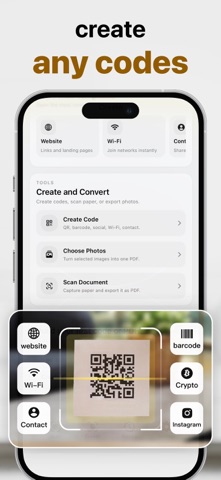
The built-in creation studio can generate scannable QR codes or barcodes for multiple real-world scenarios, including websites, text, Wi-Fi access, email, phone, SMS, contact cards, events, addresses, app links, crypto addresses, and selected social/profile shortcuts. Generated codes can be previewed, shared, stored, favorited, and revisited from the in-app library.
For document workflows, PDF creation is available in two practical forms:
Build one PDF from selected photos
Capture paper pages with the document scanner and export them as a PDF file
Everything is organized in a local history system with search, filters, favorites, generated-code records, scanned-result records, and PDF document records. Additional controls include optional scan history saving, haptic feedback, scan sound, detected-code highlighting, and automatic opening of scanned links when enabled by the user.
Subscription & In-App Purchase Information
Some features require a subscription. Payment will be charged to your Apple ID at confirmation of purchase. Subscriptions automatically renew unless canceled at least 24 hours before the end of the current period. You can manage or cancel your subscription anytime via your Apple ID account settings.
Privacy Policy Link:https://www.yuehe20219.link/pp/6759906764/
Terms of Use:https://www.yuehe20219.link/tou/6759906764/