

QSnap - QR Reader & Transfer
QSnap - QR Reader & Transfer is made and published by kouhei sasaki. AppBrain is an independent app data site and isn't affiliated with kouhei sasaki. The app name, icon, screenshots and description belong to kouhei sasaki and are shown as published on the App Store.
AppBrain's verdict
- Last updated
- March 22, 2026
- Size
- 49.9 MB
User feedback
Ratings and reviews on the App StoreComments on QSnap - QR Reader & Transfer for iOS
We don't have enough comments to show example comments. Please check back later.
Store listing
By kouhei sasaki, from the App Store


Description by kouhei sasaki Written by the developer, not by AppBrain. Click to read.
No cables. Works across iPhone, iPad, and any browser.
Send photos, documents, and more in seconds.
"I want to send this URL from my PC to my phone."
"I need to get these photos off my phone to my PC."
— QSnap solves this with just a QR code.
--------------------
FEATURES
--------------------
PC-to-Phone Transfer (Web App)
Open QSnap Web in your browser. Transfer files without installing anything. Log in by scanning a QR code from your phone.
Text to QR Code
Type any text up to 1MB and generate a QR code with one tap.
QR Scanner
Scan any QR code with your camera. Copy results with a single tap.
Smart QR Classification (15 Types)
Auto-identifies content: URL, email, phone, WiFi, location, SMS, vCard, MECARD, iCal, crypto, UPI, FTP, OTP, store link, and text. Shows the best action for each type.
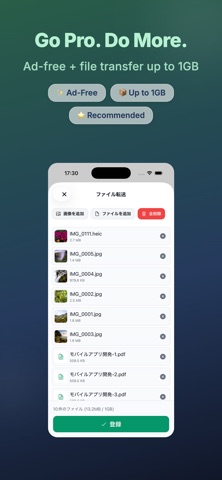
File Transfer
Send photos, documents, videos, and more via QR code. Supports multiple files at once. Up to 10MB free, 1GB with Pro.
Password Protection
Set a password on transfers. Recipients must enter it before downloading.
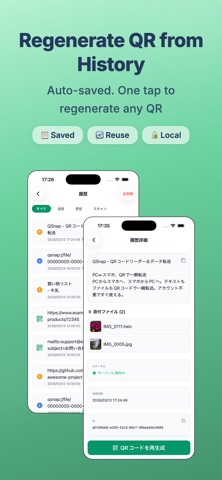
History
Every QR code you generate or scan is saved. Regenerate or reuse past codes anytime.
Dark Mode & Multi-Language
Follows your system theme. Supports English and Japanese.
--------------------
PRO PLAN
--------------------
Ad-Free
Remove all ads for a distraction-free experience.
Expanded File Transfer
Increase the limit from 10MB to 1GB.
* Payment is charged to your App Store account.
* Auto-renews unless canceled 24 hours before the period ends.
* Manage or cancel in App Store settings.
--------------------
USE CASES
--------------------
- Send URLs or notes from PC to phone without email
- Get photos off your phone without cables
- Share URLs or passwords with a friend instantly
- Send files to someone's phone on the spot
- Share photos across devices instantly
- Scan WiFi QR codes and copy the password
--------------------
SECURITY & PRIVACY
--------------------
- Password protection with server-side hashing
- 24-hour auto-delete for all uploaded data
- HTTPS encrypted communication
- History stored on device only
- No account required for basic features
--------------------
SUPPORT
--------------------
Email: qsnap.developer@gmail.com
Terms: https://q-snap.net/terms.html
Privacy: https://q-snap.net/policy.html
QSnap - cross-device transfer, simplified.
Safety and technology
Found in the app by AppBrain- Price
- Free
- App size
- 49.9 MB
- Content rating
- Everyone
Technologies used by QSnap - QR Reader & Transfer
Releases
Updates seen on the App Store- Version
- 1.1.0
- Launched
- October 2025
No changelog data
Alternatives
Similar apps and more from kouhei sasakiMore from kouhei sasaki


Rankings
App Store top chartsApp Store Rankings for QSnap - QR Reader & Transfer
About the app and developer
About QSnap - QR Reader & Transfer
QSnap - QR Reader & Transfer is an utilities app developed by kouhei sasaki.
User Ratings
The app has no ratings yet.
App Information
QSnap - QR Reader & Transfer is freely available from the App Store. The app size is 49.91 MB. The latest version available is 1.1.0. The last update was on March 22, 2026.
Technical Requirements
The app has a content rating of Everyone. The app has been available on the App Store since October 2025.
Developer information for kouhei sasaki
Address: