

Quantiloop - Live Looper
Quantiloop - Live Looper is made and published by Stephan Marx. AppBrain is an independent app data site and isn't affiliated with Stephan Marx. The app name, icon, screenshots and description belong to Stephan Marx and are shown as published on the App Store.
AppBrain's verdict
Established- Rating on App Store
- 3.03
- 38 ratings
- Last updated
- August 18, 2025
It doesn't have enough ratings yet to judge what users think.
Rankings
App Store top chartsApp Store Rankings for Quantiloop - Live Looper
Competitors
Similar apps and more from Stephan MarxAlternatives to Quantiloop - Live Looper






More from Stephan Marx

Releases
Updates seen on the App Store- Version
- 2.98.5
- Launched
- September 2017
No changelog data
User feedback
Ratings and reviews on the App StoreComments on Quantiloop - Live Looper for iOS
We don't have enough comments to show example comments. Please check back later.
Technology
Found in the app by AppBrain- Price
- Free
- App size
- 15.8 MB
- Content rating
- Everyone
Technologies used by Quantiloop - Live Looper
About the app and developer
About Quantiloop - Live Looper
Quantiloop - Live Looper is a music app developed by Stephan Marx.
User Ratings
Quantiloop - Live Looper is rated 3.03 out of 5 stars. The rating is based on 38 ratings.
App Information
Quantiloop - Live Looper is freely available from the App Store. The app size is 15.84 MB. The latest version available is 2.98.5. The last update was on August 18, 2025.
Technical Requirements
The app has a content rating of Everyone. The app has been available on the App Store since September 2017.
Developer information for Stephan Marx
Address:
Store listing
By Stephan Marx, from the App Store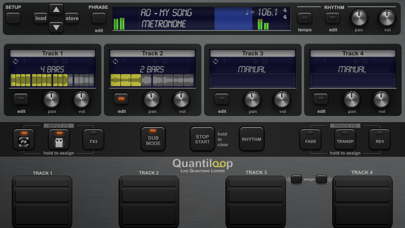
Description by Stephan Marx Written by the developer, not by AppBrain. Click to read.
Be Creative
Create 4 tracks with endless layers of overdubs to build your performance. Record a Chorus, Verse and Bridge and switch between them seamlessly or create a 1 bar percussie loop on track one, a 4 bar chord progression on track two and layer a bass line on top, all in perfect synchronisation.
Rhythm Guide
The builtin rhythm guide provides a rhythmic backing. Use the internal metronome for practice, import drum loops from virtually anywhere or host and control your favourite rhythm apps to enhance your performance. MIDI master lets you control MIDI hardware, and MIDI slave lets Quantiloop follow it. Ableton Link lets you even play in time over WiFi with external apps and devices. Quantisation aligns your actions to the nearest measure or beat so you stay in time, and real-time tempo control sets the pace. Prefer setting your own pace, disable quantisation and Quantiloop will react to your actions with minimum latency to create tight synchronised recordings.
FX
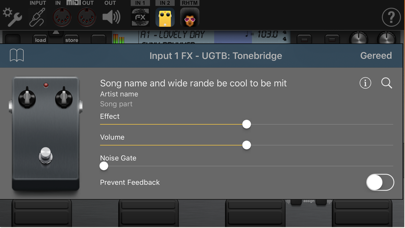
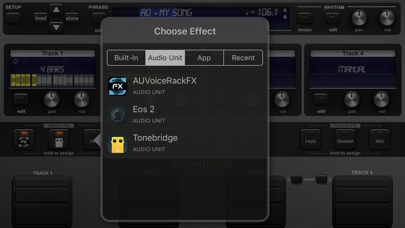
Assign up to 3 simultaneous effects to the input. Use the built-in transpose to covert your guitar into a bass, or host your guitar amp sim directly in Quantiloop. The results will be recorded into your loops.
Or assign up to 3 simultaneous track effects to the output. Use the tape stop to add drama, introduce a key change to build up your performance, or host an Inter-App audio/AU reverb processor. Track FX may be assigned to a single track, all tracks or the combined output.
Features
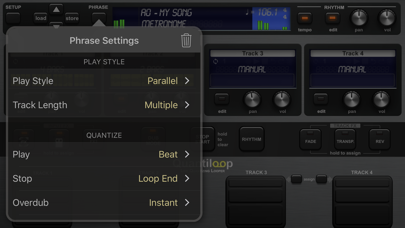
• Free, Synced and Paralel,Serial, Mixed Playing Styles
• Multiple Quantise Modes
• Multiple Stop Modes
• Unique Dub Mode and Mute Mode
• Unlimited Overdubs
• Overdub Decay
• Undo / Redo
• Auto Record
• High quality stereo audio
• Clear loop status display
• Rhythm guide with optional auto-start, auto-stop and count-in
• Audible and Visual Metronome
• Send start, stop and host sync to hosted rhythm apps.
• Sync to host when embedded in an Inter-App-Audio host
• Real-time Tempo Control
• Extensive MIDI control (*)
• Multiple Assignments per MIDI controller (tap, hold, double tap)
• MIDI Program Change support for changing presets
• Supports Audiobus and Inter-App-Audio and Audio Units (AUv3)
• Individual outputs for each track and rhythm
• Synchronise to other apps and devices with Ableton Link (*)
• MIDI clock sync (both slave and master) (*)
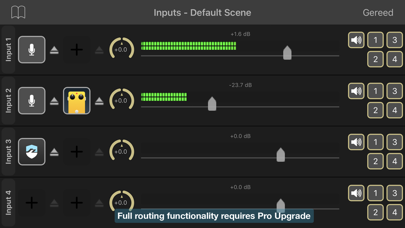
• 4 physical/iaa/au/audiobus inputs routable to any track (*)
• 8 outputs (main, monitor, track 1-4, rhythm, input out) (*)
• 3 assignable input Fx, including transpose, reverb and IAA, AUv3 ((*)
• 3 assignable track Fx, including transpose, reverse, tape stop, fade and IAA, AUv3 (*)
• Cloud (iCloud, Dropbox, Audioshare …) import / export
• AudioCopy/Paste
• Open In
• Store Phrase Presets in unlimited banks with 100 presets each (Requires Pro)
• Individual Volume and panning controls for each track
(*) Functionality partially available in this free version. Pro Upgrade required to unlock full functionality