

Question Roulette App
Question Roulette App is made and published by GK Training and Communications. AppBrain is an independent app data site and isn't affiliated with GK Training and Communications. The app name, icon, screenshots and description belong to GK Training and Communications and are shown as published on the App Store.
AppBrain's verdict
Established- Rating on App Store
- 4.56
- 16 ratings
- Last updated
- August 10, 2026
It doesn't have enough ratings yet to judge what users think.
Rankings
App Store top chartsApp Store Rankings for Question Roulette App
Competitors
Similar apps and more from GK Training and CommunicationsAlternatives to Question Roulette App







Releases
Updates seen on the App Store- Version
- 2.3.23
- Launched
- May 2018
No changelog data
User feedback
Ratings and reviews on the App StoreComments on Question Roulette App for iOS
We don't have enough comments to show example comments. Please check back later.
Technology
Found in the app by AppBrain- Price
- Free
- App size
- 36.9 MB
- Content rating
- Everyone
Technologies used by Question Roulette App
About the app and developer
About Question Roulette App
Question Roulette App is an education app developed by GK Training and Communications.
User Ratings
Question Roulette App is rated 4.56 out of 5 stars. The rating is based on 16 ratings.
App Information
Question Roulette App is freely available from the App Store. The app size is 36.85 MB. The latest version available is 2.3.23. The last update was on August 10, 2026.
Technical Requirements
The app has a content rating of Everyone. The app has been available on the App Store since May 2018.
Developer information for GK Training and Communications
GK Training and Communications
Address:
Store listing
By GK Training and Communications, from the App Store




Description by GK Training and Communications Written by the developer, not by AppBrain. Click to read.
How the Question Roulette App works:
- Question Roulette lets you answer difficult questions or objections, with topics like general business, relationships, self-reflection, cocktail party banter, and many other public speaking situations.
- Record your answer and listen to how you did. You can also read a transcript of your response, very useful for interview training.
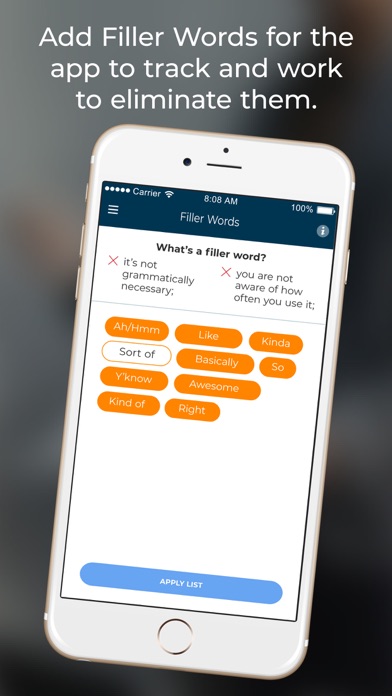
- Get immediate, concrete feedback on: time speaking, amount and type of filler language, and pace of speech.
- Save your best recordings, rate yourself with self-assessments, and track your improvement.
- Share your best responses and get feedback from colleagues or friends, to take your speech training to the next level.
Answering tough questions is great for overall communications training. Examples include:
• “You’re not qualified for this position.”
• “What do you want to do with your life?”
• “Where is this relationship going?”
Practicing out loud is the best way to prepare for an interview or presentation, and our interview questions training app makes it easy and fun. Improve your performance and build confidence before you ever get in the room.
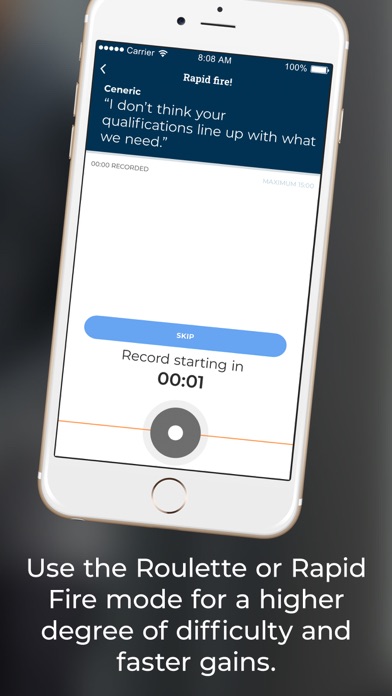
You can experience this interview training app in three different modes: choose the objection yourself, get one roulette question asked randomly with time to warm up, or get one question at random and start speaking immediately.
Choose Question:
In the “Choose Category” screen, you can pick a topic area and then choose a question you want to practice answering for interview questions training. You can see default questions or ones you’ve created yourself (if you own a “Group Account”).
Roulette Mode:
This allows you to practice answering questions one after another, great for developing public speaking skills. In this mode, the app prompts you with a random question. You can think, prepare yourself, and start answering the roulette questions when you feel ready.
Rapid Fire:
The Rapid Fire mode challenges you to answer questions without having the time to prepare a response, which is excellent for interview skills training. In this mode, the app chooses a question at random for you, and you need to begin answering it when the three-second countdown ends.
Metrics for Recorded Answers:
Once you record an answer, Question Roulette creates a transcript and shows data about your response, such as time speaking, filler language used, and words per second. Our interview training app will give you concrete feedback on your answer and suggest tips and videos to help you improve your speaking skills.
Self-Assessment and Feedback:
After you review your answer and do a self-assessment, you can delete or replay your recording, as well as save it for future reference. If you want to get feedback on your answers from other users, you can share it. Both the self-assessment and feedback are rated from 1 to 5 stars.
In-App Purchases:
You can purchase the Exclusive World and unlock more questions in our roulette questions app. You’ll get exclusive access to 25+ additional questions related to job interviews, start-ups, and entrepreneurship!
Download the Question Roulette App and start speech training today to improve your communication skills!
EULA: https://www.apple.com/legal/internet-services/itunes/dev/stdeula/