

Quick Cut Pro - Video Editor
Quick Cut Pro - Video Editor is made and published by Scott Manley. AppBrain is an independent app data site and isn't affiliated with Scott Manley. The app name, icon, screenshots and description belong to Scott Manley and are shown as published on the App Store.
AppBrain's verdict
New- Rating on App Store
- 5.00
- 4 ratings
- Last updated
- September 23, 2026
- Size
- 5.36 MB
Quick Cut Pro - Video Editor came out 64 days ago. It doesn't have enough ratings yet to judge what users think.
User feedback
Ratings and reviews on the App StoreComments on Quick Cut Pro - Video Editor for iOS
We don't have enough comments to show example comments. Please check back later.
Store listing
By Scott Manley, from the App Store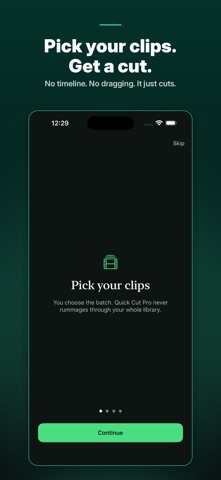

Description by Scott Manley Written by the developer, not by AppBrain. Click to read.
Quick Cut Pro turns a folder of phone videos into an edited montage in seconds. No timeline to wrangle, no dragging clips around. Choose your footage, choose a length, and it cuts.
HOW IT DECIDES
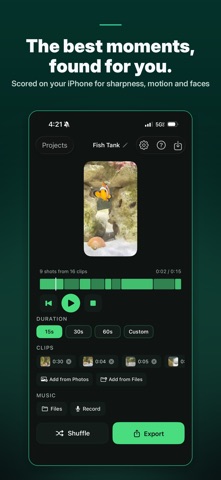
Every clip you pick is analysed on your iPhone for sharpness, exposure, motion, faces and near-duplicates. The dull footage and the accidental repeats are left out, and the strongest moments are packed into the length you asked for. Nothing is uploaded and nothing leaves your phone.
DON'T LIKE IT? SHUFFLE
Shuffle rolls a new edit from the same clips instantly. It reuses the analysis, so there is no waiting - press it until you like what you see.
CUT TO THE BEAT
Add a track from Files and Quick Cut Pro finds its tempo, then lands the cut points on the beat. A waveform sits under the timeline with the beats marked, so you can see the cuts hit rather than take our word for it. If a track has no clear beat, the app says so and cuts freely instead of snapping to a grid it guessed.
FINE CONTROL WHEN YOU WANT IT
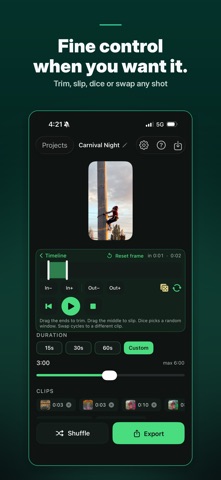
Tap any shot to open the clip editor:
- Trim - drag either end to change how long the shot runs
- Slip - drag the middle to keep the length and move to a different moment
- Dice - keep the rhythm, jump to a random moment
- Swap - put a different clip in this shot's place
REFRAMED, NOT SQUASHED
Export 9:16, 1:1 or 16:9. The crop follows the interesting part of the frame rather than blindly taking the middle.
BRING FOOTAGE FROM ANYWHERE
Import from Photos, or from Files for footage that never went into your photo library - camera cards, AirDrop, iCloud Drive. Add more clips at any point, or drop ones you do not want.
PROJECTS
Every cut is saved automatically the moment your clips land. Come back later and your footage, settings and trims are exactly as you left them.
FREE, AND HONEST ABOUT IT
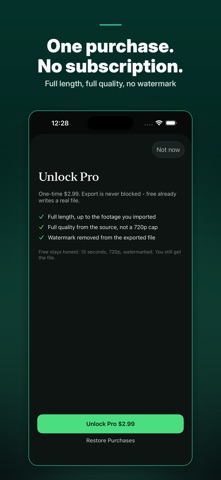
The free version exports a real file: 15 seconds, 720p, watermarked. Export is never blocked. Pro is a one-time $2.99 - no subscription - and unlocks full length, full quality from your source, and no watermark.
PRIVACY
Everything happens on your iPhone. No account, no upload, no tracking, no ads.
Safety and technology
Found in the app by AppBrain- Price
- Free
- App size
- 5.36 MB
- Content rating
- Everyone
Technologies used by Quick Cut Pro - Video Editor
Releases
Updates seen on the App Store- Version
- 1.1.1
- Launched
- September 2026
No changelog data
Alternatives
Similar apps and more from Scott ManleyAlternatives to Quick Cut Pro - Video Editor




More from Scott Manley


Rankings
App Store top chartsApp Store Rankings for Quick Cut Pro - Video Editor
About the app and developer
About Quick Cut Pro - Video Editor
Quick Cut Pro - Video Editor is a photo & video app developed by Scott Manley.
What is the rating of Quick Cut Pro - Video Editor?
Quick Cut Pro - Video Editor is rated 5.00 out of 5 stars, based on 4 ratings.
Is Quick Cut Pro - Video Editor free?
Quick Cut Pro - Video Editor is free. The app size is 5.36 MB. The latest version available is 1.1.1. The last update was on September 23, 2026.
What are the requirements for Quick Cut Pro - Video Editor?
The app has a content rating of Everyone. The app has been available on the App Store since September 2026.
Developer information for Scott Manley
Address: