

Quick QR code Generator pro
Quick QR code Generator pro is made and published by Miyuki Kikuchi. AppBrain is an independent app data site and isn't affiliated with Miyuki Kikuchi. The app name, icon, screenshots and description belong to Miyuki Kikuchi and are shown as published on the App Store.
AppBrain's verdict
- Last updated
- April 2, 2026
Rankings
App Store top chartsApp Store Rankings for Quick QR code Generator pro
Competitors
Similar apps and more from Miyuki KikuchiAlternatives to Quick QR code Generator pro


More from Miyuki Kikuchi


Releases
Updates seen on the App Store- Version
- 1.1
- Launched
- April 2026
No changelog data
User feedback
Ratings and reviews on the App StoreComments on Quick QR code Generator pro for iOS
We don't have enough comments to show example comments. Please check back later.
Technology
Found in the app by AppBrain- Price
- Free
- App size
- 10.3 MB
- Content rating
- Everyone
Technologies used by Quick QR code Generator pro
About the app and developer
About Quick QR code Generator pro
Quick QR code Generator pro is an utilities app developed by Miyuki Kikuchi.
User Ratings
The app has no ratings yet.
App Information
Quick QR code Generator pro is freely available from the App Store. The app size is 10.35 MB. The latest version available is 1.1. The last update was on April 2, 2026.
Technical Requirements
The app has a content rating of Everyone. The app has been available on the App Store since April 2026.
Developer information for Miyuki Kikuchi
Address:
Store listing
By Miyuki Kikuchi, from the App Store


Description by Miyuki Kikuchi Written by the developer, not by AppBrain. Click to read.
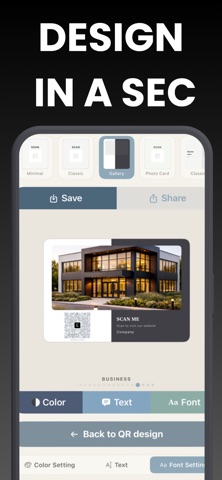
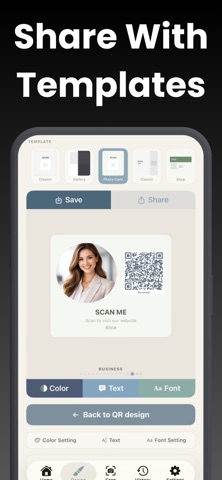
Most QR code apps just give you a bare image. QuickQRConverter goes further by placing your QR code into professionally designed templates like business cards, sticker banners, posters, and message cards. Generate, customise, and save — all in one app.
WHAT YOU CAN CREATE
- URL and website links
- Wi-Fi access cards (guests scan to connect instantly)
- Contact cards (vCard with name, phone, email, address)
- Plain text and notes
- Photo-based QR codes
SCAN AND READ INSTANTLY
Point your camera at any QR code or barcode and get results in seconds. The built-in scanner reads URLs, Wi-Fi credentials, contact info, and plain text — then lets you open, copy, or save with one tap. Works offline with no internet required.
TEMPLATES FOR EVERY OCCASION
Choose from multiple template styles including Simple Outline, Card Message, Business Card, Sticker Banner, and more. Each template comes with sub-styles like Ribbon, Badge, Classic, Shop Card, Arch Poster, Flag Poster, and Gallery — all designed to look great on screen and in print.
CUSTOMISE YOUR DESIGN
- Multiple colour themes with curated palettes
- Font options: serif, rounded, heavy, and mono
- Add your logo or choose from built-in SF Symbol icons
- Adjust QR code colours and intensity
- Full preview before saving
PREMIUM FEATURES
Upgrade to QuickQR Premium to unlock:
- All templates and sub-styles
- All colour themes and fonts
- Logo overlay on QR codes
- No watermark on saved designs
- No ads
- Unlimited history
- High-resolution export for professional printing
Free users can create and scan QR codes with basic templates and colour choices. A small watermark is added to saved designs, which can be removed by watching a short ad or upgrading to premium.
Subscription options: weekly, monthly, yearly, or lifetime purchase. Weekly plan includes a 3-day free trial. Payment is charged to your Apple ID account at confirmation of purchase. Subscriptions automatically renew unless cancelled at least 24 hours before the end of the current period. You can manage or cancel subscriptions in your Apple ID account settings.
Privacy Policy: https://quickqrconverter.netlify.app/
EULA: https://www.apple.com/legal/internet-services/itunes/dev/stdeula/