Download Android Apps and Games
AppBrain
  • Apps
  • Apps being viewed right now Trending apps today Most popular apps All-time most downloaded apps Top rated apps iPhone and iPad apps
  • Intelligence ▾
    Intelligence overview → Track any Android app or your whole market
    Track & analyze
    Keyword Tracker & OptimizerTrack & improve Play rankings App Performance ReportOne-off PDF for any app StatisticsFree Android & Play market stats
    Promote your app
    Featured Apps App Links
  • Intelligence
  • Pricing
  • Dashboard
  • Sign up
  • Log in
Last updated on: 2026-09-22
App Store Apps > Utilities > Quick Timer - Tap & Go
Quick Timer - Tap & Go icon

Quick Timer - Tap & Go

1.21
SEOK KI KWON
0.00
0 reviews
Free

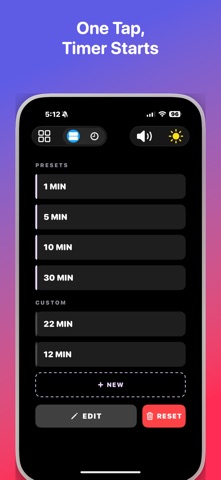
Quick Timer - Tap & Go Screenshot 1 of 5
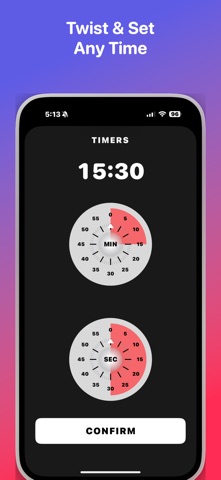
Quick Timer - Tap & Go Screenshot 2 of 5
Quick Timer - Tap & Go Screenshot 3 of 5
Quick Timer - Tap & Go Screenshot 4 of 5
Quick Timer - Tap & Go Screenshot 5 of 5
Download from the App Store

About Quick Timer - Tap & Go

Quick Timer - Tap & Go is an utilities app developed by SEOK KI KWON.

User Ratings

The app has no ratings yet.

App Information

Quick Timer - Tap & Go is FREE to download. The download size is 15.84 MB. The latest version available is 1.21. The last update was on September 1, 2026.

Technical Requirements

The app has a content rating of Everyone. The app has been available on the App Store since April 2026.

Description
Your timer should be running before you even think about it.

Quick Timer does one thing and does it ruthlessly well: it gets a countdown on your screen in a single tap. No loading screens. No sign-up walls. No "are you sure?" confirmations. You open it, you tap it, it is already counting down. Done.

ONE TAP. ZERO FRICTION.

The main screen greets you with preset timers — 1 minute, 5 minutes, 10 minutes, 30 minutes — ready to fire. Tap once and the countdown starts instantly. Not in two steps. Not after a transition. Instantly. This is the fastest timer on your phone, and it is not even close.

A COUNTDOWN YOU CAN READ FROM ACROSS THE ROOM

Big, bold, high-contrast numbers fill the screen so you never have to squint, walk over, or pick up your phone. Whether you are across the kitchen with flour on your hands or halfway through a plank, you will always know exactly how much time is left.

YOUR TIME, YOUR WAY

Need something that is not on the preset list? Tap New, spin the minute and second dials, and confirm. That is it — your custom timer is saved permanently and waiting for you with a single tap next time. Build a collection for cooking, workouts, study sessions, meditation, or whatever your life demands.

LIST VIEW. GRID VIEW. YOUR CALL.

Switch between a clean list layout and a compact grid with one button. Organize your timers the way your brain works, not the way some designer decided you should.

PICK YOUR ALARM SOUND

Choose from multiple built-in tones so you actually notice when your timer goes off. Your selection is saved across sessions — set it once and forget it.

IT WORKS EVEN WHEN YOU WALK AWAY

Lock your phone. Switch to another app. Close the screen entirely. Quick Timer keeps counting in the background and delivers a push notification with your chosen alarm sound the moment time is up. No more burnt pasta because you forgot to check your phone.

DARK MODE THAT ACTUALLY LOOKS GOOD

Toggle between light and dark themes with a single tap. Your preference is remembered every time you open the app. Late-night timers never have to blind you again.

RESTART IN ONE TAP

Timer finished? Hit Restart and the same countdown begins immediately. Perfect for interval training, repetitive tasks, or back-to-back cooking steps. No scrolling back to find it. No re-entering the time.

WHAT WE LEFT OUT ON PURPOSE

No ads. No subscriptions. No accounts. No analytics pop-ups. No "rate this app" interruptions. No features you will never use. Quick Timer was built for people who are tired of apps that waste their time while pretending to save it.

Open it. Tap it. Get on with your life.
Show more Show less

More data about Quick Timer - Tap & Go

Price Free to download
Rating No ratings
Ranking Not ranked
Version 1.21
App download size 15.8 MB
Suitable for Everyone

Alternative downloads for the Quick Timer - Tap & Go app

TapSec: Focus Touch Timer icon TapSec: Focus Touch Timer
Kuzin Artem
0.0
Free
Date Radar Countdown Stopwatch icon Date Radar Countdown Stopwatch
Jin Yu
5.0
Free
1 ratings
Multicolor Stopwatch icon Multicolor Stopwatch
MOSHIMORE
5.0
Free
2 ratings
Infinity Timer: Never Forget icon Infinity Timer: Never Forget
Robinson Chinnappan
0.0
Free
Better Timer: Multi & Repeat icon Better Timer: Multi & Repeat
Hung Nguyen
5.0
Free
5 ratings
Simple Loop Timer icon Simple Loop Timer
Portly Pig
0.0
Free
Meeting Timer / Church Timer icon Meeting Timer / Church Timer
Michael Fahim
3.5
Free
2 ratings
Lock Screen Timer & Stopwatch icon Lock Screen Timer & Stopwatch
Adrian Ilka
0.0
Free

Changelog of Quick Timer - Tap & Go

No changelog data

Developer information for SEOK KI KWON

SEOK KI KWON

Address:

Share Quick Timer - Tap & Go

Comments on Quick Timer - Tap & Go for iOS

We don't have enough comments to show example comments. Please check back later.

App Store Rankings for Quick Timer - Tap & Go

This app is not ranked

Technologies used by Quick Timer - Tap & Go

Frequently asked questions about Quick Timer - Tap & Go

Is Quick Timer - Tap & Go free?

Yes. Quick Timer - Tap & Go is free to download from the App Store.

Is Quick Timer - Tap & Go still available?

Yes. Quick Timer - Tap & Go is on the App Store, and the last update we saw was on September 1, 2026.

How large is the Quick Timer - Tap & Go download?

Quick Timer - Tap & Go is 15.84 MB to download.

Is Quick Timer - Tap & Go suitable for children?

App Store rates the content of Quick Timer - Tap & Go as suitable for everyone.

Who made Quick Timer - Tap & Go?

Quick Timer - Tap & Go was developed by SEOK KI KWON. It is listed in the utilities category on the App Store.

What are the best alternatives to Quick Timer - Tap & Go?

People looking at Quick Timer - Tap & Go also look at these utilities apps: TapSec: Focus Touch Timer, Date Radar Countdown Stopwatch, Multicolor Stopwatch, Infinity Timer: Never Forget, Better Timer: Multi & Repeat.

Popular Utilities Apps Apps other people are watching Apps on sale Top new apps Today's trending apps
TapSec: Focus Touch Timer icon TapSec: Focus Touch Timer
Date Radar Countdown Stopwatch icon Date Radar Countdown Stopwatch
Multicolor Stopwatch icon Multicolor Stopwatch
Infinity Timer: Never Forget icon Infinity Timer: Never Forget
Better Timer: Multi & Repeat icon Better Timer: Multi & Repeat
Simple Loop Timer icon Simple Loop Timer
Meeting Timer / Church Timer icon Meeting Timer / Church Timer
Lock Screen Timer & Stopwatch icon Lock Screen Timer & Stopwatch

Back to top
AppBrain Intelligence premium content

Subscribe now to get full and unlimited access to AppBrain Intelligence. You'll have access to:

  • App Intelligence dashboard (performance timeline, competitor comparison, country rankings, insight cards)
  • Detailed ranking data per app
  • Full timeline per developer
  • Device market shares data per country
  • Unlimited keyword tracking
1 Month

$75/mo
(billed every month)

SAVE 0%
Subscribe
3 Months

$65/mo
($195 billed every 3 months)

SAVE 13%
Subscribe
1 Year

$57.50/mo
($690 billed every year)

SAVE 23%
Subscribe
Each subscription will automatically renew 3 days before the expiration date for the same time period. Subscriptions can be cancelled at any time before the renewal.

AppBrain is a directory focused on discovering great apps and games. We give statistics, rankings and search options that Google Play and the App Store don't have. All trademarks are owned by their respective owners. AppBrain doesn't offer APKs or binaries, and always lets users install the official version from Google Play or the App Store.

More apps

  • Top Android apps being viewed
  • Courtesy Barber Studio
  • Wake Up tickle Sleeping Girl
  • LiveBall - Live Football TV Android App

App statistics

  • Android statistics
  • Google Play Developer stats
  • Trending Android Apps
  • Trending iOS apps
  • Top popular Apps
  • Buy the best Android phone

About AppBrain

  • Contact
  • Privacy
  • Documentation
  • DMCA takedowns
  • Articles
  • Blog
  • How to improve the earnings of your ad units
© 2010-2026 - AppBrain