




AppBrain's verdict
- Last updated
- November 9, 2026
- Size
- 30.6 MB
User feedback
Ratings and reviews on the App StoreComments on Quick3D CAD Viewer for iOS
We don't have enough comments to show example comments. Please check back later.
Store listing
By Ryo Tazaki, from the App StoreDescription by Ryo Tazaki Written by the developer, not by AppBrain. Click to read.
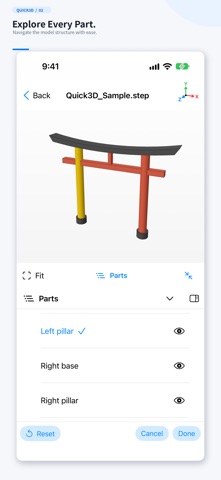
V2.0 introduces a contextual interface that presents tools for the current task, with an iOS light-mode-based design. Move between 3D viewing, the model tree, measurement and analysis.
Supported formats
STEP / STP, IGES / IGS, STL, OBJ, PLY, 3MF, GLB / glTF and USDZ / USD.
Available hierarchy, colors and units depend on the format and file. Mesh display supports static geometry and base colors, with limitations for textures, transparency and animation.
Viewing and measurement
- Rotate, zoom, pan and fit the model to the view.
- Select parts and control their visibility in the model tree.
- Measure point-to-point distance, diameter, radius, planar-face distance and cylinder-axis distance where the geometry and format support them.
- Keep up to 10 recent files.
- Hide viewer banner ads using the existing full-screen mode.
CAD analysis in V2.0
- Bounding dimensions: inspect model-coordinate X, Y and Z dimensions for the whole model or a selected body, in mm or inches.
- Volume, mass and centroid: calculate properties of a valid single closed solid. Use material density presets or a custom density and show a centroid marker.
- 3D annotations: place pins, leaders and comments on the model, save them on your device and reopen them later.
- Dynamic sections: set the plane direction and position for a section preview and B-Rep section lines.
- Integrated draft and undercut analysis: inspect color-coded draft angles and sampled undercut candidates for a specified straight pull direction.
- STEP comparison: select bodies from the same assembly or separate files. View removed, added and common regions with their volumes.
Scope and limitations
B-Rep analysis requires STEP or IGES geometry. Volume, mass and comparison require valid closed solids. Assembly overlaps are not automatically removed to calculate a total. Comparison operates on one closed solid per side in the same coordinate system.
Comparison and capped sections are limited to 2,000 faces per target; CPU section previews accept up to 100,000 input triangles. Draft and undercut results are approximate, can miss small features and do not guarantee manufacturability. Mass calculated from density is an estimate.
Mesh formats lack analytic CAD surface information, so some measurements and analyses are unavailable. Assumed or unknown units are identified. Point-to-point measurement may also be unavailable for USD files whose units cannot be read.
Privacy
Model loading and analysis run on your device. The app does not upload CAD files to a developer-operated analysis server. Recent-file history and annotations are stored on your device. Google AdMob provides advertising and Google UMP handles consent management. See the privacy policy for advertising-related data practices.
Japanese and English interfaces are supported.
Safety and technology
Found in the app by AppBrain- Price
- Free
- App size
- 30.6 MB
- Content rating
- Everyone
Technologies used by Quick3D CAD Viewer
Releases
Updates seen on the App Store- Version
- 2.0
- Launched
- October 2026
No changelog data
Alternatives
Similar apps and more from Ryo TazakiAlternatives to Quick3D CAD Viewer




Rankings
App Store top chartsApp Store Rankings for Quick3D CAD Viewer
About the app and developer
About Quick3D CAD Viewer
Quick3D CAD Viewer is an utilities app developed by Ryo Tazaki.
User Ratings
The app has no ratings yet.
App Information
Quick3D CAD Viewer is freely available from the App Store. The app size is 30.61 MB. The latest version available is 2.0. The last update was on November 9, 2026.
Technical Requirements
The app has a content rating of Everyone. The app has been available on the App Store since October 2026.
Quick3D CAD Viewer is made and published by Ryo Tazaki. AppBrain is an independent app data site and isn't affiliated with Ryo Tazaki. The app name, icon, screenshots and description belong to Ryo Tazaki and are shown as published on the App Store.
Developer information for Ryo Tazaki
Address:
Frequently asked questions about Quick3D CAD Viewer
Is Quick3D CAD Viewer free?
Yes. Quick3D CAD Viewer is free on the App Store.
Is Quick3D CAD Viewer still available?
Yes. Quick3D CAD Viewer is on the App Store, and the last update we saw was on November 9, 2026.
How large is Quick3D CAD Viewer?
Quick3D CAD Viewer is 30.61 MB.
Is Quick3D CAD Viewer suitable for children?
App Store rates the content of Quick3D CAD Viewer as suitable for everyone.
Who made Quick3D CAD Viewer?
Quick3D CAD Viewer was developed by Ryo Tazaki. It is listed in the utilities category on the App Store.
What are the best alternatives to Quick3D CAD Viewer?
People looking at Quick3D CAD Viewer also look at these utilities apps: iHarmonizer, STLFinder, Scan to CAD: CAD Reader, My G-code Editor, Weiler Watch.