AppBrain
AppBrain
  • Apps
  • Apps being viewed right now Trending apps today Most popular apps All-time most installed apps Top rated apps iPhone and iPad apps
  • Intelligence ▾
    Intelligence overview → Track any Android app or your whole market
    Track & analyze
    Keyword Tracker & OptimizerTrack & improve Play rankings App Performance ReportOne-off PDF for any app StatisticsFree Android & Play market stats
    Promote your app
    Featured Apps App Links
  • Intelligence
  • Pricing
  • Dashboard
  • Sign up
  • Log in
App Store Apps > Productivity > QuickBend: Conduit Bending
QuickBend: Conduit Bending icon

QuickBend: Conduit Bending

by Bret Hardman · Productivity · $6.99
On the App Store since July 2015 · Data updated 2026-10-17
App Store

QuickBend: Conduit Bending is made and published by Bret Hardman. AppBrain is an independent app data site and isn't affiliated with Bret Hardman. The app name, icon, screenshots and description belong to Bret Hardman and are shown as published on the App Store.

AppBrain's verdict

EstablishedLoved by usersTop 10
Rating on App Store
4.82
4,001 ratings
Last updated
September 13, 2026
Size
21.7 MB

Users love it: 4.8 stars from 4,001 ratings. Its best ranking is #1 in Top Paid, Productivity in United States.

User feedback

Ratings and reviews on the App Store

Comments on QuickBend: Conduit Bending for iOS

We don't have enough comments to show example comments. Please check back later.

Store listing

By Bret Hardman, from the App Store
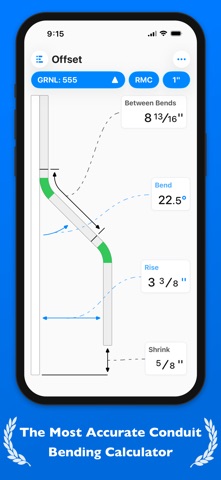
QuickBend: Conduit Bending Screenshot 1 of 10
QuickBend: Conduit Bending Screenshot 2 of 10
QuickBend: Conduit Bending Screenshot 3 of 10
QuickBend: Conduit Bending Screenshot 4 of 10
QuickBend: Conduit Bending Screenshot 5 of 10
QuickBend: Conduit Bending Screenshot 6 of 10
QuickBend: Conduit Bending Screenshot 7 of 10
QuickBend: Conduit Bending Screenshot 8 of 10
QuickBend: Conduit Bending Screenshot 9 of 10
QuickBend: Conduit Bending Screenshot 10 of 10
Screenshots by Bret Hardman, from the the App Store listing
Description by Bret Hardman Written by the developer, not by AppBrain. Click to read.
QuickBend is the fastest and most precise conduit bending calculator app. Designed to be innovative and intuitive while remaining visually appealing. This advanced conduit bending calculator offers the most accurate measurements by taking into account the radius of the shoe and bender, plus the conduit type and size diameter. All measurements are generated using the centerline radius algorithm, and have all been rigorously processed and field tested. Even the bends displayed within QuickBend are generated using the same engine.

Built for electricians by an electrician. QuickBend can be used by anyone working with conduit or tubing whether you are a seasoned professional, a novice cub, or even a DIY enthusiast. Made to avoid simple mistakes, and to save time and money. In addition to providing fast and precise calculations, there is plenty of information and documentation provided for individual bends. Explanations on how to use specific features, and step by step process to bending conduit.

Offering the most intuitive method to input data. Whether you want to get straight to the point, or comb through the possibilities of a bend. You can switch back and forth between different input styles such as a number pad, or a slider bar (Press & Slide). Both having their unique advantages. QuickBend allows you, the user to toggle between three different types of measurements; inches, foot + inches, and centimeters.

With QuickCheck built into QuickBend, there's a subtle change in text colors when a bend is impossible (red), or whether the bend may be unlikely to work (orange). This app for convenience, and we want it to benefit you. So much so that we added it into the input styles for bends, so you can see if a bend is possible before even tapping on the bend amount.

Supporting the following bends!
• Offset
• Rolling Offset
• Matching Bends Offset
• Matching Centers Offset
• Parallel Offset
• Three-Point Saddle
• Four-Point Saddle
• 90° Bend
• Kick with 90°
• Matching Bend Kick
• Matching Center Kick
• Parallel Kick
• Parallel Kick: Forward
• Compound 90° - Circle Obstruction
• Compound 90° - Rectangle Obstruction
• Compound 90° - Square Obstruction
• Segmented 90°

Plus you have the ability to layout multiple bends on a single conduit, and get each measurement for a mark on the conduit. With the option to easily flip an individual or set of marks per bend.

There's no limit to QuickBend. Easily, select between different types of benders and choose the size of the shoe and conduit type all within the same screen that you are working on. No need for complex navigations. In addition, you can pin benders you use the most, so you can select and switch between them quickly without consistently scrolling. All benders are spec'd out using the information provided by the manufacturers, and worst case scenario if one of the many benders available don't match the one you are using you can now add in your own bender. There's also an option to not select a bender and to use the multiplier method.

Edit and view all of your benders' specifications. Detailed information on the centerline radius, deduct, gain, setback. Plus the ability to view the travel, and radius adjustment for any degree bend between up-to 90°. All of this is visualized and edited within the 'Bender Specs'.
Official page on the App Store

Safety and technology

Found in the app by AppBrain
Price
$6.99
App size
21.7 MB
Content rating
Everyone

Technologies used by QuickBend: Conduit Bending

Releases

Updates seen on the App Store
Version
4.2.2
Launched
July 2015

No changelog data

Alternatives

Similar apps and more from Bret Hardman

Alternatives to QuickBend: Conduit Bending

Electrician Handy Tool icon Electrician Handy Tool
Handy Tool LLC
3.8
Free
23 ratings
Electrician's Sidekick icon Electrician's Sidekick
IDEAL INDUSTRIES, INC
3.6
Free
18 ratings
Ugly's Electrical References icon Ugly's Electrical References
Informed Publishing
4.4
$12.99
1.5K ratings
Electrical Code-A-Day icon Electrical Code-A-Day
PawEng, LLC
4.8
Free
9.3K ratings
Electrical Calculations icon Electrical Calculations
Egal Net di Ettore Gallina
4.6
Free
128 ratings
Wire Color Code icon Wire Color Code
Bonsaisoft LLC
4.6
Free
1.0K ratings
Fraction Calculator Plus #1 icon Fraction Calculator Plus #1
DigitAlchemy LLC
4.9
Free
22.4K ratings
Fluke Connect icon Fluke Connect
Fluke Corp.
4.4
Free
334 ratings

More from Bret Hardman

Workman's Calculator Pro icon Workman's Calculator Pro
Bret Hardman
4.1
$1.99
51 ratings
RIGID: Conduit Bending Calculator icon RIGID: Conduit Bending Calculator
Bret Hardman
2.9
$2.99
15 ratings
Phased: Circuit Colors icon Phased: Circuit Colors
Bret Hardman
3.9
$0.99
13 ratings
MTRList icon MTRList
Bret Hardman
4.5
Free
12 ratings
Derated: Conduit Fill icon Derated: Conduit Fill
Bret Hardman
4.9
$1.99
10 ratings
PIER: Ohm's Law Calculator icon PIER: Ohm's Law Calculator
Bret Hardman
3.2
$1.99
4 ratings

Rankings

App Store top charts
Highest rank
#1
Chart
Top Paid
Productivity
Country
United States

App Store Rankings for QuickBend: Conduit Bending

Top rankings

Rank Country Category List
1 United States Productivity Top Paid
2 Canada Productivity Top Paid
1 Iran Productivity Top Paid

Ranking history in United States

About the app and developer

About QuickBend: Conduit Bending

QuickBend: Conduit Bending is a productivity app developed by Bret Hardman.

User Ratings

QuickBend: Conduit Bending is rated 4.82 out of 5 stars. The rating is based on 4 thousand ratings.

App Information

QuickBend: Conduit Bending costs $6.99. The app size is 21.66 MB. The latest version available is 4.2.2. The last update was on September 13, 2026.

Technical Requirements

The app has a content rating of Everyone. The app has been available on the App Store since July 2015.

Developer information for Bret Hardman

Bret Hardman

Address:

Share QuickBend: Conduit Bending

Popular Productivity Apps Top new apps Apps other people are watching Price drops on Google Play Today's trending apps
Electrician Handy Tool icon Electrician Handy Tool
Electrician's Sidekick icon Electrician's Sidekick
Ugly's Electrical References icon Ugly's Electrical References
Electrical Code-A-Day icon Electrical Code-A-Day
Electrical Calculations icon Electrical Calculations
Wire Color Code icon Wire Color Code
Fraction Calculator Plus #1 icon Fraction Calculator Plus #1
Fluke Connect icon Fluke Connect
Overview Alternatives Reviews Rankings Technology
AppBrain Intelligence premium content

Subscribe now to get full and unlimited access to AppBrain Intelligence. You'll have access to:

  • App Intelligence dashboard (performance timeline, competitor comparison, country rankings, insight cards)
  • Detailed ranking data per app
  • Full timeline per developer
  • Device market shares data per country
  • Unlimited keyword tracking
1 Month

$75/mo
(billed every month)

SAVE 0%
Subscribe
3 Months

$65/mo
($195 billed every 3 months)

SAVE 13%
Subscribe
1 Year

$57.50/mo
($690 billed every year)

SAVE 23%
Subscribe
Each subscription will automatically renew 3 days before the expiration date for the same time period. Subscriptions can be cancelled at any time before the renewal.

AppBrain is an app data site, we track rankings, ratings, installs for all apps and games on Google Play and the App Store. AppBrain doesn't host app files or APKs, all install links go directly to the official store. All trademarks are owned by their respective owners. As an Amazon Associate AppBrain earns from qualifying purchases.

More apps

  • Top Android apps being viewed
  • Grozio
  • Wave Launcher
  • Alexis: Minimalist Icon Pack

App statistics

  • Android statistics
  • Google Play Developer stats
  • Trending Android Apps
  • Trending iOS apps
  • Top popular Apps
  • Buy the best Android phone
  • Buy & sell app businesses

About AppBrain

  • Contact
  • Privacy
  • Documentation
  • DMCA takedowns
  • Articles
  • Blog
  • How to improve the earnings of your ad units
© 2010-2026 - AppBrain