

QuickIn Doc is made and published by BD2DB. AppBrain is an independent app data site and isn't affiliated with BD2DB. The app name, icon, screenshots and description belong to BD2DB and are shown as published on the App Store.
AppBrain's verdict
- Last updated
- April 14, 2026
Rankings
App Store top chartsApp Store Rankings for QuickIn Doc
This app is not ranked
Competitors
Similar apps and more from BD2DBAlternatives to QuickIn Doc


More from BD2DB

Releases
Updates seen on the App Store- Version
- 2.2.0
- Launched
- February 2026
No changelog data
User feedback
Ratings and reviews on the App StoreComments on QuickIn Doc for iOS
We don't have enough comments to show example comments. Please check back later.
Technology
Found in the app by AppBrain- Price
- Free
- App size
- 10.9 MB
- Content rating
- Everyone
Technologies used by QuickIn Doc
About the app and developer
About QuickIn Doc
QuickIn Doc is a productivity app developed by BD2DB.
User Ratings
The app has no ratings yet.
App Information
QuickIn Doc is freely available from the App Store. The app size is 10.86 MB. The latest version available is 2.2.0. The last update was on April 14, 2026.
Technical Requirements
The app has a content rating of Everyone. The app has been available on the App Store since February 2026.
Developer information for BD2DB
Address:
Store listing
By BD2DB, from the App Store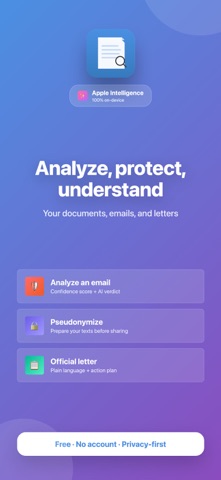




Screenshots by BD2DB, from the the App Store listing
Description by BD2DB Written by the developer, not by AppBrain. Click to read.
ASK THE ESSENTIALS FROM YOUR DOCUMENTS, EVEN CONFIDENTIAL ONES — 100% PRIVATE
QuickIn analyses your documents with Apple Intelligence, directly on your device. No data is sent to the cloud. Not to Apple, not to anyone. No account. No tracking.
NEW: QUICKACTIONS — DIRECT ACCESS TO FEATURES
From the home screen, choose your action:
• Simple QuickActions: summarise, extract dates, translate, rephrase… in one tap
• Extended QuickActions: guided multi-step analyses combining automated processing and artificial intelligence
EXTENDED ANALYSES
◆ Analyse a suspicious email
Check the reliability of a received message. QuickIn extracts domains, links and headers, calculates a deterministic trust score, then AI writes a clear verdict. Works with .eml files and copy-paste.
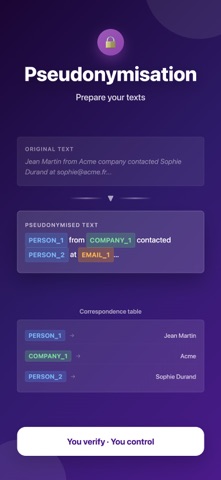
◆ Pseudonymisation assistance
Prepare a text for sharing with confidence. QuickIn detects and replaces most names, emails, phone numbers and identifiers with markers. You validate the entities, correct if needed, and verify the result before use (sending by email, using in a prompt on a cloud LLM). AI remains a probabilistic tool: processing may miss sensitive data. Use is at your own responsibility.
◆ Understand an official letter
Decode your administrative letters: HMRC, council tax, bailiff, bank… QuickIn identifies the sender, rephrases in plain language, lists the actions to take with deadlines, and assesses the urgency level.
SIMPLE AND FAST
1. Open QuickIn — the home screen shows available actions
2. Import a document or paste from clipboard
3. Choose a QuickAction or ask your question
4. Get an instant answer or a guided workflow
ABSOLUTE PRIVACY
• 100% local processing with Apple Intelligence
• No data sent to the cloud, ever
• No account required, no login
• Works offline
SUBSCRIPTION
• Free: unlimited documents, 3 extended analyses per month, 2 devices
• Standard (7.99€/year): unlimited extended analyses, unlimited devices, full customisation
SYSTEM REQUIREMENTS
iPhone with iOS 26 / iPad with iPadOS 26 / Mac with macOS Tahoe 26
Apple Intelligence compatible devices (iPhone 15 Pro+, iPad M1+, Mac Apple Silicon)
SUPPORT: support@quickin.app — https://quickin.app
Website : https://quickin.app
Privacy Policy : https://bd2db.com/quickin/
Terms of Use : https://www.apple.com/legal/internet-services/itunes/dev/stdeula/
QuickIn analyses your documents with Apple Intelligence, directly on your device. No data is sent to the cloud. Not to Apple, not to anyone. No account. No tracking.
NEW: QUICKACTIONS — DIRECT ACCESS TO FEATURES
From the home screen, choose your action:
• Simple QuickActions: summarise, extract dates, translate, rephrase… in one tap
• Extended QuickActions: guided multi-step analyses combining automated processing and artificial intelligence
EXTENDED ANALYSES
◆ Analyse a suspicious email
Check the reliability of a received message. QuickIn extracts domains, links and headers, calculates a deterministic trust score, then AI writes a clear verdict. Works with .eml files and copy-paste.
◆ Pseudonymisation assistance
Prepare a text for sharing with confidence. QuickIn detects and replaces most names, emails, phone numbers and identifiers with markers. You validate the entities, correct if needed, and verify the result before use (sending by email, using in a prompt on a cloud LLM). AI remains a probabilistic tool: processing may miss sensitive data. Use is at your own responsibility.
◆ Understand an official letter
Decode your administrative letters: HMRC, council tax, bailiff, bank… QuickIn identifies the sender, rephrases in plain language, lists the actions to take with deadlines, and assesses the urgency level.
SIMPLE AND FAST
1. Open QuickIn — the home screen shows available actions
2. Import a document or paste from clipboard
3. Choose a QuickAction or ask your question
4. Get an instant answer or a guided workflow
ABSOLUTE PRIVACY
• 100% local processing with Apple Intelligence
• No data sent to the cloud, ever
• No account required, no login
• Works offline
SUBSCRIPTION
• Free: unlimited documents, 3 extended analyses per month, 2 devices
• Standard (7.99€/year): unlimited extended analyses, unlimited devices, full customisation
SYSTEM REQUIREMENTS
iPhone with iOS 26 / iPad with iPadOS 26 / Mac with macOS Tahoe 26
Apple Intelligence compatible devices (iPhone 15 Pro+, iPad M1+, Mac Apple Silicon)
SUPPORT: support@quickin.app — https://quickin.app
Website : https://quickin.app
Privacy Policy : https://bd2db.com/quickin/
Terms of Use : https://www.apple.com/legal/internet-services/itunes/dev/stdeula/