

QuickLab - Photo Editor
QuickLab - Photo Editor is made and published by MICHAL PUCHEL. AppBrain is an independent app data site and isn't affiliated with MICHAL PUCHEL. The app name, icon, screenshots and description belong to MICHAL PUCHEL and are shown as published on the App Store.
AppBrain's verdict
- Last updated
- August 28, 2026
- Size
- 63.6 MB
User feedback
Ratings and reviews on the App StoreComments on QuickLab - Photo Editor for iOS
We don't have enough comments to show example comments. Please check back later.
Store listing
By MICHAL PUCHEL, from the App Store


Description by MICHAL PUCHEL Written by the developer, not by AppBrain. Click to read.
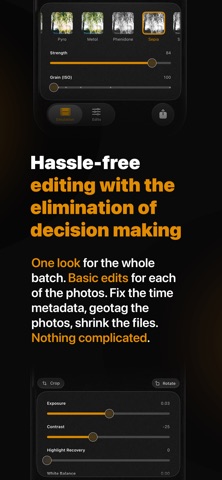
IMPORT PHOTOS AND SELECT ON FILM SIMULATION
Only one look for the whole batch - eliminating the decision making on each of the photos. Works well even with RAW files.
APPLY BASIC EDITS TO THE PHOTOS
Each of the photos might be exposed a bit differently, might need a bit of cropping or a change of white balance. Nothing complicated, nothing requiring decisions - just tweaks.
FIX THE METADATA, GEOTAG THE PHOTOS, SHRINK THE FILES
QuickLab helps you keep your photos organized. Camera didn't stamp them with a time zone? Fix it on export. Took a .gpx recording of your route? Geotag the whole batch from it. And don't forget the size of your library - downsample the pictures on the way out.
EVERYTHING REMEMBERS WHERE YOU LEFT OFF
The last selected film simulation stays selected for your next import. Intensity and ISO are saved per film, so you can dial a look in once and leave it there forever. And the film list is yours to arrange - hide the ones you never reach for, put your favourites first.
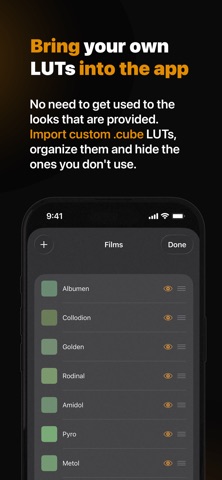
BRING YOUR OWN LOOK
While the film selection is small by design, you can import your own .cube LUTs and have the pictures look just the way you like.
WHY I CREATED QUICKLAB
I really enjoy shooting with film-look camera apps, and I wanted to bring the joy of “not caring” with beautiful results to my camera. As I sometimes take on professional photography jobs, I hate opening a photo editor and tweaking the settings photo by photo. I also use self hosted photo library and enjoy having photos with the correct timezone set, location, and with a size adequate to the quality of the photos (as many memories are perfect in only 12 megapixels). Well, if you combine all these requirements, you get QuickLab! I hope you will enjoy it as much as I do.
Free for 14 days, then a one-time purchase - no subscription needed.
Safety and technology
Found in the app by AppBrain- Price
- Free
- App size
- 63.6 MB
- Content rating
- Everyone
Technologies used by QuickLab - Photo Editor
Releases
Updates seen on the App Store- Version
- 1.3
- Launched
- August 2026
No changelog data
Alternatives
Similar apps and more from MICHAL PUCHELAlternatives to QuickLab - Photo Editor


Rankings
App Store top chartsApp Store Rankings for QuickLab - Photo Editor
About the app and developer
About QuickLab - Photo Editor
QuickLab - Photo Editor is a photo & video app developed by MICHAL PUCHEL.
What is the rating of QuickLab - Photo Editor?
QuickLab - Photo Editor has no ratings yet.
Is QuickLab - Photo Editor free?
QuickLab - Photo Editor is free. The app size is 63.61 MB. The latest version available is 1.3. The last update was on August 28, 2026.
What are the requirements for QuickLab - Photo Editor?
The app has a content rating of Everyone. The app has been available on the App Store since August 2026.
Developer information for MICHAL PUCHEL
Address: