

QuickPlanX: Project Gantt Plan
QuickPlanX: Project Gantt Plan is made and published by 皓 李. AppBrain is an independent app data site and isn't affiliated with 皓 李. The app name, icon, screenshots and description belong to 皓 李 and are shown as published on the App Store.
AppBrain's verdict
- Rating on App Store
- 5.00
- 8 ratings
- Last updated
- October 15, 2026
- Size
- 57.0 MB
It doesn't have enough ratings yet to judge what users think.
User feedback
Ratings and reviews on the App StoreComments on QuickPlanX: Project Gantt Plan for iOS
We don't have enough comments to show example comments. Please check back later.
Store listing
By 皓 李, from the App Store




Description by 皓 李 Written by the developer, not by AppBrain. Click to read.
Plan in a modern, distraction-free workspace. Use Gantt, Table, Tree, and Column views plus a centralized Inspector for quick edits and consistency. One app for iPhone, iPad, and Mac.
Professional scheduling tools in an intuitive, discoverable workflow — without the complexity.
- Draft structure instantly with indented text paste.
- Keep schedules accurate with visual links and batch edits.
- Share progress with clear exports and reports.
## Privacy You Can Trust
Your projects are stored on your device and in your private iCloud (CloudKit).
## Work Faster, Stay Current
Projects change. QuickPlanX keeps your plan accurate as work moves.
- Paste indented text to draft your WBS (notes, minutes, AI outlines).
- Paste from spreadsheets, then batch edit in Table View like a grid.
- Duplicate tasks/branches, then drag to reorganize.
- Switch views for structure, schedule, and data edits.
- Link tasks on the Gantt chart (Link Maintenance + gestures + shortcuts).
- Use shortcuts, Action Bar, and context menus.
- On Mac, use multiple windows.
- Widgets keep active tasks in sight.
## Multiple Views, One Plan
Switch views to see every angle without losing context, so you can plan, edit, and review faster.
- Gantt Chart: Schedule, links, baselines, Critical Path.
- Table View: Spreadsheet-style batch editing.
- Tree View: Build and reorganize your WBS.
- Column View: Finder-style navigation for deep plans.
- Inspector: Edit task properties.
## Customize Your Workflow
Every project is unique. Track what matters.
Beyond core fields, add what you need—especially for cost and metadata.
Add extra cost (including Budget and Cost Variance), text, toggle, URL, picker, and rich fields (Photo, Icon, Contact, Color).
- Choose fields per project; show/hide in Table View and Inspector.
- Rename and reorder fields to match your terminology.
- Cost control: track Resource Cost; compare budget vs. actual.
- Choose what appears on Gantt bars and Tree/Column views.
## Professional Scheduling, Made Practical
Don’t trade power for simplicity. Get the scheduling capabilities professionals need.
- Deep Hierarchy: Task groups and nested subprojects.
- Real-World Logic: Finish-to-Start and Linked Lists.
- Critical Path: See what drives the finish date.
- Baselines: Compare planned vs. current schedule, work, and costs.
- Flexible Calendars: Working days, holidays, and hours.
- Resources & Rates: Plan workload; track costs.
- Progress Tracking: % Complete and Physical % Complete.
## Share Clear Reports
Share and discuss your plan with stakeholders, clients, or your team.
- Export to PDF, image, or CSV.
- Export task data to text via templates (emails, reports, docs) for clean status updates.
- Export the whole plan or a branch.
- Resource Report: workload and costs by Day/Week/Month/Year.
- Milestones Report: key dates, with baseline comparison.
- S-Curve and Bar charts for work/cost trends (with baselines).
## Sync and Backup You Can Trust
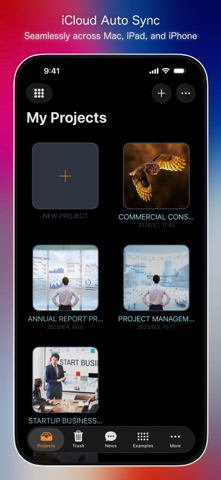
QuickPlanX uses CloudKit to sync projects across devices on the same Apple ID.
- Automatic sync across iPhone, iPad, and Mac.
- Offline capable: work anywhere; sync when you reconnect.
- Conflict handling protects your edits.
- Built-in safety tools:
- Trash (restore or delete)
- Auto Backup to `.quickplanx`
- Export/Import `.quickplanx` via AirDrop, email, or cloud
## Import and Export with Your Tools
Fits into your existing ecosystem.
- Microsoft Project (XML): import and export for collaboration.
- Spreadsheets: column mapping + copy/paste workflows.
- Mind maps (OPML): import/export.
- iCalendar (ICS): export timelines.
- CostX import for estimate-driven planning.
- Import legacy QuickPlan `.qpp` files.
QuickPlanX helps you stay focused on the project, not the tool.
---
Terms of Use: https://www.apple.com/legal/internet-services/itunes/dev/stdeula/
Safety and technology
Found in the app by AppBrain- Price
- Free
- App size
- 57.0 MB
- Content rating
- Everyone
Technologies used by QuickPlanX: Project Gantt Plan
Releases
Updates seen on the App Store- Version
- 6.0
- Launched
- May 2026
No changelog data
Alternatives
Similar apps and more from 皓 李More from 皓 李





Rankings
App Store top chartsApp Store Rankings for QuickPlanX: Project Gantt Plan
About the app and developer
About QuickPlanX: Project Gantt Plan
QuickPlanX: Project Gantt Plan is a business app developed by 皓 李.
What is the rating of QuickPlanX: Project Gantt Plan?
QuickPlanX: Project Gantt Plan is rated 5.00 out of 5 stars, based on 8 ratings.
Is QuickPlanX: Project Gantt Plan free?
QuickPlanX: Project Gantt Plan is free. The app size is 56.99 MB. The latest version available is 6.0. The last update was on October 15, 2026.
What are the requirements for QuickPlanX: Project Gantt Plan?
The app has a content rating of Everyone. The app has been available on the App Store since May 2026.
Developer information for 皓 李
Address:
Frequently asked questions about QuickPlanX: Project Gantt Plan
Is QuickPlanX: Project Gantt Plan free?
Yes. QuickPlanX: Project Gantt Plan is free on the App Store.
Is QuickPlanX: Project Gantt Plan still available?
Yes. QuickPlanX: Project Gantt Plan is on the App Store, and the last update we saw was on October 15, 2026.
How large is QuickPlanX: Project Gantt Plan?
QuickPlanX: Project Gantt Plan is 56.99 MB.
Is QuickPlanX: Project Gantt Plan suitable for children?
App Store rates the content of QuickPlanX: Project Gantt Plan as suitable for everyone.
How do people rate QuickPlanX: Project Gantt Plan?
QuickPlanX: Project Gantt Plan scores 5.00 out of 5 stars, from 8 ratings on the App Store.
Who made QuickPlanX: Project Gantt Plan?
QuickPlanX: Project Gantt Plan was developed by 皓 李. It is listed in the business category on the App Store.