


AppBrain's verdict
EstablishedLoved by users- Rating on App Store
- 4.91
- 4,122 ratings
- Last updated
- November 13, 2026
- Size
- 29.6 MB
Users love it: 4.9 stars from 4,122 ratings.
User feedback
Ratings and reviews on the App StoreComments on QuickScan:PDF OCR Text Scanner for iOS
We don't have enough comments to show example comments. Please check back later.
Store listing
By iSolid apps, from the App StoreDescription by iSolid apps Written by the developer, not by AppBrain. Click to read.
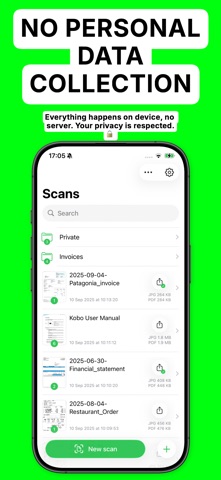
QuickScan is the easiest & quickest yet super-powerful scanner on iOS.
Main features:
### iOS integration ###
• QuickScan has been designed specifically for iOS & iPadOS for seamless integration and an exceptional user experience.
### Scan & import ###
• Scan with your camera (automatic document detection & automatic angle correction)
• Import existing images
• Import existing PDF files
• Organize your documents in folders
### OCR (text recognition) ###
• Professional-quality OCR on images and existing PDFs
• Make documents searchable with text integrated into PDFs (search, select, copy, paste)
• Automatic language detection and dictionary matching for highly accurate results
### SIGN ###
• Add signatures to your documents
• Create signatures with your finger, Apple Pencil, or import existing signatures
• Adjust size and color for a polished look
### Automate ###
• Automatic document/file naming with patterns (e.g., document date, title, issuer, time, text, counter)
• 'Export Favorites': Automatically export to preconfigured locations (cloud, email, etc.) with custom settings (color, black & white, filename, format)
• 'Export Groups': Export to multiple locations simultaneously by grouping Export Favorites
• Automatic deletion of documents after successful export
• iOS Home screen & Lock screen Widgets & Control Center controls. Associate an Export Favorite to the widget for instant export to that favorite after the scan started by tapping the widget.
• Place document automatically in the configured folder when the scan is started from a Widget/Shortcut associated to an Export Favorite
• Siri Shortcuts compatible
• Launch scan directly from the home screen with a long press on the app icon (or using a widget)
### Export ###
• Export in PDF with the recognized text integrated (very advanced feature). This allows to search/copy & paste into the generated PDF.
• Export recognized text as a .txt file
• Export as images with optional filters (grayscale, black & white)
• Save to cloud services with Favorites (iCloud Drive, Dropbox, Google Drive, OneDrive, SharePoint, WebDAV, paperless-ngx, pCloud, NAS, SMB, NextCloud, and more)
• Export anywhere (to Files, to any Drive, E-mail, message, Airdrop, …), or to the cloud
• Apply image filters (grayscale, black & white), crop, rotate images
• Easily adjust output file size and quality with real-time size estimation
• ... and much more, there are really many useful features
Everything is processed on your device: No internet connection required and ZERO data collection.
There’s no quicker, easier way to scan, OCR, and manage documents beautifully
SUPPORTED LANGUAGES FOR OCR:
• ENGLISH
• GERMAN
• FRENCH
• SPANISH
• ITALIAN
• PORTUGUESE
• CHINESE
• KOREAN
• JAPANESE
• UKRAINIAN
• RUSSIAN
• VIETNAMESE
• THAI
• ARABIC
• ARABIC NAJDI
• Danish
• Swedish
• Dutch
• Norwegian
• Norwegian Nynorsk
• Norwegian Bokmål
• Czech
• Polish
• Romanian
• Turkish
• Indonesian
• Malay
• Other languages are supported but do not benefit from the enhanced accuracy provided by language dictionaries
I hope you’ll save a lot of time thanks to the efficiency of QuickScan!
Your privacy matters: everything happens locally, on your device! This app does not use any server. No personal data is collected.
QuickScan is 100% free to use (no ads, does not sell your data). In-app purchases are optional donations to help me support development and bring future updates. They do not restrict the app's functionality.
---------
The privacy policy and terms of use can be found here: https://quickscanapp.com/privacy.html
Safety and technology
Found in the app by AppBrain- Price
- Free
- App size
- 29.6 MB
- Content rating
- Everyone
Technologies used by QuickScan:PDF OCR Text Scanner
Releases
Updates seen on the App Store- Version
- 9.7.8
- Launched
- May 2020
No changelog data
Alternatives
Similar apps and more from iSolid appsAlternatives to QuickScan:PDF OCR Text Scanner


 Text Capture: Image to Text


More from iSolid apps






Rankings
App Store top chartsApp Store Rankings for QuickScan:PDF OCR Text Scanner
About the app and developer
About QuickScan:PDF OCR Text Scanner
QuickScan:PDF OCR Text Scanner is a productivity app developed by iSolid apps.
What is the rating of QuickScan:PDF OCR Text Scanner?
QuickScan:PDF OCR Text Scanner is rated 4.91 out of 5 stars, based on 4.1 thousand ratings.
Is QuickScan:PDF OCR Text Scanner free?
QuickScan:PDF OCR Text Scanner is free. The app size is 29.60 MB. The latest version available is 9.7.8. The last update was on November 13, 2026.
What are the requirements for QuickScan:PDF OCR Text Scanner?
The app has a content rating of Everyone. The app has been available on the App Store since May 2020.
QuickScan:PDF OCR Text Scanner is made and published by iSolid apps. AppBrain is an independent app data site and isn't affiliated with iSolid apps. The app name, icon, screenshots and description belong to iSolid apps and are shown as published on the App Store.
Developer information for iSolid apps
Address: