

QuickTUI: AI Agent Terminal
QuickTUI: AI Agent Terminal is made and published by 宇雷 廖. AppBrain is an independent app data site and isn't affiliated with 宇雷 廖. The app name, icon, screenshots and description belong to 宇雷 廖 and are shown as published on the App Store.
AppBrain's verdict
- Rating on App Store
- 5.00
- 2 ratings
- Last updated
- October 4, 2026
- Size
- 67.6 MB
It doesn't have enough ratings yet to judge what users think.
User feedback
Ratings and reviews on the App StoreComments on QuickTUI: AI Agent Terminal for iOS
We don't have enough comments to show example comments. Please check back later.
Store listing
By 宇雷 廖, from the App Store



Description by 宇雷 廖 Written by the developer, not by AppBrain. Click to read.
QuickTUI is the iPhone and iPad app for your own computer or server. Kick off Claude Code, Codex, Gemini, or any long-running terminal job — then walk away. Your session stays live on your machine, and you can check in from wherever you are. Free for one server, with a direct connection by default — your code never touches our servers.
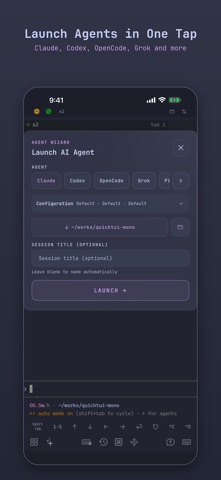
LAUNCH ANY AGENT IN ONE TAP — NEW
The Agent Wizard starts Claude Code, Codex, OpenCode, Grok, Gemini, Cursor, Kimi, Qoder, or Pi in the folder you pick. Save model and effort presets (effort where supported), reuse recent folders, and name the session — or let QuickTUI name it for you.
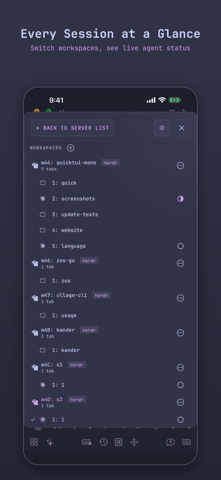
EVERY SESSION AT A GLANCE — NEW
The rebuilt switcher shows workspaces, windows or tabs, and panes in one tree. Swipe to jump between sessions. With the Herdr backend, an icon shows every agent's live status — working, idle, blocked, or done — so you know who needs you before you open anything.
TMUX OR HERDR, NOW ON WINDOWS TOO — NEW
Run your sessions in tmux or Herdr. On Windows, QuickTUI runs on Herdr (install Herdr first), so the same app now reaches your Windows PC as well as your Mac or Linux machine.
REACH IN FROM ANYWHERE
Your agent hit a confirm prompt. You're on the subway. Attach, approve, detach — 10 seconds, and it keeps going without you. When a direct link won't work — behind NAT, no public IP, no port forwarding — the optional Relay connection gets you in.
BUILT FOR THE TERMINAL
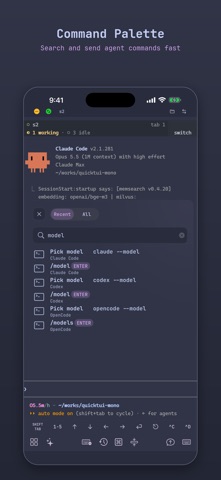
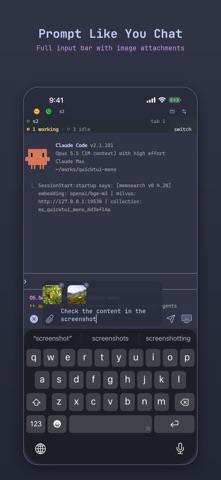
Up to three shortcut bars, each with left, center, and right zones you arrange by drag and drop. Esc, Tab, Ctrl combos, and arrow keys are one tap away. A command palette with ready-made commands for popular agents, git, and tmux — search, fill in parameters, send. A full input bar with image and camera attachments. Searchable clipboard history. Text selection and copy, built right in.
PORTS AND PREVIEWS
Scan the listening ports on your machine and forward one in a tap. Open it in the built-in Port Browser, in mobile or desktop mode, to check your dev server right from your phone.
BROWSE FILES TOO
Browse, preview, and transfer files, or upload images from your photo library into a folder. The file browser is off by default and only starts listing files after you enable it. On macOS, the QuickTUI server may also need Files & Folders or Full Disk Access after opt-in. Direct connections do not send terminal or file content to QuickTUI.
THEMES THAT LOOK RIGHT
37 terminal color schemes — Catppuccin, Tokyo Night, Gruvbox, Kanagawa, Everforest, Solarized, Dracula, Nord, Rose Pine, and more. Separate dark and light themes, auto-switched with your system. Font, size, line height, padding, and cursor style — all yours to tune.
SETUP IN MINUTES
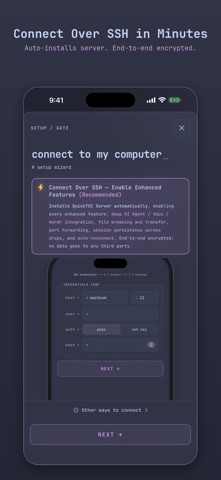
Have SSH access to your Mac or Linux machine? Connect over SSH and QuickTUI installs its server and pairs for you — with a password or an SSH key. Or install the server yourself with one line from https://quicktui.ai and scan the pairing QR code. Just need a shell? Direct SSH profiles work with no server install at all.
FREE TO USE, PRO FOR MORE
Download free and connect to one server — every feature included: terminal, Agent Wizard, sessions, file browser, port forwarding, themes, and shortcuts. Upgrade to QuickTUI Pro with a one-time purchase to unlock unlimited server profiles. The optional Relay connection is part of QuickTUI Cloud, a separate subscription. If you bought the app before it became free, you're already Pro — just tap Restore Purchase in Settings or the Paywall.
YOUR SERVER, YOUR DATA
Each device pairs with its own key, stored in the iOS Keychain. Your code, your keys, your API quotas — all stay on your own machine. Direct connections require no QuickTUI account; an account is only needed for optional Cloud features. No telemetry. On a direct connection there is no third party in the loop — Relay is strictly optional.
Terms of Use (EULA): https://www.apple.com/legal/internet-services/itunes/dev/stdeula/
Safety and technology
Found in the app by AppBrain- Price
- Free
- App size
- 67.6 MB
- Content rating
- Everyone
Technologies used by QuickTUI: AI Agent Terminal
Releases
Updates seen on the App Store- Version
- 1.9.3
- Launched
- April 2026
No changelog data
Rankings
App Store top chartsApp Store Rankings for QuickTUI: AI Agent Terminal
About the app and developer
About QuickTUI: AI Agent Terminal
QuickTUI: AI Agent Terminal is an overall app developed by 宇雷 廖.
User Ratings
QuickTUI: AI Agent Terminal is rated 5.00 out of 5 stars. The rating is based on 2 ratings.
App Information
QuickTUI: AI Agent Terminal is freely available from the App Store. The app size is 67.58 MB. The latest version available is 1.9.3. The last update was on October 4, 2026.
Technical Requirements
The app has a content rating of Everyone. The app has been available on the App Store since April 2026.
Developer information for 宇雷 廖
Address:
Frequently asked questions about QuickTUI: AI Agent Terminal
Is QuickTUI: AI Agent Terminal free?
Yes. QuickTUI: AI Agent Terminal is free on the App Store.
Is QuickTUI: AI Agent Terminal still available?
Yes. QuickTUI: AI Agent Terminal is on the App Store, and the last update we saw was on October 4, 2026.
How large is QuickTUI: AI Agent Terminal?
QuickTUI: AI Agent Terminal is 67.58 MB.
Is QuickTUI: AI Agent Terminal suitable for children?
App Store rates the content of QuickTUI: AI Agent Terminal as suitable for everyone.
How do people rate QuickTUI: AI Agent Terminal?
QuickTUI: AI Agent Terminal scores 5.00 out of 5 stars, from 2 ratings on the App Store.
Who made QuickTUI: AI Agent Terminal?
QuickTUI: AI Agent Terminal was developed by 宇雷 廖. It is listed in the overall category on the App Store.