

QuickWindChk is made and published by SEUNGSOO YOU. AppBrain is an independent app data site and isn't affiliated with SEUNGSOO YOU. The app name, icon, screenshots and description belong to SEUNGSOO YOU and are shown as published on the App Store.
AppBrain's verdict
- Last updated
- September 1, 2026
Rankings
App Store top chartsApp Store Rankings for QuickWindChk
Competitors
Similar apps and more from SEUNGSOO YOUAlternatives to QuickWindChk


More from SEUNGSOO YOU

Releases
Updates seen on the App Store- Version
- 1.0.4
- Launched
- March 2026
No changelog data
User feedback
Ratings and reviews on the App StoreComments on QuickWindChk for iOS
We don't have enough comments to show example comments. Please check back later.
Technology
Found in the app by AppBrain- Price
- Free
- App size
- 28.8 MB
- Content rating
- Everyone
Technologies used by QuickWindChk
About the app and developer
About QuickWindChk
QuickWindChk is an utilities app developed by SEUNGSOO YOU.
User Ratings
The app has no ratings yet.
App Information
QuickWindChk is freely available from the App Store. The app size is 28.85 MB. The latest version available is 1.0.4. The last update was on September 1, 2026.
Technical Requirements
The app has a content rating of Everyone. The app has been available on the App Store since March 2026.
Developer information for SEUNGSOO YOU
Address:
Store listing
By SEUNGSOO YOU, from the App Store


Description by SEUNGSOO YOU Written by the developer, not by AppBrain. Click to read.
Wind Envelope — Check your wind margin quickly and clearly. Set crosswind and tailwind limits, then see the remaining margin clearly.
Pattern HDG — See the traffic-pattern direction that fits your runway, along with wind-corrected headings for each leg. Choose left- or right-hand traffic, set TAS, and switch the pattern presentation UP or DOWN for the view that is easiest to read.
You can also:
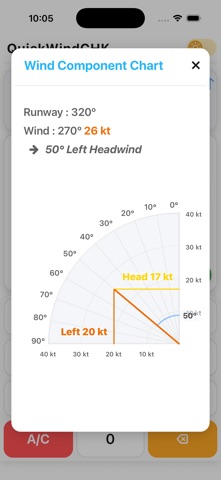
- See headwind, tailwind, and left or right crosswind components instantly.
- Use a clean runway-and-wind diagram to understand the result visually.
- Enter data quickly with the purpose-built keypad.
- Lock runway or wind-direction values for repeated checks.
- Use light or dark appearance on both iPhone and iPad.
Important!
QuickWindChk is a fast reference tool. Always use current official weather information, aircraft limitations, airport procedures, and approved flight-planning resources when making operational decisions.