

QuikFlow: Flowchart & Mind Map
QuikFlow: Flowchart & Mind Map is made and published by coneno GmbH. AppBrain is an independent app data site and isn't affiliated with coneno GmbH. The app name, icon, screenshots and description belong to coneno GmbH and are shown as published on the App Store.
AppBrain's verdict
- Rating on App Store
- 5.00
- 4 ratings
- Last updated
- April 18, 2026
- Size
- 86.5 MB
It doesn't have enough ratings yet to judge what users think.
User feedback
Ratings and reviews on the App StoreComments on QuikFlow: Flowchart & Mind Map for iOS
We don't have enough comments to show example comments. Please check back later.
Store listing
By coneno GmbH, from the App Store


Description by coneno GmbH Written by the developer, not by AppBrain. Click to read.
CREATE FLOWS, NOT JUST MIND MAPS
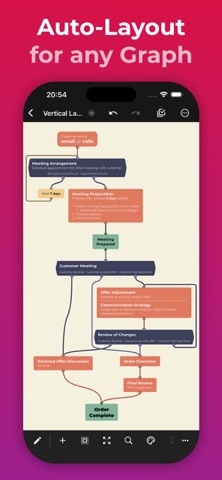
Creating flows is just like creating mind maps. But without the restrictions. Let flows converge or loop back around. All while retaining the same intuitive workflow.
FOCUS ON YOUR CONTENT, NOT ON THE LAYOUT
Define your flow and the relationships between different elements. The layout happens automatically while you are working. To adjust the layout, you can reorganize elements using drag-and-drop.
MAKE CHANGES WITHOUT WORRYING ABOUT THE DETAILS
No matter what you change, the layout will automatically adapt. Paste a whole subflow into the middle of the flow. Delete any part of the flow, no matter how intertwined. You won’t have to spend most of your time fixing the layout.
EXPAND YOUR FLOW
A node is simple. But every node can expand into a full rich-text document with headlines, lists, images, links, dividers and more. On canvas or in off-canvas notes. There can even be interactive tasks and checklists, allowing you to do flow-based task management.
FIND YOUR STYLE
Style each node and connector. Quickly reuse styles across your graph using the automatically generated library. Find the right look for new files using our premade templates or your own custom templates.
SHARE AND EXPORT WITHOUT SURPRISES
Easily share your creations in popular file formats (PDF and PNG). In high quality and without fuss. It is that simple.
INPUT BEYOND THE TOUCH
We think we built the qui(c)kest way to create a flow using touch. But QuikFlow started on desktop. And we brought all the mouse and keyboard support over to iPad.
USE FOR FREE. UPGRADE IF YOU WANT TO
QuikFlow gives you access to many features, including all of our innovative layout features, for free without any strings attached.
You can upgrade to QuikFlow Pro to access expanded node content, styling, templates, and additional export features. Try QuikFlow Pro with a free 7-day trial. Buy it either as a monthly or yearly subscription, or as a one-time purchase.
Files created using QuikFlow Pro can be opened and edited in the free version.
Website: https://quikflow.app
Email: quikflow@coneno.com
Terms of Use: https://www.apple.com/legal/internet-services/itunes/dev/stdeula/
Safety and technology
Found in the app by AppBrain- Price
- Free
- App size
- 86.5 MB
- Content rating
- Everyone
Technologies used by QuikFlow: Flowchart & Mind Map
Releases
Updates seen on the App Store- Version
- 2.0.10
- Launched
- March 2023
No changelog data
Alternatives
Similar apps and more from coneno GmbHMore from coneno GmbH


Rankings
App Store top chartsApp Store Rankings for QuikFlow: Flowchart & Mind Map
About the app and developer
About QuikFlow: Flowchart & Mind Map
QuikFlow: Flowchart & Mind Map is a productivity app developed by coneno GmbH.
User Ratings
QuikFlow: Flowchart & Mind Map is rated 5.00 out of 5 stars. The rating is based on 4 ratings.
App Information
QuikFlow: Flowchart & Mind Map is freely available from the App Store. The app size is 86.53 MB. The latest version available is 2.0.10. The last update was on April 18, 2026.
Technical Requirements
The app has a content rating of Everyone. The app has been available on the App Store since March 2023.
Developer information for coneno GmbH
Address:
Frequently asked questions about QuikFlow: Flowchart & Mind Map
Is QuikFlow: Flowchart & Mind Map free?
Yes. QuikFlow: Flowchart & Mind Map is free on the App Store.
Is QuikFlow: Flowchart & Mind Map still available?
Yes. QuikFlow: Flowchart & Mind Map is on the App Store, and the last update we saw was on April 18, 2026.
How large is QuikFlow: Flowchart & Mind Map?
QuikFlow: Flowchart & Mind Map is 86.53 MB.
Is QuikFlow: Flowchart & Mind Map suitable for children?
App Store rates the content of QuikFlow: Flowchart & Mind Map as suitable for everyone.
How do people rate QuikFlow: Flowchart & Mind Map?
QuikFlow: Flowchart & Mind Map scores 5.00 out of 5 stars, from 4 ratings on the App Store.
Who made QuikFlow: Flowchart & Mind Map?
QuikFlow: Flowchart & Mind Map was developed by coneno GmbH. It is listed in the productivity category on the App Store.