

QuiverBooks
QuiverBooks is made and published by ShadowForge Limited Liability Company. AppBrain is an independent app data site and isn't affiliated with ShadowForge Limited Liability Company. The app name, icon, screenshots and description belong to ShadowForge Limited Liability Company and are shown as published on the App Store.
AppBrain's verdict
- Last updated
- August 18, 2026
Rankings
App Store top chartsApp Store Rankings for QuiverBooks
Competitors
Similar apps and more from ShadowForge Limited Liability CompanyAlternatives to QuiverBooks




More from ShadowForge Limited Liability Company


Releases
Updates seen on the App Store- Version
- 1.1.2
- Launched
- June 2026
No changelog data
User feedback
Ratings and reviews on the App StoreComments on QuiverBooks for iOS
We don't have enough comments to show example comments. Please check back later.
Technology
Found in the app by AppBrain- Price
- Free
- App size
- 34.5 MB
- Content rating
- Everyone
Technologies used by QuiverBooks
About the app and developer
About QuiverBooks
QuiverBooks is a books app developed by ShadowForge Limited Liability Company.
User Ratings
The app has no ratings yet.
App Information
QuiverBooks is freely available from the App Store. The app size is 34.52 MB. The latest version available is 1.1.2. The last update was on August 18, 2026.
Technical Requirements
The app has a content rating of Everyone. The app has been available on the App Store since June 2026.
Developer information for ShadowForge Limited Liability Company
Frequently asked questions about QuiverBooks
Is QuiverBooks free?
Yes. QuiverBooks is free on the App Store.
Is QuiverBooks still available?
Yes. QuiverBooks is on the App Store, and the last update we saw was on August 18, 2026.
How large is QuiverBooks?
QuiverBooks is 34.52 MB.
Is QuiverBooks suitable for children?
App Store rates the content of QuiverBooks as suitable for everyone.
Who made QuiverBooks?
QuiverBooks was developed by ShadowForge Limited Liability Company. It is listed in the books category on the App Store.
What are the best alternatives to QuiverBooks?
People looking at QuiverBooks also look at these books apps: EBook Converter & Reader App, Santa Biblia Reina Valera 1960, Comic Reader CBR, CBZ & PDF, Hedgehog reader, SideBooks.
Store listing
By ShadowForge Limited Liability Company, from the App Store

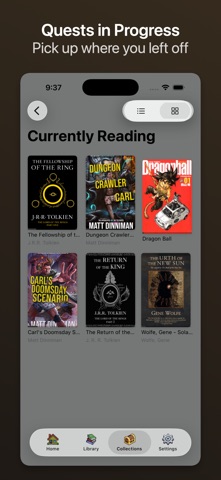

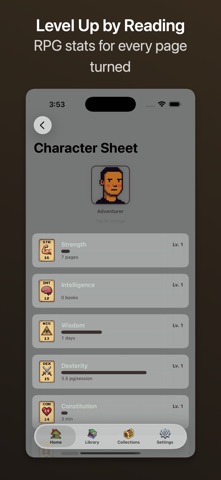

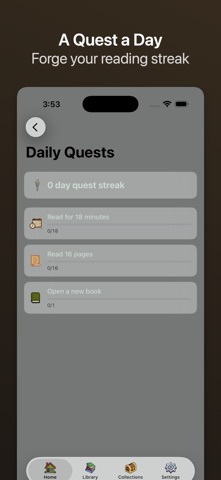


Description by ShadowForge Limited Liability Company Written by the developer, not by AppBrain. Click to read.
QuiverBooks reads the formats your library is actually made of — EPUB, MOBI, AZW, PDF, and CBZ comics — with no account, no store, and no lock-in. Bring your own files and start reading.
READ IT YOUR WAY
Paginated or scrolling. Eight fonts, adjustable size, margins, line height, paragraph and letter spacing, justification, hyphenation, and a content width you set yourself. A brightness overlay and warm filter for late nights.
THIRTEEN THEMES
From clean daylight to true dark, plus high-contrast and a spread of premium palettes. Pick one, or let the app follow your system appearance automatically.
COMICS AND PDFS, PROPERLY
CBZ gets panel-by-panel zoom, double-page spreads, and right-to-left manga mode. PDFs get real annotation, including Apple Pencil, plus display modes that suit the page.
ON-DEVICE READING TOOLS
Ask about any passage and get an answer in context. Come back to a book after a month and get a recap of the story so far. An X-Ray index tracks characters, places, and terms as they appear.
All of it runs on your device. All of it works on any book you import — not a curated catalogue. And all of it is spoiler-aware: nothing tells you about a chapter you haven't reached yet.
MARK IT UP
Bookmarks and highlights in five colors, with notes. Export your annotations as Markdown, or send them straight to Readwise.
FIND ANYTHING
Search across an entire book, tap any word for a definition, and jump by chapter from a table of contents that actually works.
READ ALOUD
Built-in text-to-speech with background playback and Lock Screen controls, so a book carries on while you do something else.
BRING YOUR OWN LIBRARY
Import from Files or iCloud Drive, drag and drop on Mac, or connect an OPDS catalogue — including a Calibre server. Fanfiction imports directly from a URL.
MAKE IT A HABIT
Daily quests, reading streaks, achievements, and a character sheet that levels up as you read. Every bit of it is free, and you can switch it off entirely if it isn't for you.
SYNCS ACROSS YOUR DEVICES
Your library, reading positions, bookmarks, and highlights follow you between iPhone, iPad, and Mac over iCloud. Books live in your own iCloud Drive, where you can reach them.
ASK FOR IT
Open any book with Siri, from Shortcuts, or straight from Spotlight search.
PRIVATE BY DESIGN
No account. No tracking. No analytics. No data collection. Book metadata lookups go to Open Library, and highlight export goes to Readwise only if you connect it yourself. Nothing else leaves your device.
FREE, PRO, AND PATRON
Reading every format is free, forever, along with bookmarks, highlights, search, read-aloud, sync, and the whole gamification system. A one-time Pro unlock adds unlimited annotations, highlight notes, export, the premium themes, and the full font set. Patron adds exclusive themes and alternate app icons. No subscription, ever.
Available in nine languages, on iPhone, iPad, and Mac.
Your library. Your files. Your quiver.