Raccord Lighting
Raccord Lighting is made and published by Raphael Medeiros. AppBrain is an independent app data site and isn't affiliated with Raphael Medeiros. The app name, icon, screenshots and description belong to Raphael Medeiros and are shown as published on the App Store.
AppBrain's verdict
- Last updated
- September 8, 2026
Rankings
App Store top chartsApp Store Rankings for Raccord Lighting
Competitors
Similar apps and more from Raphael MedeirosAlternatives to Raccord Lighting
More from Raphael Medeiros
Releases
Updates seen on the App Store- Version
- 1.1.1
- Launched
- August 2026
No changelog data
User feedback
Ratings and reviews on the App StoreComments on Raccord Lighting for iOS
We don't have enough comments to show example comments. Please check back later.
Technology
Found in the app by AppBrain- Price
- Free
- App size
- 43.1 MB
- Content rating
- Everyone
Technologies used by Raccord Lighting
About the app and developer
About Raccord Lighting
Raccord Lighting is a photo & video app developed by Raphael Medeiros.
User Ratings
The app has no ratings yet.
App Information
Raccord Lighting is freely available from the App Store. The app size is 43.10 MB. The latest version available is 1.1.1. The last update was on September 8, 2026.
Technical Requirements
The app has a content rating of Everyone. The app has been available on the App Store since August 2026.
Developer information for Raphael Medeiros
Address:
Store listing
By Raphael Medeiros, from the App StoreDescription by Raphael Medeiros Written by the developer, not by AppBrain. Click to read.
Raccord Lighting helps you create complete lighting plots, place lights and modifiers, check electrical distribution, and prepare the production’s technical material.
Start by drawing the floor plan from scratch or, on supported iPhones and iPads, scan the room in 3D to automatically create the base of the plot. Then adjust walls and measurements, organize equipment, and build the lighting setup.
CREATE THE LIGHTING PLOT
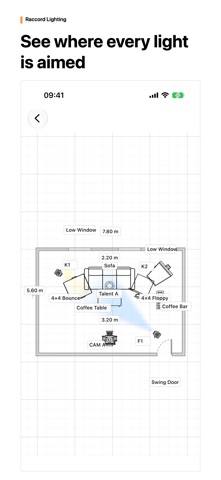
Build a clear representation of the space before the shoot. Work to scale, place lights, modifiers, and set elements, and make dimensions, directions, and notes easy to understand.
• Draw walls, doors, and room elements.
• Scan the space in 3D on supported devices.
• Place lights and modifiers.
• Organize the plot with dimensions, layers, and labels.
• See light direction with Smart Beams.
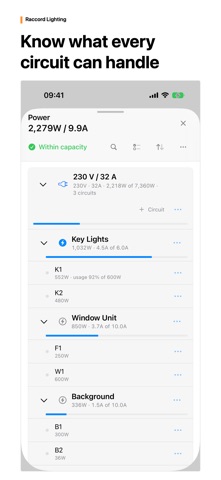
CHECK THE POWER
• Organize sources, circuits, and loads.
• Review watts, amps, available capacity, and overload warnings.
• Estimate battery and generator runtime for the setup.
HAND IT TO THE CREW
• Export plots as PDF, PNG, or JPEG.
• Generate a technical pack, electric report, rental list, and CSV.
• Review the document before sharing it with the crew or rental house.
USE THE RIGHT DEVICE
Work on iPhone, iPad, and Mac. Projects remain available locally and can sync through iCloud when it is available.
Smart Beams are a 2D visual aid, not a lux simulation. The app does not control lights or DMX consoles.
Free mode lets you try the main workflow with creation limits. Raccord Lighting Pro removes those limits; plans and prices are shown by the App Store.
Terms of Use (EULA): https://www.apple.com/legal/internet-services/itunes/dev/stdeula/