

RackIT Visualizer
RackIT Visualizer is made and published by MASAHIRO HIRAIWA. AppBrain is an independent app data site and isn't affiliated with MASAHIRO HIRAIWA. The app name, icon, screenshots and description belong to MASAHIRO HIRAIWA and are shown as published on the App Store.
AppBrain's verdict
- Last updated
- April 23, 2026
- Size
- 32.0 MB
User feedback
Ratings and reviews on the App StoreComments on RackIT Visualizer for iOS
We don't have enough comments to show example comments. Please check back later.
Store listing
By MASAHIRO HIRAIWA, from the App Store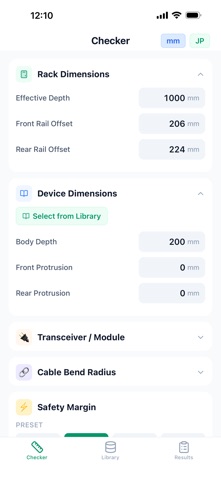


Description by MASAHIRO HIRAIWA Written by the developer, not by AppBrain. Click to read.
■ Be certain before you slide it in.
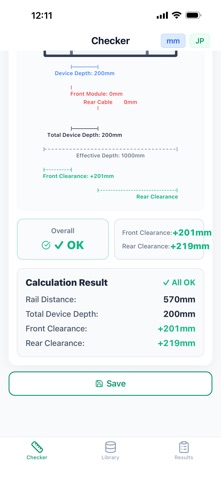
Enter the rack's usable depth, front rail position, rear rail position, device depth, front protrusion, and rear protrusion. RACKIT instantly calculates front and rear clearance and delivers a three-tier verdict: OK / Caution / NG.
■ Depth-Aware Rack Visualization
More than a flat diagram — a 3D-style cross-section that conveys real depth. Rail positions, equipment placement, and clearance relationships are intuitive at a glance. OK zones render in green, caution in amber, NG in red — persuasive enough to drop straight into a site report.
■ Rail Position Simulator
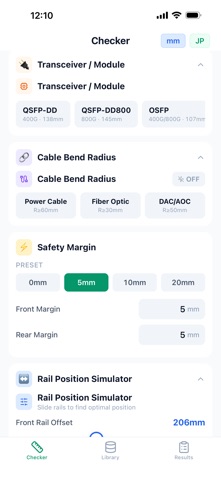
Drag the rail sliders and everything updates live: overall verdict, individual clearance values, and on-screen labels. The equipment depth itself stays locked; you fine-tune only the rails. Find the sweet spot with your fingertip.
■ Cable Bend Radius Checker
• Power cables are visualized on the rack's rear panel side
• Fiber / DAC / AOC are visualized on the front panel side
True to real-world cabling conventions, including effective protrusion introduced by bend radius — so your go / no-go decision reflects reality.
■ Equipment Library
Save the devices you use most with vendor, model, and every dimension. Search to recall instantly, apply to the checker in one tap, and add new entries on site using the floating add button.
■ Safety Margin Presets
Switch between 0 / 5 / 10 / 20 mm in one tap. Match internal standards or per-project requirements without retyping.
■ Save & Share Results
Name and save calculations. Export the full 3D-style diagram as an image to drop into reports, reviews, or chat threads.
■ Instant JP / EN Toggle
Switch between Japanese and English in one tap — ideal for global vendor calls and multinational teams.
■ Built For
• Data center install and operations engineers
• Network integrators and pre-sales engineers
• Server room and comms-room administrators
• Rack layout designers
• Site-survey technicians
■ Privacy
Rack specs, equipment library, and saved results all live locally on your iPhone. Nothing is sent to external servers. Works fully offline.
Stop discovering interference when the chassis hits the door. Know before you mount — with RACKIT.
Safety and technology
Found in the app by AppBrain- Price
- $0.49
- App size
- 32.0 MB
- Content rating
- Everyone
Technologies used by RackIT Visualizer
Releases
Updates seen on the App Store- Version
- 1.0.2
- Launched
- April 2026
No changelog data
Alternatives
Similar apps and more from MASAHIRO HIRAIWAMore from MASAHIRO HIRAIWA


Rankings
App Store top chartsApp Store Rankings for RackIT Visualizer
About the app and developer
About RackIT Visualizer
RackIT Visualizer is an utilities app developed by MASAHIRO HIRAIWA.
What is the rating of RackIT Visualizer?
RackIT Visualizer has no ratings yet.
Is RackIT Visualizer free?
RackIT Visualizer costs $0.49. The app size is 32.03 MB. The latest version available is 1.0.2. The last update was on April 23, 2026.
What are the requirements for RackIT Visualizer?
The app has a content rating of Everyone. The app has been available on the App Store since April 2026.
Developer information for MASAHIRO HIRAIWA
Address:
Frequently asked questions about RackIT Visualizer
Is RackIT Visualizer free?
No. RackIT Visualizer costs $0.49 on the App Store.
Is RackIT Visualizer still available?
Yes. RackIT Visualizer is on the App Store, and the last update we saw was on April 23, 2026.
How large is RackIT Visualizer?
RackIT Visualizer is 32.03 MB.
Is RackIT Visualizer suitable for children?
App Store rates the content of RackIT Visualizer as suitable for everyone.
Who made RackIT Visualizer?
RackIT Visualizer was developed by MASAHIRO HIRAIWA. It is listed in the utilities category on the App Store.