Raikiri Viewer is made and published by
wataru takahashi.
AppBrain is an independent app data site and isn't affiliated with wataru takahashi.
The app name, icon, screenshots and description belong to wataru takahashi and are shown as
published on the App Store.
About Raikiri Viewer
Raikiri Viewer is a books app developed by wataru takahashi.
User Ratings
The app has no ratings yet.
App Information
Raikiri Viewer is freely available from the App Store. The app size is 10.51 MB. The latest version available is 1.18.0. The last update was on September 23, 2026.
Technical Requirements
The app has a content rating of Everyone. The app has been available on the App Store since July 2026.
Description by wataru takahashi(from the App Store)
Your manga and novels, ready the moment you open them. Line up the books on your Mac, NAS or Google Drive on one shelf on your iPhone and iPad, and pick up where you left off — on the train or in bed. No waiting, no hunting, and nothing between you and the page.
■ A shelf that shows you what to read next Covers line up on a real bookshelf. Box sets packed into one archive are split into volumes, so volume 3 always follows volume 2, and a bookmark ribbon shows what you're in the middle of.
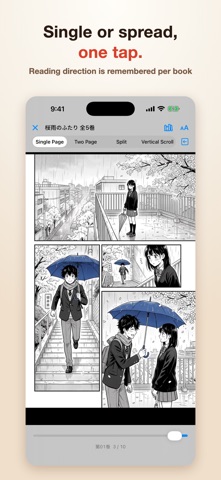
■ Single page or two-page spread, one tap away Single, Spread, Split and Scroll sit right at the top of the reader. Hold it upright for single pages, turn it sideways for spreads. Reading direction is remembered per book.
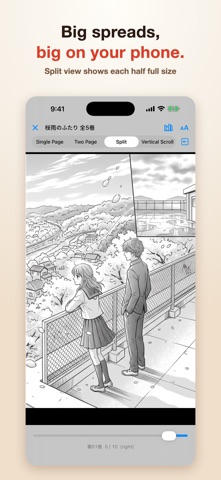
■ Big spreads, big on your phone Many comics store a two-page spread as one wide image, which gets tiny on an iPhone. Split view cuts it down the middle and shows each half full size — your place and bookmarks stay put.
■ Your Mac library in your hand Pair with the Mac app and open hundreds of books on that Mac from your iPhone or iPad. No copying files around.
■ Save a stack, read offline Save as many books as you like at once. Each download shows its own progress, and finished books get a badge and land on your shelf right away. Keep reading on a plane or in the subway.
■ Google Drive folders as shelves Add a Google Drive folder as a shelf. Folders in the Files app and iCloud Drive work too.
■ Stay zoomed in, page after page Pinch to zoom into a panel, then tap to move on. The next page opens at the same zoom, right at the corner you start reading from. Choose what a tap does: follow the binding, swap left and right, or always go forward.
■ Novels the right way round, webtoons without breaks Japanese vertical text reads right to left, and tall webtoons are recognized and scroll without breaks.
— A day with Raikiri (example scenes) — • 2,000 self-scanned volumes live on the Mac at home. On the morning commute, keep reading on your iPhone where you stopped last night. • Split view turns a dramatic two-page spread into two full-size pages, down to the tiny hand-lettering. • Before a weekend trip, save the next few volumes. No signal at the mountain inn, bedtime reading as usual.
■ Formats • Comics: ZIP / CBZ / RAR / CBR / 7z / CB7 / CBT, image folders • Ebooks: EPUB (reflowable and fixed layout), MOBI, PDF • Text: Aozora Bunko • Languages: English, Japanese, Spanish, Korean, Simplified Chinese
■ Pricing All features are free for your first month. After that, continue with an auto-renewing subscription, shared with the Mac app. • Raikiri Viewer Monthly: 1 month / $1.99 • Raikiri Viewer Yearly: 1 year / $17.99
Payment is charged to your Apple Account at confirmation of purchase. The subscription renews automatically for the same period and price unless auto-renew is turned off at least 24 hours before the end of the current period. You can manage or cancel your subscription anytime in your Apple Account settings.
Terms of Use (EULA): https://www.apple.com/legal/internet-services/itunes/dev/stdeula/ Privacy Policy: https://raikiri.watrix.co.jp/en/privacy
Each subscription will automatically renew 3 days before the expiration date for
the same time period. Subscriptions can be cancelled at any time before the renewal.