AppBrain
AppBrain
  • Apps
  • Apps being viewed right now Trending apps today Most popular apps All-time most installed apps Top rated apps iPhone and iPad apps
  • Intelligence ▾
    Intelligence overview → Track any Android app or your whole market
    Track & analyze
    Keyword Tracker & OptimizerTrack & improve Play rankings App Performance ReportOne-off PDF for any app StatisticsFree Android & Play market stats
    Promote your app
    Featured Apps App Links
  • Intelligence
  • Pricing
  • Dashboard
  • Sign up
  • Log in
App Store Apps > Photo & Video > Rake Plus: Relight & Refocus
Rake Plus: Relight & Refocus icon

Rake Plus: Relight & Refocus

by Pablo Miranda · Photo & Video · Free
On the App Store since September 2026 · Data updated 2026-10-09
App Store

Rake Plus: Relight & Refocus is made and published by Pablo Miranda. AppBrain is an independent app data site and isn't affiliated with Pablo Miranda. The app name, icon, screenshots and description belong to Pablo Miranda and are shown as published on the App Store.

AppBrain's verdict

Last updated
October 5, 2026
Size
52.9 MB

User feedback

Ratings and reviews on the App Store

Comments on Rake Plus: Relight & Refocus for iOS

We don't have enough comments to show example comments. Please check back later.

Store listing

By Pablo Miranda, from the App Store
Rake Plus: Relight & Refocus Screenshot 1 of 9
Rake Plus: Relight & Refocus Screenshot 2 of 9
Rake Plus: Relight & Refocus Screenshot 3 of 9
Rake Plus: Relight & Refocus Screenshot 4 of 9
Rake Plus: Relight & Refocus Screenshot 5 of 9
Rake Plus: Relight & Refocus Screenshot 6 of 9
Rake Plus: Relight & Refocus Screenshot 7 of 9
Rake Plus: Relight & Refocus Screenshot 8 of 9
Rake Plus: Relight & Refocus Screenshot 9 of 9
Screenshots by Pablo Miranda, from the the App Store listing
Description by Pablo Miranda Written by the developer, not by AppBrain. Click to read.
Change the light, the air and the focus of a photo after you took it.

Rake Plus reads how far away every part of your picture is and works from that, the way a real lamp, real fog and a real lens would. Four tools, all on your device.

Portrait photos carry the depth your iPhone measured when it took them. Any other photo works too: Rake Plus estimates its depth on your device.

CLEAR — take the haze out
Haze, smog and smoke thicken with distance. Clear measures how much haze lies at each distance in your photo and removes it by distance: far hills and skylines come back, and the foreground is left alone. Strength sets how much; Protect keeps the far distance and the sky from turning grainy.

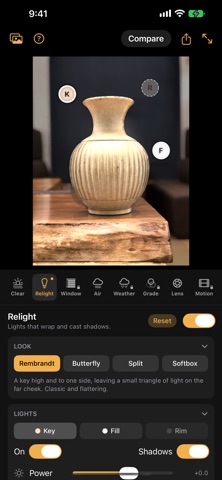
RELIGHT — move the light
Drag a lamp across the picture and watch the light wrap around a face and cast real shadows.
• Five looks in one tap: Rembrandt, Butterfly, Split, Softbox and Flash, a flash on the camera.
• Three lights like a studio: key, fill and rim.
• Drag a light to move it; pinch to pull it toward you or push it behind your subject.
• Power in stops, depth, size for crisp or soft shadows, warmth, and shadows on or off.
• Original sets how much of the photo's own light to keep.

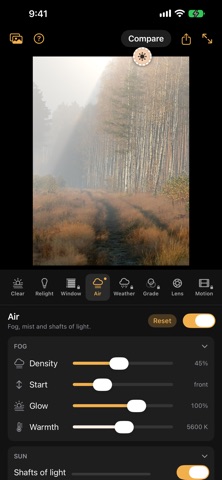
AIR — fog, mist and shafts of light
Fill the scene with fog that thickens with distance, so your subject stays clear while the background fades. Add a sun, and the fog catches its light: trees, windows and your subject block it, and the light falls through the gaps in shafts.
• Density, where the fog starts, glow and warmth.
• For the sun: power, depth, size, warmth and how strongly the beams show.

LENS — move the focus after the shot
Tap where the photo should be sharp. Everything else blurs the way a real lens would: the farther from the focus, the softer, with your subject's edges kept clean. On Portrait photos of people, the outline your iPhone saved keeps the blur off the hair.
• Aperture, and how deep the sharp zone is.
• The character of the blur: round or bladed, an anamorphic oval, cat's-eye discs at the edges, and the swirl of old portrait lenses.
• Glow: how brightly lights spread into discs.

TOGETHER
The tools stack in order: haze removed first, then your light, then the air, then the lens the whole scene is seen through. Hold Compare at any time to see the photo as it was shot, and undo or redo any change.

Save to Photos adds the result at full resolution as an edit of the original, which Photos can revert, depth and all.

IN PHOTOS TOO
Rake Plus is also in the Photos app: open a photo, tap Edit, then the ⋯ menu, Extensions, Rake Plus. A photo you edited with Rake Plus opens there with its settings, so you can change them later.

RAKE PLUS PRO — four more tools, Live Photos, borders and Recipes, one purchase
An optional one-time in-app purchase. Try every Pro tool and a Live Photo merge on your own photos in the app first; the purchase is needed to save or share, and to use them inside Photos.
• WINDOW: sun through blinds, panes or leaves, bending over your subject and shading the wall behind.
• WEATHER: rain or snow through the scene, hidden behind your subject, fading the distance.
• GRADE: colour your subject and the distance apart, with no mask to draw.
• MOTION: a short looping clip from the still — a push-in, a sway or a Vertigo zoom.
• LIVE PHOTOS: merge the three seconds into one picture: smooth water, passers-by taken out, or light trails.
• BORDERS: white or black, with the camera and its settings written underneath.
• RECIPES: save an edit, every tool as you set it, and put it on other photos in one tap.

PRIVATE BY DESIGN
Everything happens on your device, including estimating depth. Photos come in through the system picker, or from Photos when you edit there, without access to the rest of your library, and nothing is uploaded: there is no server to upload to. No account, no credits, no subscription, no ads.

TIPS
• Portrait-mode photos work best. In Photos, they are the ones with the ƒ depth control under Edit.
Official page on the App Store

Safety and technology

Found in the app by AppBrain
Price
Free
App size
52.9 MB
Content rating
Everyone

Technologies used by Rake Plus: Relight & Refocus

Releases

Updates seen on the App Store
Version
2.2
Launched
September 2026

No changelog data

Alternatives

Similar apps and more from Pablo Miranda

Alternatives to Rake Plus: Relight & Refocus

ProVisual: AI Photo & Effects icon ProVisual: AI Photo & Effects
Yuliia Aliekseienko
0.0
Free
Raster AI Studio icon Raster AI Studio
Bertay Eren
0.0
Free
Eightstop: AI Photo Enhancer icon Eightstop: AI Photo Enhancer
Alec Attie
0.0
Free
Sunva: AI Digicam Photo Editor icon Sunva: AI Digicam Photo Editor
Lightwell Games
0.0
Free
Photo Relight AI icon Photo Relight AI
俊华 罗
0.0
Free
WonderFilm: Cinema Camera icon WonderFilm: Cinema Camera
GGyess
0.0
Free
Tech Scout Camera icon Tech Scout Camera
Brook Willard
5.0
Free
10 ratings

Rankings

App Store top charts

App Store Rankings for Rake Plus: Relight & Refocus

This app is not ranked

About the app and developer

About Rake Plus: Relight & Refocus

Rake Plus: Relight & Refocus is a photo & video app developed by Pablo Miranda.

User Ratings

The app has no ratings yet.

App Information

Rake Plus: Relight & Refocus is freely available from the App Store. The app size is 52.90 MB. The latest version available is 2.2. The last update was on October 5, 2026.

Technical Requirements

The app has a content rating of Everyone. The app has been available on the App Store since September 2026.

Developer information for Pablo Miranda

Pablo Miranda

Address:

Share Rake Plus: Relight & Refocus

Price drops on Google Play Popular Photo & Video Apps Today's trending apps Apps other people are watching Top new apps
ProVisual: AI Photo & Effects icon ProVisual: AI Photo & Effects
Raster AI Studio icon Raster AI Studio
Eightstop: AI Photo Enhancer icon Eightstop: AI Photo Enhancer
Sunva: AI Digicam Photo Editor icon Sunva: AI Digicam Photo Editor
Photo Relight AI icon Photo Relight AI
WonderFilm: Cinema Camera icon WonderFilm: Cinema Camera
Tech Scout Camera icon Tech Scout Camera
Overview Alternatives Reviews Rankings Technology
AppBrain Intelligence premium content

Subscribe now to get full and unlimited access to AppBrain Intelligence. You'll have access to:

  • App Intelligence dashboard (performance timeline, competitor comparison, country rankings, insight cards)
  • Detailed ranking data per app
  • Full timeline per developer
  • Device market shares data per country
  • Unlimited keyword tracking
1 Month

$75/mo
(billed every month)

SAVE 0%
Subscribe
3 Months

$65/mo
($195 billed every 3 months)

SAVE 13%
Subscribe
1 Year

$57.50/mo
($690 billed every year)

SAVE 23%
Subscribe
Each subscription will automatically renew 3 days before the expiration date for the same time period. Subscriptions can be cancelled at any time before the renewal.

AppBrain is an app data site, we track rankings, ratings, installs for all apps and games on Google Play and the App Store. AppBrain doesn't host app files or APKs, all install links go directly to the official store. All trademarks are owned by their respective owners.

More apps

  • Top Android apps being viewed
  • Kids Handprint Android App
  • TEXTS MERCHANT
  • FileTreeSize: Storage Analyzer

App statistics

  • Android statistics
  • Google Play Developer stats
  • Trending Android Apps
  • Trending iOS apps
  • Top popular Apps
  • Buy the best Android phone
  • Buy & sell app businesses

About AppBrain

  • Contact
  • Privacy
  • Documentation
  • DMCA takedowns
  • Articles
  • Blog
  • Android app Install tracking and attribution options for the AppBrain ad network
© 2010-2026 - AppBrain