

RandomTimer - Randomized
RandomTimer - Randomized is made and published by WanYeol Park. AppBrain is an independent app data site and isn't affiliated with WanYeol Park. The app name, icon, screenshots and description belong to WanYeol Park and are shown as published on the App Store.
AppBrain's verdict
- Last updated
- October 22, 2026
Rankings
App Store top chartsApp Store Rankings for RandomTimer - Randomized
Competitors
Similar apps and more from WanYeol Park


Releases
Updates seen on the App Store- Version
- 1.0.4
- Launched
- July 2026
No changelog data
User feedback
Ratings and reviews on the App StoreComments on RandomTimer - Randomized for iOS
We don't have enough comments to show example comments. Please check back later.
Technology
Found in the app by AppBrain- Price
- Free
- App size
- 4.63 MB
- Content rating
- Everyone
Technologies used by RandomTimer - Randomized
About the app and developer
About RandomTimer - Randomized
RandomTimer - Randomized is an utilities app developed by WanYeol Park.
User Ratings
The app has no ratings yet.
App Information
RandomTimer - Randomized is freely available from the App Store. The app size is 4.63 MB. The latest version available is 1.0.4. The last update was on October 22, 2026.
Technical Requirements
The app has a content rating of Everyone. The app has been available on the App Store since July 2026.
Developer information for WanYeol Park
Address:
Frequently asked questions about RandomTimer - Randomized
Is RandomTimer - Randomized free?
Yes. RandomTimer - Randomized is free on the App Store.
Is RandomTimer - Randomized still available?
Yes. RandomTimer - Randomized is on the App Store, and the last update we saw was on October 22, 2026.
How large is RandomTimer - Randomized?
RandomTimer - Randomized is 4.63 MB.
Is RandomTimer - Randomized suitable for children?
App Store rates the content of RandomTimer - Randomized as suitable for everyone.
Who made RandomTimer - Randomized?
RandomTimer - Randomized was developed by WanYeol Park. It is listed in the utilities category on the App Store.
What are the best alternatives to RandomTimer - Randomized?
People looking at RandomTimer - Randomized also look at these utilities apps: Randobeep, Samir's Awesome Timer, Fuuuga: Multi Interval Tracker, Flip Clock - Eye-Friendly, Kairos: Random Timer.
Store listing
By WanYeol Park, from the App Store

Description by WanYeol Park Written by the developer, not by AppBrain. Click to read.
Two modes
• Basic: enter hours and minutes and count down.
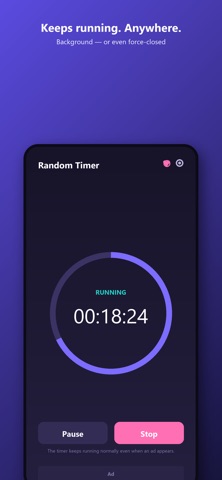
• Random: set a minimum and maximum, and the timer picks a length between them in whole minutes. You don't have to know what it picked until it goes off.
Hide the time
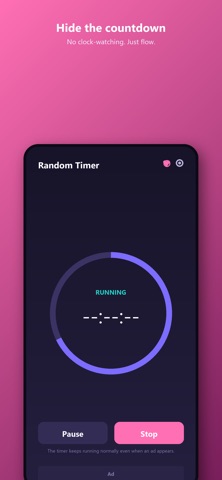
Turn on "Hide current time" before you start, or tap to hide and show the remaining time while it runs. When hidden, the display shows only --:--:--.
When time is up
If the app is open when time runs out, sound and vibration repeat until you tap Stop. If you've left the app, on iOS 26 or later a system alarm rings if you've given alarm permission; otherwise you get a single notification.
Pause, resume and stop anytime. The countdown keeps running even if you close the app, and reopening it shows the time left. Your last mode, times and hide setting are remembered.
Good to know
• Times are set in hours and minutes (no seconds).
• Available in English, Korean, Japanese, Simplified Chinese, Spanish, French, German, Portuguese, Russian and Hindi.
• A banner ad shows at the bottom of the screen, and a full-screen ad appears every 10th launch. Each time your total timer use passes another 2 hours, an ad plays when you next start a timer; if you close that ad before it finishes, the timer won't start.
• Tap Subscribe to start a monthly auto-renewing subscription that removes all ads.
Subscription details
• Subscribe (ad removal): 1-month auto-renewing subscription
• Payment is charged to your Apple ID account.
• It renews automatically unless you cancel at least 24 hours before the current period ends.
• Manage or cancel it in Settings > Apple ID > Subscriptions.
• Terms of Use (EULA): https://www.apple.com/legal/internet-services/itunes/dev/stdeula/
• Privacy Policy: https://timer.vnamu.com/privacy.html