

Rapid & Quick Calculator Pro
Rapid & Quick Calculator Pro is made and published by KinkumaDesign. AppBrain is an independent app data site and isn't affiliated with KinkumaDesign. The app name, icon, screenshots and description belong to KinkumaDesign and are shown as published on the App Store.
AppBrain's verdict
EstablishedLoved by users- Best rank
- #27
- Top Paid, Japan
- Rating on App Store
- 4.89
- 206 ratings
- Last updated
- May 3, 2026
Users love it: 4.9 stars from 206 ratings. Its best ranking is #27 in Top Paid, Finance in Japan.
Rankings
App Store top charts- Highest rank
- #27
- Chart
- Top Paid
- Finance
- Country
- Japan
App Store Rankings for Rapid & Quick Calculator Pro
Top rankings
| Rank | Country | Category | List |
|---|---|---|---|
| 27 | Japan | Finance | Top Paid |
| 59 | United States | Finance | Top Paid |
| 54 | South Korea | Finance | Top Paid |
| 62 | Iran | Finance | Top Paid |
Ranking history in Japan
Competitors
Similar apps and more from KinkumaDesignAlternatives to Rapid & Quick Calculator Pro





More from KinkumaDesign


Releases
Updates seen on the App Store- Version
- 6.7.0
- Launched
- December 2015
No changelog data
User feedback
Ratings and reviews on the App StoreComments on Rapid & Quick Calculator Pro for iOS
We don't have enough comments to show example comments. Please check back later.
Technology
Found in the app by AppBrain- Price
- $3.99
- App size
- 7.14 MB
- Content rating
- Everyone
Technologies used by Rapid & Quick Calculator Pro
About the app and developer
About Rapid & Quick Calculator Pro
Rapid & Quick Calculator Pro is a finance app developed by KinkumaDesign.
What is the rating of Rapid & Quick Calculator Pro?
Rapid & Quick Calculator Pro is rated 4.89 out of 5 stars, based on 210 ratings.
Is Rapid & Quick Calculator Pro free?
Rapid & Quick Calculator Pro costs $3.99. The app size is 7.14 MB. The latest version available is 6.7.0. The last update was on May 3, 2026.
What are the requirements for Rapid & Quick Calculator Pro?
The app has a content rating of Everyone. The app has been available on the App Store since December 2015.
Developer information for KinkumaDesign
Address:
Frequently asked questions about Rapid & Quick Calculator Pro
Is Rapid & Quick Calculator Pro free?
No. Rapid & Quick Calculator Pro costs $3.99 on the App Store.
Is Rapid & Quick Calculator Pro still available?
Yes. Rapid & Quick Calculator Pro is on the App Store, and the last update we saw was on May 3, 2026.
How large is Rapid & Quick Calculator Pro?
Rapid & Quick Calculator Pro is 7.14 MB.
Is Rapid & Quick Calculator Pro suitable for children?
App Store rates the content of Rapid & Quick Calculator Pro as suitable for everyone.
How do people rate Rapid & Quick Calculator Pro?
Rapid & Quick Calculator Pro scores 4.89 out of 5 stars, from 206 ratings on the App Store.
Who made Rapid & Quick Calculator Pro?
Rapid & Quick Calculator Pro was developed by KinkumaDesign. It is listed in the finance category on the App Store.
What are the best alternatives to Rapid & Quick Calculator Pro?
People looking at Rapid & Quick Calculator Pro also look at these finance apps: FXトレード記録, スマ保, FXデモトレードで為替レートの投資ゲーム-FX初心者ガイド, Calculator++F, Walletry: Legacy.
Store listing
By KinkumaDesign, from the App Store



Description by KinkumaDesign Written by the developer, not by AppBrain. Click to read.
A fast, friendly calculator built for everyday use — shopping, splitting bills, household budgeting, and more.
FEATURES
* History Tape — review your past calculations and reuse any answer with a single tap
* Expression Input — type the whole equation, just like you'd write it on paper
* Sales Tax — toggle tax-included/excluded with a single button; swipe to switch between multiple tax rates
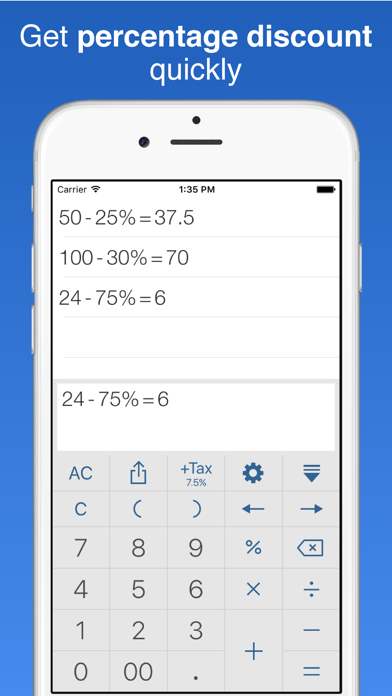
* Percentage Discounts — e.g. 100 - 30% = 70
* Precise Rounding Settings
* Multiple Color Themes
* Multiple Font Sizes and Typefaces
* Arrow Keys — move the cursor left or right to edit any part of the expression
* Share — send expressions and answers to other apps
* iPad Support — including Slide Over and Split View on supported devices
* Sound Effects
To reuse or edit an equation from your history, swipe left on it (or touch and hold) to open the menu.
We'd love to hear your feedback!