

RC Slate is made and published by Jaehong Lim. AppBrain is an independent app data site and isn't affiliated with Jaehong Lim. The app name, icon, screenshots and description belong to Jaehong Lim and are shown as published on the App Store.
AppBrain's verdict
- Last updated
- November 2, 2026
- Size
- 19.9 MB
User feedback
Ratings and reviews on the App StoreComments on RC Slate for iOS
We don't have enough comments to show example comments. Please check back later.
Store listing
By Jaehong Lim, from the App Store


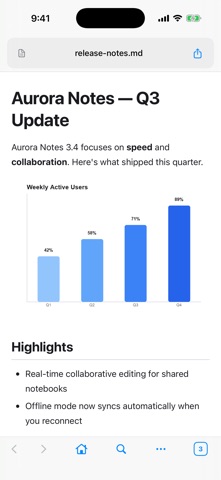
Screenshots by Jaehong Lim, from the the App Store listing
Description by Jaehong Lim Written by the developer, not by AppBrain. Click to read.
**RC Slate — the browser that opens your documents, built for people who work with AI.**
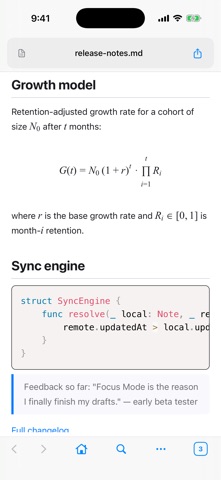
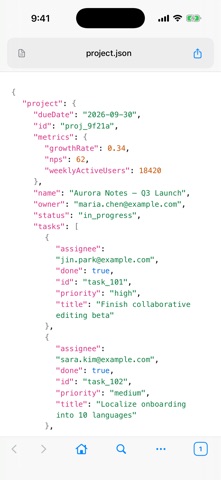
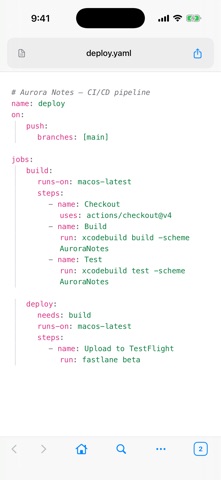
Tap a document link while browsing — Markdown, DOCX (Word), PDF, JSON, YAML, images — and it opens right there, rendered as a clean page. No downloading, no switching to another app, no wondering what a file looks like before you can see it.
**Convert anything to Markdown for AI**
Turn documents and web pages into clean, token-efficient Markdown — the same content in a fraction of the prompt size. DOCX converts through the app's own parser; web pages by pulling out the article text. Need the images too? Embed them into a single self-contained Markdown file, with quality presets and a live token estimate. Export any view as PDF, PNG, or HTML. (Markdown conversion is not lossless; full page layout is not preserved.)
**Read your Obsidian vault**
Add a vault folder and read it as it was written — wikilinks between notes and embedded images. Links resolve inside the folder you added, so a note opens the note it points to. And a vault note leaves as one piece: export it as a single self-contained Markdown file with its images embedded, or as HTML, PNG, or PDF — ready to hand to an AI. Reading only; RC Slate never edits or syncs your vault.
**A real browser underneath**
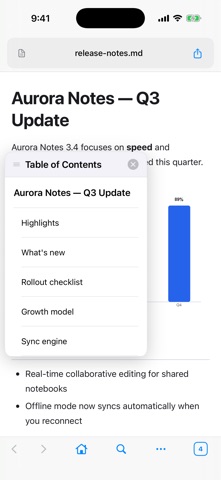
Documents are grouped by the site they came from. Switch any article to Reader Mode for a clean, distraction-free reading layout with dark mode. iPhone and iPad layouts, with a sidebar and tab strip on iPad.
**Clean pages for every format**
- Markdown with tables, syntax highlighting, Mermaid diagrams, and LaTeX math
- JSON and YAML: colour-coded, with their keys in the table of contents so you can jump straight to one
- DOCX (Word) page by page, view-only (the document's own fonts are not included)
- PDF and images
**Open files from anywhere**
Files on your device open from the Files app — or send a file from any app through the share menu, straight to RC Slate. SelfDrop syncs a file across your devices (up to 20 MB per file).
**Works offline**
Viewing local files works offline on your device.
Tap a document link while browsing — Markdown, DOCX (Word), PDF, JSON, YAML, images — and it opens right there, rendered as a clean page. No downloading, no switching to another app, no wondering what a file looks like before you can see it.
**Convert anything to Markdown for AI**
Turn documents and web pages into clean, token-efficient Markdown — the same content in a fraction of the prompt size. DOCX converts through the app's own parser; web pages by pulling out the article text. Need the images too? Embed them into a single self-contained Markdown file, with quality presets and a live token estimate. Export any view as PDF, PNG, or HTML. (Markdown conversion is not lossless; full page layout is not preserved.)
**Read your Obsidian vault**
Add a vault folder and read it as it was written — wikilinks between notes and embedded images. Links resolve inside the folder you added, so a note opens the note it points to. And a vault note leaves as one piece: export it as a single self-contained Markdown file with its images embedded, or as HTML, PNG, or PDF — ready to hand to an AI. Reading only; RC Slate never edits or syncs your vault.
**A real browser underneath**
Documents are grouped by the site they came from. Switch any article to Reader Mode for a clean, distraction-free reading layout with dark mode. iPhone and iPad layouts, with a sidebar and tab strip on iPad.
**Clean pages for every format**
- Markdown with tables, syntax highlighting, Mermaid diagrams, and LaTeX math
- JSON and YAML: colour-coded, with their keys in the table of contents so you can jump straight to one
- DOCX (Word) page by page, view-only (the document's own fonts are not included)
- PDF and images
**Open files from anywhere**
Files on your device open from the Files app — or send a file from any app through the share menu, straight to RC Slate. SelfDrop syncs a file across your devices (up to 20 MB per file).
**Works offline**
Viewing local files works offline on your device.
Safety and technology
Found in the app by AppBrain- Price
- Free
- App size
- 19.9 MB
- Content rating
- High
Technologies used by RC Slate
Releases
Updates seen on the App Store- Version
- 1.1.5
- Launched
- August 2026
No changelog data
Alternatives
Similar apps and more from Jaehong LimAlternatives to RC Slate


More from Jaehong Lim

Rankings
App Store top chartsApp Store Rankings for RC Slate
This app is not ranked
About the app and developer
About RC Slate
RC Slate is an utilities app developed by Jaehong Lim.
What is the rating of RC Slate?
RC Slate has no ratings yet.
Is RC Slate free?
RC Slate is free. The app size is 19.90 MB. The latest version available is 1.1.5. The last update was on November 2, 2026.
What are the requirements for RC Slate?
The app has a content rating of High Maturity. The app has been available on the App Store since August 2026.
Developer information for Jaehong Lim
Address: