Download Android Apps and Games
AppBrain
  • Apps
  • Apps being viewed right now Trending apps today Most popular apps All-time most downloaded apps Top rated apps
  • Intelligence ▾
    Intelligence overview → Track any Android app or your whole market
    Track & analyze
    Keyword Tracker & OptimizerTrack & improve Play rankings App Performance ReportOne-off PDF for any app StatisticsFree Android & Play market stats
    Promote your app
    Featured Apps App Links
  • Intelligence
  • Pricing
  • Dashboard
  • Sign up
  • Log in
Last updated on: 2026-05-26
App Store Apps > Education > Read&Write
Read&Write icon

Read&Write

7.15.1
Everway Opco Ltd.
3.14
29 reviews
Free

Read&Write Screenshot 1 of 8
Read&Write Screenshot 2 of 8
Read&Write Screenshot 3 of 8
Read&Write Screenshot 4 of 8
Read&Write Screenshot 5 of 8
Read&Write Screenshot 6 of 8
Read&Write Screenshot 7 of 8
Read&Write Screenshot 8 of 8
Download from the App Store

About Read&Write

Read&Write is an overall app developed by Everway Opco Ltd..

Download Statistics

User Ratings

Read&Write is rated 3.14 out of 5 stars. The rating is based on 29 ratings.

App Information

Read&Write is FREE to download. The APK download size is 217.82 MB. The latest version available is 7.15.1. The last update was on May 19, 2026.

Technical Requirements

The app has a content rating of Everyone. The app has been available on Google Play January 2015.

Description
Read&Write for iPad is a reading and writing app with high-quality text-to-speech, formatting controls, a wide range of fonts and styles and cloud storage integration.

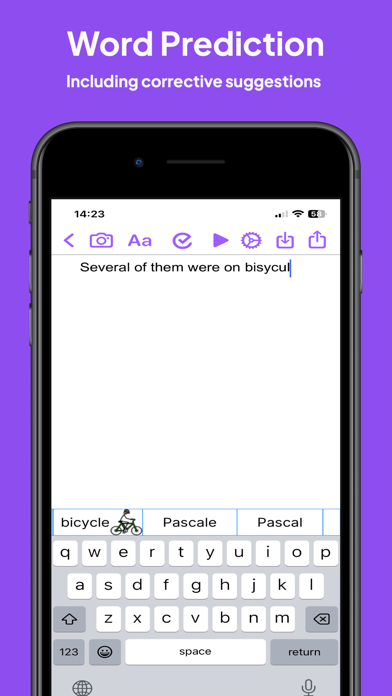
Read&Write provides visual highlighting in-sync with spoken words, a great range of colour and font settings to allow for optimum reading, and word prediction to help with writing. Read&Write is a quality app for proofreading text through listening, helping with reading and literacy development, and creating audio files from any text.

PRODUCT FEATURES

• Text-to-Speech
- Type into Read&Write and have the text read back to you. You can check text and proofread it quickly and easily.
- You can import documents into Read&Write from apps such as Mail, or import directly from Dropbox, Google Drive and OneDrive.. Read&Write can open a range of document formats including Word doc, PDF and epub.
- Text from any app can be copied and pasted into Read&Write ready to be read back.
- Apple's speech recognition can be used to dictate text directly into Read&Write, and can be listened back to ensure it is right.
- The Apple spell check works in Read&Write too, further helping accuracy.
- You can save the text as an audio file using the same high-quality voice.

• Word Prediction
Word prediction helps with writing more quickly and accurately.

• Visual Highlighting
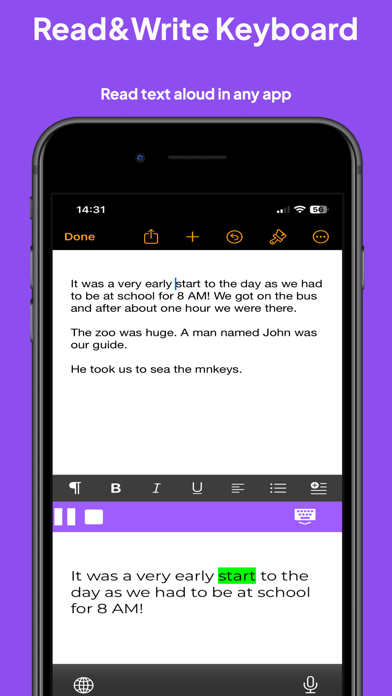
Text is highlighted as the text is read back. Highlighting allows you to coordinate reading and listening. Read&Write lets you pick the colour and style of highlighting required.
There are four highlighting modes to choose from: none, word by word, word trail, or sentence by sentence highlighting.

• Font & Layout
Change the font type, size or colour to suit your needs. Layout the text for easier reading by adjusting the character, line and paragraph spacing and adjusting the page margins. Text can be formatted bold, italic and underlined to emphasise. Images can be inserted into the text from the camera or your library.

• Save to Audio
Convert any text into an audio file using any of the high-quality voices. This is quick and easy, allowing text to be listened to on the move. Great for proofreading on the go.

• Share your text
Text created within Read&Write can be emailed, messaged, printed, opened in another app, or copied and pasted into another app, like Safari.

• Read webpages
You can now read webpages in Safari and other browsers, using the "Read&Write Toolbar" extension from the share menu.

* Spellcheck & Grammar check
Use the Read&Write spellcheck feature that can provide you with additional word descriptions and pictures to help you find the correct word.

Also included in this app is the Read&Write Keyboard app, which is a powerful keyboard replacement that works in every app. Supporting reading, writing, comprehension and vocabulary development, Read&Write provides a rich set of features which extend accessibility and provide a range of tools to help with literacy including:

• Text to speech
• Prediction
• Dictionary / Talking dictionary
• Picture Dictionary
• Check It
• Talk&Type (available for iOS 10 and above)
• Speak as I type
• OpenDyslexic font support
• Language translation in Safari (French or Spanish, Locale dependent)
• French language localisation

The Read&Write keyboard app provides help everywhere it’s needed whether it’s working on documents, presentations, being creative or just using mail. It’s great for those with individual needs such as Dyslexia and those where English is not their first language, but it’s designed for everyone.
Show more Show less

More data about Read&Write

Price Free to download
Rating 3.14 based on 29 ratings
Ranking Not ranked
Version 7.15.1
App download size 217.8 MB
Suitable for Everyone

Alternative downloads for the Read&Write app

Snap&Read Universal icon Snap&Read Universal
Don Johnston Incorporated
2.7
Free
10 ratings
Co:Writer Universal icon Co:Writer Universal
Don Johnston Incorporated
2.6
Free
17 ratings
SnapType icon SnapType
SNAPTYPE, LLC
4.5
Free
368 ratings
Clicker Writer icon Clicker Writer
Crick Software
4.5
Free
2 ratings
Number Line, by MLC icon Number Line, by MLC
The Math Learning Center
4.4
Free
15 ratings
TeachTown Basics icon TeachTown Basics
TeachTown - a division of Jigsaw Learning, Inc.
4.1
Free
18 ratings
Number Frames, by MLC icon Number Frames, by MLC
The Math Learning Center
4.0
Free
7 ratings
Wet-Dry-Try Handwriting icon Wet-Dry-Try Handwriting
Handwriting Without Tears & Get Set for School
2.4
Free
38 ratings

More from Everway Opco Ltd.

OrbitNote icon OrbitNote
Everway Opco Ltd.
4.7
Free
60 ratings

Changelog of Read&Write

No changelog data

Show more Show less

Developer information for Everway Opco Ltd.

Everway Opco Ltd.

N/A

Share Read&Write

Comments on Read&Write for iOS

We don't have enough comments to show example comments. Please check back later.

App Store Rankings for Read&Write

This app is not ranked

Technologies used by Read&Write

Today's trending apps Top new apps Apps on sale Apps other people are watching Popular Overall
Snap&Read Universal icon Snap&Read Universal
Co:Writer Universal icon Co:Writer Universal
SnapType icon SnapType
Clicker Writer icon Clicker Writer
Number Line, by MLC icon Number Line, by MLC
TeachTown Basics icon TeachTown Basics
Number Frames, by MLC icon Number Frames, by MLC
Wet-Dry-Try Handwriting icon Wet-Dry-Try Handwriting

Back to top
AppBrain Intelligence premium content

Subscribe now to get full and unlimited access to AppBrain Intelligence. You'll have access to:

  • App Intelligence dashboard (performance timeline, competitor comparison, country rankings, insight cards)
  • Detailed ranking data per app
  • Full timeline per developer
  • Device market shares data per country
1 Month

$75/mo
(billed every month)

SAVE 0%
Subscribe
3 Months

$65/mo
($195 billed every 3 months)

SAVE 13%
Subscribe
1 Year

$57.50/mo
($690 billed every year)

SAVE 23%
Subscribe
Each subscription will automatically renew 3 days before the expiration date for the same time period. Subscriptions can be cancelled at any time before the renewal.

AppBrain is a directory focused on discovering great apps and games. We give statistics, rankings and search options that Google Play and the App Store don't have. All trademarks are owned by their respective owners. AppBrain doesn't offer APKs or binaries, and always lets users install the official version from Google Play or the App Store.

More apps

  • Top Android apps being viewed
  • Fairy Godmother Tales 2 f2p Android App
  • View GPS TRACKER SA
  • Doctor Games for kids

Android Statistics

  • Android statistics
  • Google Play Developer stats
  • Trending Android Apps
  • Top popular Apps
  • Buy the best Android phone

About AppBrain

  • Contact
  • Privacy
  • Documentation
  • DMCA takedowns
  • Articles
  • Blog
  • How to improve the earnings of your ad units
© 2010-2026 - AppBrain