AppBrain
AppBrain
  • Apps
  • Apps being viewed right now Trending apps today Most popular apps All-time most installed apps Top rated apps iPhone and iPad apps
  • Intelligence ▾
    Intelligence overview → Track any Android app or your whole market
    Track & analyze
    Keyword Tracker & OptimizerTrack & improve Play rankings App Performance ReportOne-off PDF for any app StatisticsFree Android & Play market stats
    Promote your app
    Featured Apps App Links
  • Intelligence
  • Pricing
  • Dashboard
  • Sign up
  • Log in
App Store Apps > Productivity > Reader Ink: PDF Editor & Sign
App profile & analytics · Productivity · Data updated 2026-10-21
Reader Ink: PDF Editor & Sign icon

Reader Ink: PDF Editor & Sign

by ILKER YILDIRIM · Free · Version 1.1
Availability On the App Store since September 2026 ↗
Rating on App Store
–
Rating
–
0 reviews
Best rank
–
not in the top lists
Last updated
September 20, 2026
1.1

Reader Ink: PDF Editor & Sign is made and published by ILKER YILDIRIM. AppBrain is an independent app data site and isn't affiliated with ILKER YILDIRIM. The app name, icon, screenshots and description belong to ILKER YILDIRIM and are shown as published on the App Store.

About Reader Ink: PDF Editor & Sign

Reader Ink: PDF Editor & Sign is a productivity app developed by ILKER YILDIRIM.

User Ratings

The app has no ratings yet.

App Information

Reader Ink: PDF Editor & Sign is freely available from the App Store. The app size is 23.33 MB. The latest version available is 1.1. The last update was on September 20, 2026.

Technical Requirements

The app has a content rating of Everyone. The app has been available on the App Store since September 2026.

Description by ILKER YILDIRIM (from the App Store)
Reader Ink is a fast, focused PDF app for iPhone and iPad. Read comfortably, mark up with Apple Pencil, fill and sign forms, and listen to any document — all in one calm, native app.

READING THAT FEELS RIGHT
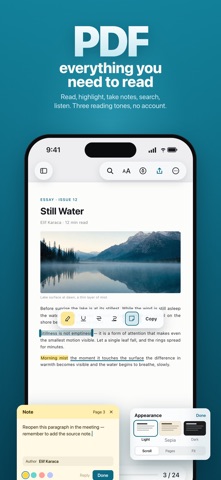
• Three reading tones — light, warm sepia, and a true dark mode that inverts the page while keeping photos, charts, and colored diagrams intact.
• Full-width pages, fluid scrolling, and instant open even for very large documents.
• Continuous or single-page layouts, pinch to zoom, and fit-to-width in one tap.
• Move fast with a thumbnail grid, the document outline (table of contents), and your own bookmarks.
• Open several documents at once as tabs, and keep your place across sessions.

FIND ANYTHING INSTANTLY
• One fast search with results grouped by page and the current match clearly emphasized.
• Match case and whole-words options; full keyboard shortcuts on iPad and Mac.

MARK UP WITH APPLE PENCIL — OR YOUR FINGER
• Apple’s own tool palette floats right on the live page: pen, highlighter, marker, eraser, and ruler.
• Highlight, underline, and strike through text that snaps to the lines.
• Add shapes, stamps (Approved, Confidential, Draft, date), and sticky notes.
• Everything is written as standard PDF annotations, so your work opens correctly in Preview, Acrobat, and everywhere else.
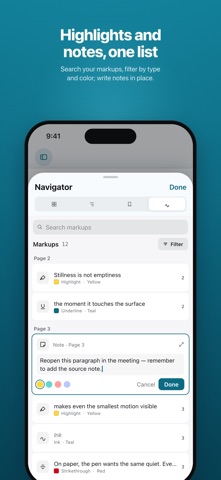
• See every highlight and note in one list — search it, filter by type and color, tap to jump, edit in place.
• Share a flattened copy or a clean, unmarked copy; your original is never changed.

FILL & SIGN
• Tap form fields and type; move through them with next and previous.
• Create your signature once — draw it, type it, or capture it from a photo — store it securely on device, and reuse it anytime.
• Add a date stamp, then share a flattened, signed copy. The original document stays untouched.

LISTEN TO ANY DOCUMENT
• Read aloud sentence by sentence, with the spoken sentence highlighted on the page.
• Choose the voice and speed; the page language is detected automatically.
• Control playback from the Lock Screen and headphones.

LOOK UP & TRANSLATE
• Select text to look up definitions, translate, or search the web — right from the page.

NEVER LOSE YOUR WORK
• Local version history keeps earlier versions of every document; go back anytime without losing anything.
• Automatic recovery restores your document if the app is interrupted.

WORKS WITH YOUR FILES
• Edit documents in place in the Files app and iCloud Drive — no importing, no separate library.

DESIGNED FOR EVERYONE
• Built with VoiceOver document structure, Dynamic Type, Reduce Transparency, Reduce Motion, and Differentiate Without Color.
• Fully localized in 23 languages.

Reader Ink brings reading, annotation, forms, signatures, and read-aloud together in one place — precise, quiet, and right at home on Apple devices.

PDF viewer, PDF editor, PDF converter and PDF scanner — all in one app. Convert PDF to Word, PDF to Excel, PDF to PowerPoint and PDF to JPG. Scan to PDF with OCR. Merge PDF, split PDF and compress PDF. Sign PDF and fill PDF forms. As your PDF viewer and PDF editor, Reader Ink lets you annotate PDF, highlight PDF and read PDF aloud. PDF reader, PDF editor, PDF converter, PDF scanner, PDF signer — Reader Ink.

Ready for Apple Duo, Apple's foldable phone — more room to read PDF, annotate PDF and sign PDF.

Privacy Policy: https://60studio.net/apps/reader-ink/privacy
Terms of Use (EULA): https://www.apple.com/legal/internet-services/itunes/dev/stdeula/
Show more Show less

Screenshots

Reader Ink: PDF Editor & Sign Screenshot 1 of 6
Reader Ink: PDF Editor & Sign Screenshot 2 of 6
Reader Ink: PDF Editor & Sign Screenshot 3 of 6
Reader Ink: PDF Editor & Sign Screenshot 4 of 6
Reader Ink: PDF Editor & Sign Screenshot 5 of 6
Reader Ink: PDF Editor & Sign Screenshot 6 of 6
Screenshots by ILKER YILDIRIM, from the the App Store listing
Official page on the App Store

Alternatives to Reader Ink: PDF Editor & Sign

PixelChain: Habit Tracker icon PixelChain: Habit Tracker
Ayhan YILMAZ
0.0
Free
Eve - PDF Editor icon Eve - PDF Editor
KAAN DONMEZ
0.0
Free
LuNote: Notes, Tasks, Planner icon LuNote: Notes, Tasks, Planner
Lu Apps LLC
0.0
Free
My WISeID icon My WISeID
OISTE
0.0
Free
SoloPen Notes icon SoloPen Notes
Ahmed Omar
4.8
Free
4 ratings
Reader's Bench: PDF & Notes icon Reader's Bench: PDF & Notes
Rohmiapps Inc.
3.0
Free
3 ratings
E Sign: AI Signature Generator icon E Sign: AI Signature Generator
IOBits Technologies LLC
0.0
Free
Chariow Creators icon Chariow Creators
Axa Zara
4.7
Free
3 ratings

More from ILKER YILDIRIM

ChatSphere - AI Friend & Chats icon ChatSphere - AI Friend & Chats
ILKER YILDIRIM
4.0
Free
6 ratings
Rimo: AI Car Mods & Tuning icon Rimo: AI Car Mods & Tuning
ILKER YILDIRIM
5.0
Free
1 ratings
Wha+ Sticker - Text to Sticker icon Wha+ Sticker - Text to Sticker
ILKER YILDIRIM
0.0
Free

Changelog of Reader Ink: PDF Editor & Sign

No changelog data

Developer information for ILKER YILDIRIM

ILKER YILDIRIM

Address:

Share Reader Ink: PDF Editor & Sign

Comments on Reader Ink: PDF Editor & Sign for iOS

We don't have enough comments to show example comments. Please check back later.

App Store Rankings for Reader Ink: PDF Editor & Sign

This app is not ranked

Technologies used by Reader Ink: PDF Editor & Sign

Frequently asked questions about Reader Ink: PDF Editor & Sign

Is Reader Ink: PDF Editor & Sign free?

Yes. Reader Ink: PDF Editor & Sign is free on the App Store.

Is Reader Ink: PDF Editor & Sign still available?

Yes. Reader Ink: PDF Editor & Sign is on the App Store, and the last update we saw was on September 20, 2026.

How large is Reader Ink: PDF Editor & Sign?

Reader Ink: PDF Editor & Sign is 23.33 MB.

Is Reader Ink: PDF Editor & Sign suitable for children?

App Store rates the content of Reader Ink: PDF Editor & Sign as suitable for everyone.

Who made Reader Ink: PDF Editor & Sign?

Reader Ink: PDF Editor & Sign was developed by ILKER YILDIRIM. It is listed in the productivity category on the App Store.

What are the best alternatives to Reader Ink: PDF Editor & Sign?

People looking at Reader Ink: PDF Editor & Sign also look at these productivity apps: PixelChain: Habit Tracker, Eve - PDF Editor, LuNote: Notes, Tasks, Planner, My WISeID, SoloPen Notes.

Popular Productivity Apps Apps other people are watching Today's trending apps Top new apps Price drops on Google Play
PixelChain: Habit Tracker icon PixelChain: Habit Tracker
Eve - PDF Editor icon Eve - PDF Editor
LuNote: Notes, Tasks, Planner icon LuNote: Notes, Tasks, Planner
My WISeID icon My WISeID
SoloPen Notes icon SoloPen Notes
Reader's Bench: PDF & Notes icon Reader's Bench: PDF & Notes
E Sign: AI Signature Generator icon E Sign: AI Signature Generator
Chariow Creators icon Chariow Creators
Overview Alternatives Reviews Rankings Technology
AppBrain Intelligence premium content

Subscribe now to get full and unlimited access to AppBrain Intelligence. You'll have access to:

  • App Intelligence dashboard (performance timeline, competitor comparison, country rankings, insight cards)
  • Detailed ranking data per app
  • Full timeline per developer
  • Device market shares data per country
  • Unlimited keyword tracking
1 Month

$75/mo
(billed every month)

SAVE 0%
Subscribe
3 Months

$65/mo
($195 billed every 3 months)

SAVE 13%
Subscribe
1 Year

$57.50/mo
($690 billed every year)

SAVE 23%
Subscribe
Each subscription will automatically renew 3 days before the expiration date for the same time period. Subscriptions can be cancelled at any time before the renewal.

AppBrain is an app data site, we track rankings, ratings, installs for all apps and games on Google Play and the App Store. AppBrain doesn't host app files or APKs, all install links go directly to the official store. All trademarks are owned by their respective owners. As an Amazon Associate AppBrain earns from qualifying purchases.

More apps

  • Top Android apps being viewed
  • Twisted Story
  • EasyReceipt — Receipt Scanner
  • Ape Labs CONNECT V2

App statistics

  • Android statistics
  • Google Play Developer stats
  • Trending Android Apps
  • Trending iOS apps
  • Top popular Apps
  • Buy the best Android phone
  • Buy & sell app businesses

About AppBrain

  • Contact
  • Privacy
  • Documentation
  • DMCA takedowns
  • Articles
  • Blog
  • Android Interstitial Ads: Best practices to optimize your app's earnings
© 2010-2026 - AppBrain