




AppBrain's verdict
- Last updated
- November 4, 2026
- Size
- 4.29 MB
User feedback
Ratings and reviews on the App StoreComments on Readglide: Speech Rehearsal for iOS
We don't have enough comments to show example comments. Please check back later.
Store listing
By Kohei Omori, from the App StoreDescription by Kohei Omori Written by the developer, not by AppBrain. Click to read.
WHAT ARE YOU PRACTICING?
• Sample scripts for nine occasions: a job interview, a wedding speech, a toast, a best man or friend's speech, a eulogy, a sermon, a news reading, narration and an audiobook reading
• Read a sample as it is, or swipe left and choose Use as My Script to rewrite it and save it
• News reading sample: your pace is compared with a typical news-reading pace, overall and by section (English, Japanese and Chinese)
• Narration sample: pick a 15 to 120 second slot and see whether the take fits it
• Interview sample: the system voice reads each Q: question aloud while you answer from the A: lines
SCORED AGAINST YOUR SCRIPT
• Read as written: how closely the part you read matched the script, word for word, and how many of its lines you covered
• Skipped lines, speaking rate, and each pause of two seconds or longer
• Fillers and off-script words: the "um"s and "uh"s that speech recognition picked up, and words you said that are not in the script
• A practice history for each script, with your personal best
ON THE CLOCK
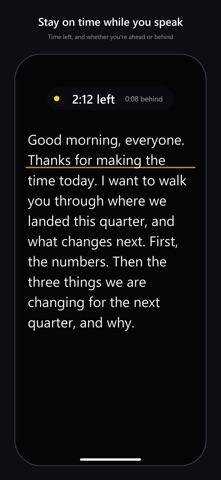
• Time budget: a green, yellow or red signal, the time left, and a marker showing where the scroll should be by now
• Fit to time sets the scroll speed so the rest of the script finishes close to your time, and each # section shows planned and actual time
• Timer & Bell, with no script on screen: a large countdown, a warning bell and a time-up bell
AUDIOBOOK RECORDINGS
• Keep audio-only recordings of the audiobook sample or a saved script in the app, checked line by line against the text
• Retake only a line you misread or skipped; the original stays, and a retake can be undone
• Export one .m4a audio file per chapter, split at your # headings, and share it
REHEARSE YOUR WAY
• Audio only, or on camera with the script floating over the live preview and kept out of the video, at up to 4K and 60 fps depending on the model
• Script captions: save a video take with captions from your script, in its original aspect ratio or 9:16, or share an .srt file
• Shoot by Section: in a saved script, record one # section at a time and join the takes you pick into one video
• Retakes: in a video take, cut the false starts where you reread part of the script and save a new video; the original stays
• Self-tapes: write character names in capitals ("ANNA: …"), pick your role, hear your partner's lines read aloud, and add a slate card
READ-ALOUD LOG FOR PARENTS AND TEACHERS
• Read a text aloud, see the reading time and the spots to practice, and keep a dated log you can share a month at a time as one image
THE PROMPTER
• Smooth auto-scroll with fine speed control, section jumps, tap to pause and a countdown
• Follow my voice (optional): the script moves at your speaking pace and stops when you stop. If you go off script, it picks up again when you return. Recognition runs on the iPhone or iPad itself and saves or sends no audio
• Font size, typeface, line spacing, margins, five color themes, mirror mode and vertical text for Japanese
• Import PDF, Word (.docx), text and RTF files; control it with a Bluetooth remote or foot switch
ON-DEVICE SPEECH RECOGNITION
Readglide turns your take into text on the iPhone or iPad itself and compares it with the script without uploading the audio. These checks work for scripts in languages the iPhone or iPad can recognize offline. A score keeps only numbers; the log also keeps each script's title and the spots to practice. Audiobook recordings you keep stay inside the app.
Safety and technology
Found in the app by AppBrain- Price
- $1.99
- App size
- 4.29 MB
- Content rating
- Everyone
Technologies used by Readglide: Speech Rehearsal
Releases
Updates seen on the App Store- Version
- 1.5
- Launched
- September 2026
No changelog data
Alternatives
Similar apps and more from Kohei OmoriMore from Kohei Omori


Rankings
App Store top chartsApp Store Rankings for Readglide: Speech Rehearsal
About the app and developer
About Readglide: Speech Rehearsal
Readglide: Speech Rehearsal is a productivity app developed by Kohei Omori.
User Ratings
The app has no ratings yet.
App Information
Readglide: Speech Rehearsal costs $1.99. The app size is 4.29 MB. The latest version available is 1.5. The last update was on November 4, 2026.
Technical Requirements
The app has a content rating of Everyone. The app has been available on the App Store since September 2026.
Readglide: Speech Rehearsal is made and published by Kohei Omori. AppBrain is an independent app data site and isn't affiliated with Kohei Omori. The app name, icon, screenshots and description belong to Kohei Omori and are shown as published on the App Store.
Developer information for Kohei Omori
Address: