

Readori: E-Book Reader
Readori: E-Book Reader is made and published by JIANPING YAN. AppBrain is an independent app data site and isn't affiliated with JIANPING YAN. The app name, icon, screenshots and description belong to JIANPING YAN and are shown as published on the App Store.
AppBrain's verdict
- Rating on App Store
- 4.00
- 3 ratings
- Last updated
- October 18, 2026
It doesn't have enough ratings yet to judge what users think.
Rankings
App Store top chartsApp Store Rankings for Readori: E-Book Reader
Competitors
Similar apps and more from JIANPING YANAlternatives to Readori: E-Book Reader


Releases
Updates seen on the App Store- Version
- 1.1.1
- Launched
- May 2026
No changelog data
User feedback
Ratings and reviews on the App StoreComments on Readori: E-Book Reader for iOS
We don't have enough comments to show example comments. Please check back later.
Technology
Found in the app by AppBrain- Price
- Free
- App size
- 135.3 MB
- Content rating
- High
Technologies used by Readori: E-Book Reader
About the app and developer
About Readori: E-Book Reader
Readori: E-Book Reader is a books app developed by JIANPING YAN.
User Ratings
Readori: E-Book Reader is rated 4.00 out of 5 stars. The rating is based on 3 ratings.
App Information
Readori: E-Book Reader is freely available from the App Store. The app size is 135.29 MB. The latest version available is 1.1.1. The last update was on October 18, 2026.
Technical Requirements
The app has a content rating of High Maturity. The app has been available on the App Store since May 2026.
Developer information for JIANPING YAN
Address:
Store listing
By JIANPING YAN, from the App Store



Description by JIANPING YAN Written by the developer, not by AppBrain. Click to read.
DISCOVER PUBLIC-DOMAIN BOOKS Explore classic literature from established public-domain catalogs: • Browse titles from Project Gutenberg • Discover carefully produced editions from Standard Ebooks • Find public-domain selections available through ManyBooks • Download available EPUB editions and add them to your bookshelf Catalog availability, languages, and download formats are determined by the respective services. Public-domain status may vary by country or region.
LISTEN TO AUDIOBOOKS Browse volunteer-recorded LibriVox audiobooks and stream available recordings from the Internet Archive. • Search by title or author, with section and chapter lists • Sleep timer, playback speed and play modes • Lock-screen and headphone controls with cover artwork • Resume where you left off and keep playing the next episode after you leave the reader
BUILD YOUR PERSONAL LIBRARY Import supported files from the Files app and keep them in your own library: • EPUB and TXT, with automatic chapter and encoding detection • DRM-free MOBI, AZW, AZW3, and PRC files • CBZ comic archives • Offline reading after files are imported Readori can also work with compatible reading-service configurations (connectors) that you choose to add. Preview them before import, then group or pin them. Availability, authentication, content rights, and access requirements are determined by each service. Readori does not provide or host third-party copyrighted book catalogs.
FOLLOW RSS AND ATOM FEEDS • Subscribe to RSS and Atom feeds and organize them into groups • Track read and unread articles • Keep browsing inside article pages, with inline video • Import and export OPML files
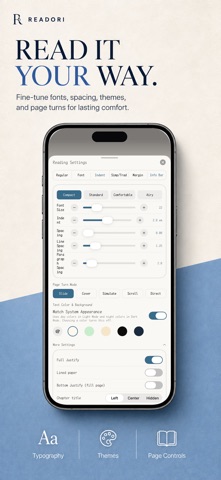
A READER BUILT FOR COMFORT • Slide, cover, curl, scroll and instant page turns, plus a webtoon mode for comics • Adjustable fonts, size, weight, line and paragraph spacing, and margins, with layout presets • Light, dark, system, and customizable reading themes • Highlights, underlines and notes; custom colors for dialogue • Bookmarks, chapter navigation and chapter-level resume • Custom tap zones, keyboard and page-turner support • Reading-time and streak statistics • Text-to-Speech with sentence highlighting and automatic page turning
ORGANIZE AND SYNC • Search, sort, pin, group and multi-select books • Grid or list layouts with unread-chapter badges • Full backup and restore, including progress, bookmarks and notes • Optionally sync supported bookshelf data, bookmarks, highlights, settings, and reading progress with iCloud
ACCESSIBILITY AND PRIVACY Readori supports VoiceOver and Reduce Motion, with layouts optimized for iPhone and iPad, including Split View and Stage Manager. Core reading features do not require a Readori account. Reading data is primarily stored on your device. iCloud sync is optional and uses the Apple ID already signed in on your device. Readori does not display third-party advertising, sell personal data, or use data for cross-app advertising tracking. Public catalogs, audiobook streaming, RSS, iCloud, and user-configured services are subject to their respective availability, terms, and privacy policies.
Some personalization, backup, and advanced Text-to-Speech features require Readori Pro, available as a one-time purchase or an annual subscription. Payment is charged to your Apple ID account. Subscriptions renew automatically unless auto-renew is turned off at least 24 hours before the end of the current period. Manage or cancel in App Store account settings.