

Readova - eBook Reader is made and published by 俊 汪. AppBrain is an independent app data site and isn't affiliated with 俊 汪. The app name, icon, screenshots and description belong to 俊 汪 and are shown as published on the App Store.
AppBrain's verdict
- Rating on App Store
- 5.00
- 2 ratings
- Last updated
- September 28, 2026
It doesn't have enough ratings yet to judge what users think.
Rankings
App Store top chartsApp Store Rankings for Readova - eBook Reader
Competitors
Similar apps and more from 俊 汪Alternatives to Readova - eBook Reader


Releases
Updates seen on the App Store- Version
- 1.3.5
- Launched
- May 2026
No changelog data
User feedback
Ratings and reviews on the App StoreComments on Readova - eBook Reader for iOS
We don't have enough comments to show example comments. Please check back later.
Technology
Found in the app by AppBrain- Price
- Free
- App size
- 69.8 MB
- Content rating
- Everyone
Technologies used by Readova - eBook Reader
About the app and developer
About Readova - eBook Reader
Readova - eBook Reader is a books app developed by 俊 汪.
User Ratings
Readova - eBook Reader is rated 5.00 out of 5 stars. The rating is based on 2 ratings.
App Information
Readova - eBook Reader is freely available from the App Store. The app size is 69.78 MB. The latest version available is 1.3.5. The last update was on September 28, 2026.
Technical Requirements
The app has a content rating of Everyone. The app has been available on the App Store since May 2026.
Developer information for 俊 汪
Address:
Store listing
By 俊 汪, from the App Store



Description by 俊 汪 Written by the developer, not by AppBrain. Click to read.
Our goal is simple: make reading feel peaceful again.
No forced sign-in. No built-in bookstore. No ads. Open your library and start reading.
A Quiet, Fluid Experience
Enjoy smooth scrolling, natural page turns, and carefully rendered text, images, and layouts.
Open Your Books
Supports EPUB, PDF,MOBI, AZW, AZW3, TXT, FB2, and other popular formats. Import local files directly without complicated conversions.
Read Your Way
Choose continuous scrolling or page-turning mode. Customize fonts, text size, spacing, and themes. Import your own fonts and look up selected words
with the system dictionary.
Listening Is Reading Too
Listen while commuting, doing chores, or resting your eyes.
Use system voices right away, or enjoy clear, natural narration with the high-quality offline voice engine. Follow along with sentence highlighting,
adjust rate and pitch, set a sleep timer, and control playback from the Lock Screen or Control Center.
You can also connect your own cloud voice service for more voice options. System voices and the offline engine can process text on your device.
Hands-Free Reading
Auto Scroll moves the page at your preferred pace. Timed Page Turns advance pages automatically. Sentence Mode reads one sentence at a time and
continues onto the next page.
Annotations and Notes
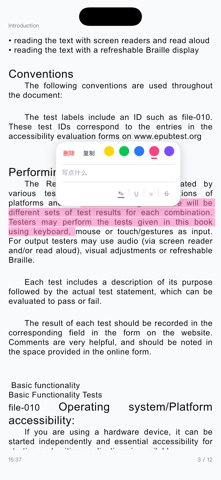
Use highlights, underlines, wavy underlines, or strikethroughs in multiple colors. Add private notes to selected text.
Reading Statistics
Explore daily, weekly, monthly, and yearly statistics, including reading time, words read, streaks, trends, and focused hours.
Organize Your Library
Create categories, reorder books, pin favorites, and sort by title or date. Switch between English and Chinese on layouts optimized for different
iPhone sizes.
Continue Across Devices
Use iCloud or WebDAV to sync your library, book files, progress, annotations, notes, and categories.
Sync is optional and enabled only by you. Readova does not provide a public library or upload books to Readova servers.
Upgrade to Pro
Choose a Pro subscription or a one-time lifetime purchase.
High-Quality Offline Voices
Generate speech on your device for natural narration without a constant internet connection.
Cloud Sync
Sync your library, files, progress, notes, and categories through iCloud or WebDAV.
WebDAV Import
Connect your own WebDAV service and import eBooks directly.
49-Encoding Detection
Recognize Simplified Chinese, Traditional Chinese, Japanese, Korean, and many other text encodings.
Unlimited Library, Categories, and Notes
Organize your collection and capture thoughts without limits.
Custom Fonts and Sorting
Import fonts and arrange categories by name, date, or drag and drop.
Reading Insights
View weekly, monthly, and yearly reading trends.
The free version includes core reading, system text-to-speech, Auto Reading, basic encoding support, daily statistics, and annotations.
Your Reading Stays Private
Readova does not include a bookstore, distribute eBooks, or analyze your book content.
Books and reading data stay on your device by default. If you enable iCloud or WebDAV, relevant data is synced to your own account or configured
service. If you connect a cloud voice service, narrated text is sent to that service.
System text-to-speech, Auto Reading, and the offline voice engine can run locally on your device.
Made by an independent developer who loves reading.
No ads. No third-party tracking. No unnecessary distractions.
Just reading.
Terms of Use (EULA):
https://www.apple.com/legal/internet-services/itunes/dev/stdeula/