

ReAudio - Audio Editor & Mixer
ReAudio - Audio Editor & Mixer is made and published by Goujie Tech. AppBrain is an independent app data site and isn't affiliated with Goujie Tech. The app name, icon, screenshots and description belong to Goujie Tech and are shown as published on the App Store.
AppBrain's verdict
- Last updated
- October 10, 2026
Rankings
App Store top chartsApp Store Rankings for ReAudio - Audio Editor & Mixer
Competitors
Similar apps and more from Goujie TechAlternatives to ReAudio - Audio Editor & Mixer


More from Goujie Tech


Releases
Updates seen on the App Store- Version
- 1.5.9
- Launched
- February 2026
No changelog data
User feedback
Ratings and reviews on the App StoreComments on ReAudio - Audio Editor & Mixer for iOS
We don't have enough comments to show example comments. Please check back later.
Technology
Found in the app by AppBrain- Price
- Free
- App size
- 206.0 MB
- Content rating
- Medium
Technologies used by ReAudio - Audio Editor & Mixer
About the app and developer
About ReAudio - Audio Editor & Mixer
ReAudio - Audio Editor & Mixer is an utilities app developed by Goujie Tech.
What is the rating of ReAudio - Audio Editor & Mixer?
ReAudio - Audio Editor & Mixer has no ratings yet.
Is ReAudio - Audio Editor & Mixer free?
ReAudio - Audio Editor & Mixer is free. The app size is 205.96 MB. The latest version available is 1.5.9. The last update was on October 10, 2026.
What are the requirements for ReAudio - Audio Editor & Mixer?
The app has a content rating of Medium Maturity. The app has been available on the App Store since February 2026.
Developer information for Goujie Tech
Address:
Frequently asked questions about ReAudio - Audio Editor & Mixer
Is ReAudio - Audio Editor & Mixer free?
Yes. ReAudio - Audio Editor & Mixer is free on the App Store.
Is ReAudio - Audio Editor & Mixer still available?
Yes. ReAudio - Audio Editor & Mixer is on the App Store, and the last update we saw was on October 10, 2026.
How large is ReAudio - Audio Editor & Mixer?
ReAudio - Audio Editor & Mixer is 205.96 MB.
Is ReAudio - Audio Editor & Mixer suitable for children?
App Store gives ReAudio - Audio Editor & Mixer a medium maturity rating, so it is not meant for young children.
Who made ReAudio - Audio Editor & Mixer?
ReAudio - Audio Editor & Mixer was developed by Goujie Tech. It is listed in the utilities category on the App Store.
What are the best alternatives to ReAudio - Audio Editor & Mixer?
People looking at ReAudio - Audio Editor & Mixer also look at these utilities apps: Blur It - Face Privacy Editor, Convert Video to Audio - Pro, SavefromNet: Video Saver, SnapContact - Face to Contacts, iDevice Monitor.
Store listing
By Goujie Tech, from the App Store




Description by Goujie Tech Written by the developer, not by AppBrain. Click to read.
WHAT MAKES REAUDIO DIFFERENT?
Immersive Visual Studio (New Design!)
Experience audio editing in a whole new way. Our sleek Cyberpunk Dark Mode and high-contrast Neon Waveforms let you "see" the music. The intuitive layout mimics professional desktop software, giving you precise control over every beat without the complexity.
Creative Audio Toolkit
• Video to MP3 Converter & Audio Extractor: Turn any video from TikTok, YouTube, Instagram or your local library into high-quality MP3/M4A/AAC/WAV audio in seconds. Extract pure sound seamlessly without losing quality, turning video content into portable audio you can listen to anytime, anywhere.
• Vocal Remover: Stop struggling with noisy tracks—extract vocals or instrumentals instantly for practice, editing, or performance.
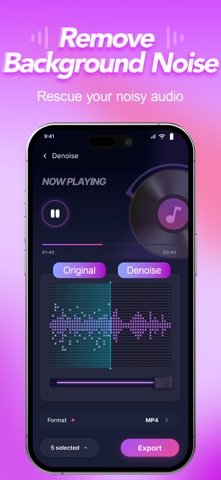
• Advanced Denoise: Effortlessly clean up background hums, hiss and noisy recordings for crystal-clear voiceovers, podcasts and audio tracks.
• Spatial Reverb: Transform flat recordings into rich audio with room, hall, or cathedral effects.
• 10-Band Equalizer: Boost the bass or clarify vocals with a graphic EQ.
• Pitch & Speed: Change the tempo without affecting pitch, or shift the key for creative voice effects.
Professional Multitrack Editor
Don't just trim—mix.
• Layer Tracks: Combine vocals, background music, and sound effects on separate tracks.
• Visual Timeline: Drag, drop, and rearrange clips with a clear view of your entire project.
• Precision Control: Split, cut, and duplicate audio clips with sample-level accuracy.
Instant Ringtone Maker
Hear a sound you love on TikTok, YouTube, or a video? Capture it instantly.
• Extract Audio: Convert video to audio in seconds.
• Custom Ringtones: Trim the best part and set it as your personalized ringtone or alarm notification effortlessly.
POWERFUL FEATURES FOR CREATORS:
• Lossless Export: Save your projects in high-quality formats (MP3, WAV, M4A).
• Fade In/Out: Apply smooth transitions for a professional touch.
• Volume Booster: Increase the volume of quiet recordings without distortion.
• File Management: Organize your works with a visual library and waveform previews.
ReAudio is Perfect For:
• Content Creators: Preparing audio for Reels, TikTok, or YouTube.
• Podcasters: Mixing intro music, voice, and sound effects.
• Musicians: Sketching demos or practicing with slowed-down tracks.
• Everyone: Extracting audio from videos, cleaning up recordings, creating unique ringtones and managing audio files.
Subscription
ReAudio offers free audio editing tools, while premium features such as batch processing, high-quality audio export require a subscription. Subscription plans are available weekly, monthly, or yearly. Subscriptions automatically renew unless canceled at least 24 hours before the end of the current period. Manage or cancel anytime in your Apple ID account settings.
Download ReAudio now and unleash your creativity with the ultimate mobile audio studio!
Privacy Policy: https://www.goedgelab.com/privacy.html
Terms of Service: https://www.goedgelab.com/terms.html