

Recast: Convert & Compress
Recast: Convert & Compress is made and published by LEON NELIO FIGUEIRA. AppBrain is an independent app data site and isn't affiliated with LEON NELIO FIGUEIRA. The app name, icon, screenshots and description belong to LEON NELIO FIGUEIRA and are shown as published on the App Store.
AppBrain's verdict
- Last updated
- October 12, 2026
Rankings
App Store top chartsApp Store Rankings for Recast: Convert & Compress
Competitors
Similar apps and more from LEON NELIO FIGUEIRAAlternatives to Recast: Convert & Compress


More from LEON NELIO FIGUEIRA


Releases
Updates seen on the App Store- Version
- 1.3.1
- Launched
- August 2026
No changelog data
User feedback
Ratings and reviews on the App StoreComments on Recast: Convert & Compress for iOS
We don't have enough comments to show example comments. Please check back later.
Technology
Found in the app by AppBrain- Price
- Free
- App size
- 1.80 MB
- Content rating
- Everyone
Technologies used by Recast: Convert & Compress
About the app and developer
About Recast: Convert & Compress
Recast: Convert & Compress is an utilities app developed by LEON NELIO FIGUEIRA.
User Ratings
The app has no ratings yet.
App Information
Recast: Convert & Compress is freely available from the App Store. The app size is 1.80 MB. The latest version available is 1.3.1. The last update was on October 12, 2026.
Technical Requirements
The app has a content rating of Everyone. The app has been available on the App Store since August 2026.
Developer information for LEON NELIO FIGUEIRA
Address:
Frequently asked questions about Recast: Convert & Compress
Is Recast: Convert & Compress free?
Yes. Recast: Convert & Compress is free on the App Store.
Is Recast: Convert & Compress still available?
Yes. Recast: Convert & Compress is on the App Store, and the last update we saw was on October 12, 2026.
How large is Recast: Convert & Compress?
Recast: Convert & Compress is 1.80 MB.
Is Recast: Convert & Compress suitable for children?
App Store rates the content of Recast: Convert & Compress as suitable for everyone.
Who made Recast: Convert & Compress?
Recast: Convert & Compress was developed by LEON NELIO FIGUEIRA. It is listed in the utilities category on the App Store.
What are the best alternatives to Recast: Convert & Compress?
People looking at Recast: Convert & Compress also look at these utilities apps: Stud Finder and Beam Detector, AR Ruler-Measure Tape Height, MultiQR Scanner, BIShare: File Transfer to PC, Hey Translate Chat Translator.
Store listing
By LEON NELIO FIGUEIRA, from the App Store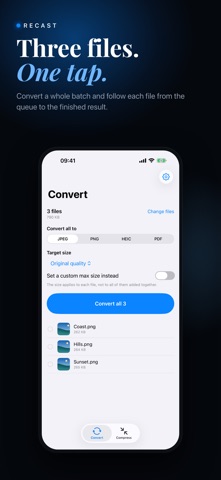

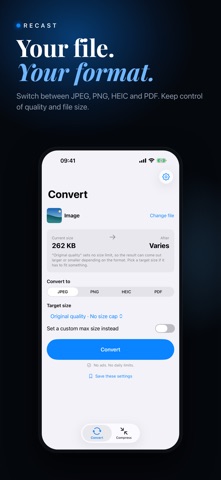


Description by LEON NELIO FIGUEIRA Written by the developer, not by AppBrain. Click to read.
CONVERT
Convert images into JPEG, PNG, HEIC or PDF. Turn videos into MP4, MOV or GIF, or extract their audio as M4A. Export PDF pages as images and turn GIFs into video or still images. Extract the video from a Live Photo. HEIC encoding depends on device support.
COMPRESS
Choose an actual target size or enter your own. Recast can reduce quality and dimensions to reach the target and tells you when a target cannot be met. GIF conversion may shorten a clip to keep the output manageable. Compressing a PDF may flatten selectable text into images; the result explains when this happens.
BATCH AND AUTOMATE
Convert or compress multiple files in one go. Combine photos into one PDF, in the order you choose. Run conversions from Shortcuts and the Action button. Save your favourite settings and reuse them with one tap.
ON YOUR DEVICE
Your files are never uploaded. Conversion works offline on your iPhone or iPad. Optional tips use Apple's in-app purchase system.
HONEST ABOUT RESULTS
Some conversions and ZIP archives make files bigger. Recast shows the actual result and explains any size or quality tradeoffs. An already suitable file is kept as it is where possible.
ALSO INCLUDED
Compress images and PDFs from the share sheet
Pack other files into a ZIP archive
Keep recent results ready to share again
Choose an export folder
Preview before and after
Light and dark appearance
OPTIONAL SUPPORT
If Recast helps you, you can leave a tip in Settings > Support Recast. Tips are one-time consumable in-app purchases. They are entirely optional, do not unlock features, and are not subscriptions. Every feature stays free whether you tip or not.
Thank you to everyone who previously bought Recast or Recast Pro. All existing functionality remains available without restoring a purchase.